

The earlier you purchase our C-ADBTP-2601 exam prep the faster you pass exam C-ADBTP-2601. Could you believe that? I can tell you that all candidates pass exam with our exam prep. Don't waste your time on one more time C-ADBTP-2601 exam. Most of our customers pass exam at first shot. What are you hesitating for? Time is money. Opportunity knocks but once. We are engaged on C-ADBTP-2601 exam prep study many years and we can guarantee you pass exam for sure. Trust me, professionals be professionals. You need to do more things what you enjoy.
Our education experts are studying SAP C-ADBTP-2601 exam prep many years. We edit all questions and answers based on real exam forecast and past real exam characters. In most situations our exam prep can include more than 80% questions of the real test. Also we make out the software version of C-ADBTP-2601 exam prep so that you can simulate the real C-ADBTP-2601 exam scene and practice more times. Our on-line APP version is popular by many young people. Studying can be more interesting and convenient anywhere. We helped more than 100000+ candidates pass exam in past. If you spend all your attention on our exam prep one or two days before the real test and master all questions and answers I believe you will pass C-ADBTP-2601 exam as what we say.

Instant Download: Upon successful payment, Our systems will automatically send the product you have purchased to your mailbox by email. (If not received within 12 hours, please contact us. Note: don't forget to check your spam.)
Not only our C-ADBTP-2601 exam prep is accurate and valid to help you pass exam but also we have good customer service. We aim to satisfy every customer at our best.
1. We guarantee all candidates can pass exam. If you fail the exam please provide us your failure mark SAP certification we will refund you all the exam prep C-ADBTP-2601 cost. No Help, Full Refund! Or you can choose to change other exam subject. (Administrating SAP Business Technology Platform(C_ADBTP_2601))
2. Our working time is 7*24 (including the official holidays). Whenever you contact with us we will reply you in three hours. It is our pleasure to serve for you. We are happy to solve with you no matter you have any question or doubt about C-ADBTP-2601 exam prep materials or other relating information.
3. For each customer we provide one-year service warranty. We will send you the latest C-ADBTP-2601 exam prep within this year once it updates. You can ask us all questions about SAP certification examinations we try our best to reply you.
4. Our SAP department experts will check the exam prep update version. Once it updates we will refresh the website with the latest C-ADBTP-2601 version and we will send the latest version to all our customers ASAP. We make sure all C-ADBTP-2601 exam prep for sale are accurate and valid latest versions.
5. We provide the free demo download of C-ADBTP-2601 exam prep for your reference before purchasing. After you pay we will send you the download link and password for your downloading in a minute. If you find you purchase the wrong exam code we will exchange for you one time.
6. We have discount for old customers. If you stand for your company which wants to build long-term relationship with us we can talk about the discount details. Our official holiday coupon will be sent to old customers first.
If you want to know more you can contact with us in any time. Trust me, we are the best provider of C-ADBTP-2601 exam prep with high passing rate to help you pass SAP Certified Associate C-ADBTP-2601 exam 100% not only our exam prep is accurate & valid but also our customer service is satisfying.
SAP C-ADBTP-2601 Exam Syllabus Topics:
| Section | Objectives |
|---|---|
| Topic 1: Administration and Operations | - Monitoring and logging - Subaccount administration - User and role management |
| Topic 2: Connectivity and Integration | - On-premise connectivity - Cloud Connector configuration - API and service connectivity |
| Topic 3: SAP Business Technology Platform (BTP) Fundamentals | - Entitlements and quotas - Core concepts of SAP BTP - Global account, subaccount, and directory structure |
| Topic 4: Runtime and Environment Management | - Cloud Foundry environment administration - Service instance lifecycle management - Kyma runtime basics |
| Topic 5: Security and Identity Management | - Trust configuration (IAS / Identity Providers) - Role collections and role management - Authentication and authorization concepts |
SAP Administrating SAP Business Technology Platform(C_ADBTP_2601) Sample Questions:
SIMULATION
Create Directories and Subaccounts
In a global account for SAP Business Technology Platform (BTP), create a hierarchy of subaccounts using directories.
Task 1: Create Directories
In your SAP BTP cockpit, create the directory Americas (Description: Americas Accounts) with your global account as the parent.
Create the directory Eurasia (Description: Eurasia Accounts) with your global account as the parent.
Create the directory Partner (Description: Partner Accounts) with the Americas directory as the parent. Add the label access with value external.
Create the directory Human Resources (Description: Human Resources Accounts) with the Eurasia directory as the parent. Add the label access with value internal.
Correct Answer:
See the Explanation below for complete solution
Explanation:
Task 1: Create Directories
You need to create these directories:
Americas
Eurasia
Partner under Americas with label access=external
Human Resources under Eurasia with label access=internal
Before You Start
Log in to the SAP BTP Cockpit.
Make sure you are inside the correct Global Account.
Open the left-side navigation menu.
Why this is important:
All directories in this task must be created inside the correct global account hierarchy. If you create them in the wrong location, the simulation result will be incorrect.
Step 1 - Create Directory Americas
What to do
In the SAP BTP Cockpit, select your Global Account.
In the left navigation menu, click Directories.
Click Create or Create Directory.
Fill the fields as follows:
Name: Americas
Description: Americas Accounts
Parent: your Global Account
Click Create.
Explanation:
This creates a top-level directory directly under the global account.
It will later be used as the parent for the Partner directory.
What to verify
After creation, you should see:
Americas
listed under the directories of the global account.
Step 2 - Create Directory Eurasia
What to do
Stay in Directories.
Click Create Directory again.
Fill the fields:
Name: Eurasia
Description: Eurasia Accounts
Parent: your Global Account
Click Create.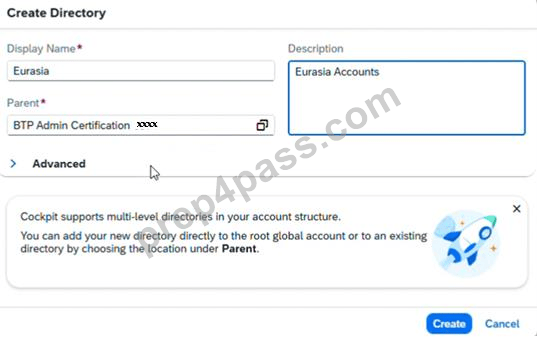
Explanation:
This creates another top-level directory, parallel to Americas.
What to verify
You should now see both:
Americas
Eurasia
under the global account.
Step 3 - Create Directory Partner under Americas
What to do
In the Directories area, select Americas.
Click Create Directory.
Enter:
Name: Partner
Description: Partner Accounts
Parent: Americas
Locate the Labels section.
Add a new label:
Key: access
Value: external
Click Create.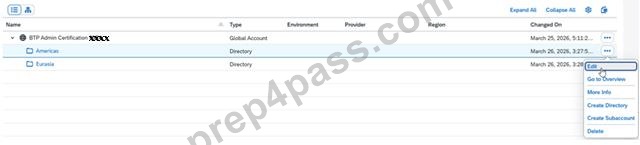


Explanation:
This creates Partner as a child directory under Americas.
The label is required and must be entered exactly:
access = external
This label helps classify the directory.
What to verify
Under Americas, you should now see:
Partner
and the directory should contain the label:
access=external
Step 4 - Create Directory Human Resources under Eurasia
What to do
Go back to the Directories list.
Select Eurasia.
Click Create Directory.
Enter:
Name: Human Resources
Description: Human Resources Accounts
Parent: Eurasia
In the Labels section, add:
Key: access
Value: internal
Click Create.
Explanation:
This creates Human Resources as a child directory under Eurasia.
The required label is:
access = internal
What to verify
Under Eurasia, you should now see:
Human Resources
and the label should be:
access=internal
Final Expected Directory Structure
After completing Task 1, your structure must be exactly like this:
Global Account
Americas
Partner
Label: access=external
Eurasia
Human Resources
Label: access=internal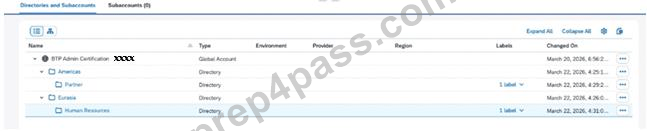
Important Checks Before Moving On
Verify all of the following:
Americas exists
Eurasia exists
Partner is under Americas
Human Resources is under Eurasia
Partner has label access=external
Human Resources has label access=internal
All names and descriptions are entered exactly as required
Common Mistakes to Avoid
1. Wrong parent
Partner must be created under Americas
Human Resources must be created under Eurasia
2. Wrong label key or value
Use exactly:
access → external
access → internal
3. Spelling errors
Be careful with:
Americas
Eurasia
Partner
Human Resources
4. Creating all directories directly under the global account
Only Americas and Eurasia are direct children of the global account.
Partner and Human Resources must be child directories.
Viewing page 1 out of 10 pages.
Viewing questions 1-1 out of 10 questions.


 Kirk

 Glenn

 Cyril
 Annabelle

 Justin
 Wythe
 Regina
 Stan
 Adrian
 Angela
 Hubery
 Glenn
 Lou
 June
 Cherry
 Hogan
 Lucien


