

2026 Latest SC-401 Exam Dumps Recently Updated 275 Questions
Microsoft SC-401 Real 2026 Braindumps Mock Exam Dumps
NEW QUESTION # 71
You have a Microsoft 365 subscription that contains 20 data loss prevention (DLP) policies.
You need to identify the following:
*Rules that are applied without triggering a policy alert
*The top 10 files that have matched DLP policies
*Alerts that are miscategorized
Which report should you use for each requirement? To answer, drag the appropriate reports to the correct requirements. Each report may be used once, more than once, or not at all. You may need to drag the split bar between panes or scroll to view content.
NOTE: Each correct selection is worth one point.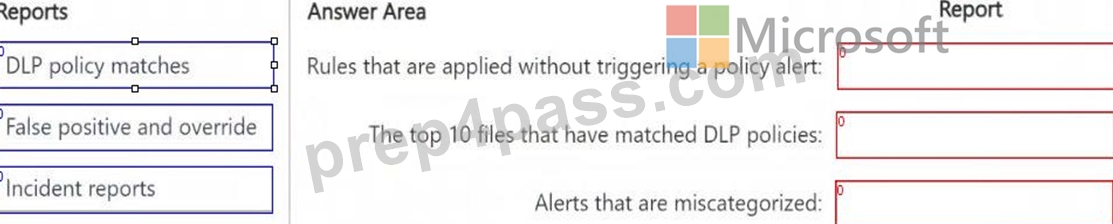
Answer:
Explanation: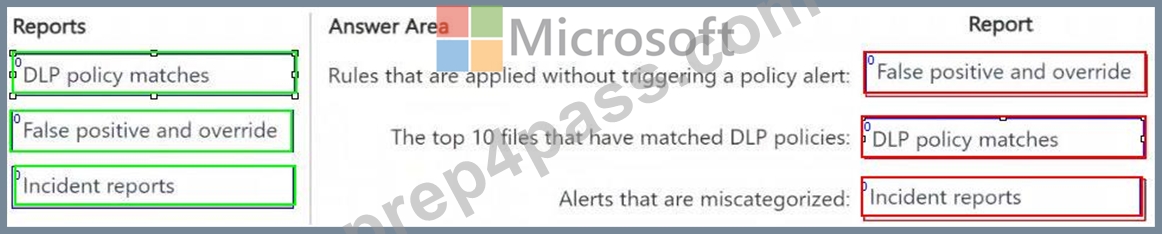
NEW QUESTION # 72
You have a Microsoft OneDrive folder that contains the files shown in the following table.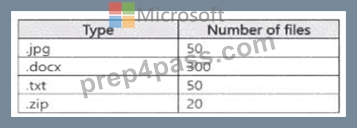
In Microsoft Defender for Cloud Apps, you create a file policy to automatically apply a classification. What is the effect of applying the policy?
- A. The policy will apply to only the .docx and .txt files. The policy will classify the files within 24 hours.
- B. The policy will apply to all the files. The policy will classify only 100 files daily.
- C. The policy will apply to only the docx and txt files. The policy will classify the files immediately.
- D. The policy will apply to only the .docx files. The policy will classify only 100 files daily.
Answer: A
NEW QUESTION # 73
You have a new Microsoft 365 E5 tenant.
You need to create a custom trainable classifier that will detect product order forms. The solution must use the principle of least privilege.
What should you do first? To answer, select the appropriate options in the answer area.
NOTE: Each correct selection is worth one point.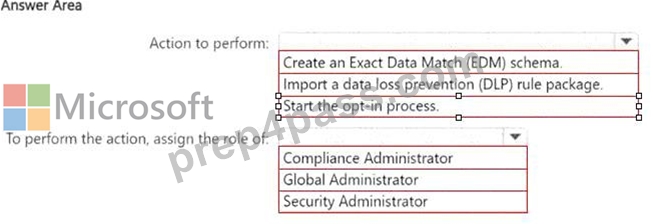
Answer:
Explanation: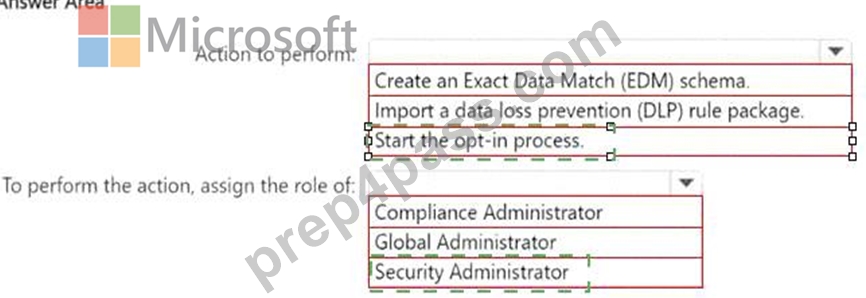
Explanation: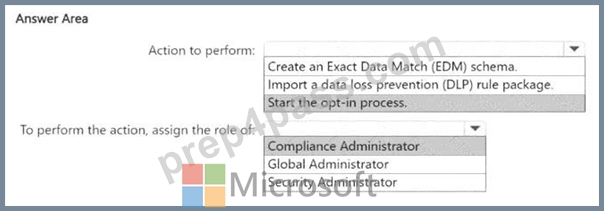
To create a custom trainable classifier in Microsoft Purview (formerly Microsoft Compliance Center), you must first opt into the trainable classifier feature.
Before using custom trainable classifiers, Microsoft requires manual opt-in through the Microsoft Purview compliance portal. Without this step, you cannot create a new classifier.
The Compliance Administrator role has the necessary permissions to configure data classification, DLP policies, and trainable classifiers. Global Administrator has higher privileges but is not required for this task, violating the principle of least privilege. Security Administrator is focused on security-related settings but does not manage compliance features like classifiers.
NEW QUESTION # 74
At the end of a project, you upload project documents to a Microsoft SharePoint Online library that contains many files. The following is a sample of the project document file names:
* aei_AA989.docx
* bd_WS098.docx
* cei_DF112.docx
* ebc_QQ454.docx
* ecc_BB565.docx
All documents that use this naming format must be labeled as Project Documents:
You need to create an auto-apply retention label policy.
What should you use to identify the files?
- A. A retention label
- B. A sensitive info type
- C. A trainable classifier
Answer: B
NEW QUESTION # 75
You have a Microsoft 365 subscription.
You are evaluating whether to use the Microsoft Purview auditing solutions shown in the following table.
You plan to implement Microsoft Purview Audit (Standard).
Which solutions can you use?
- A. Solution1, Solution2, and Solution3
- B. Solution2 only
- C. Solution2 and Solution3 only
- D. Solution3 only
- E. Solution1 and Solution2 only
Answer: B
NEW QUESTION # 76
You have a Microsoft 365 E5 subscription that uses Microsoft Purview and just-in-time (JIT) protection. The subscription contains the users shown in the following table.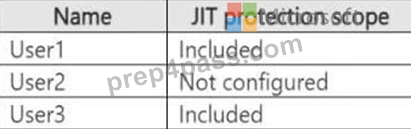
The subscription contains the devices shown in the following table.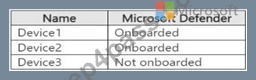
The devices contain the files shown in the following table.
For each of the following statements, select Yes if the statement is true. Otherwise, select No.
NOTE: Each correct selection is worth one point.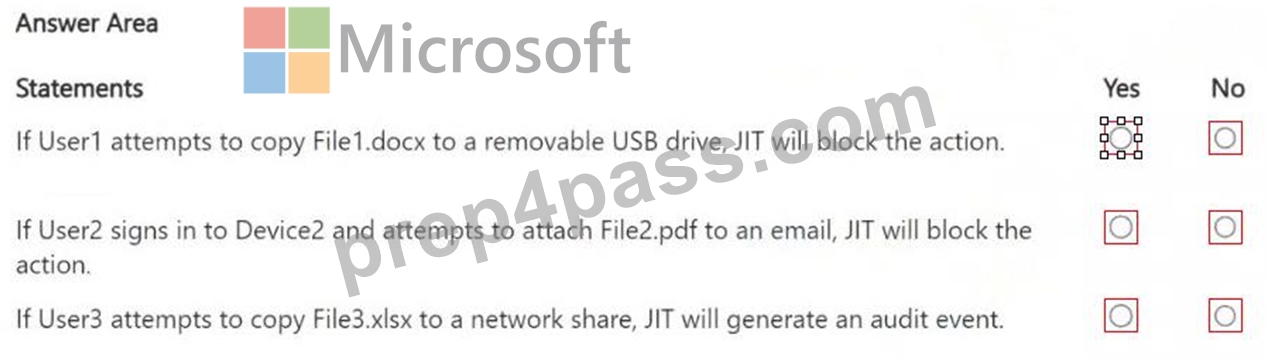
Answer:
Explanation: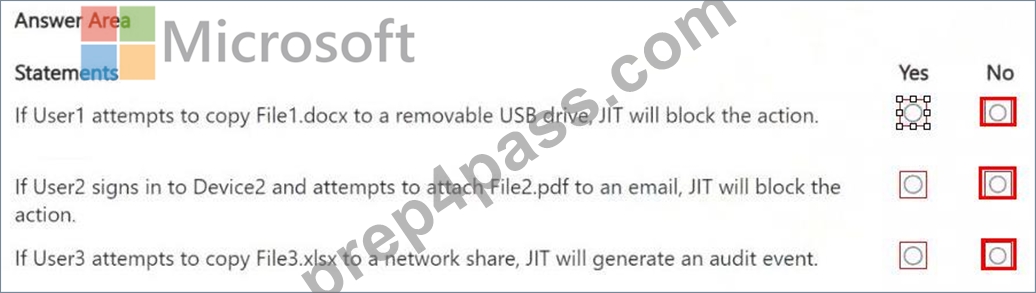
NEW QUESTION # 77
You have a Microsoft 365 tenant that is opt-in for trainable classifiers.
You need to ensure that a user named User1 can create custom trainable classifiers. The solution must use the principle of least privilege.
Which role should you assign to User1?
- A. Security Administrator
- B. Security Operator
- C. Global Administrator
- D. Compliance Administrator
Answer: D
Explanation:
To create custom trainable classifiers in Microsoft Purview, the user must have rights in the compliance portal. The Compliance Administrator role provides the necessary permissions to create and manage trainable classifiers. Security roles focus on threat management, and Global Administrator is excessive (not least privilege).
Reference: Trainable classifiers in Microsoft Purview
NEW QUESTION # 78
You have a data loss prevention (DIP) policy that has the advanced DIP rules shown in the following table.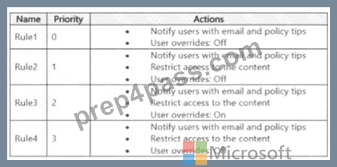
You need to identity which rules will apply when content matches multiple advanced DIP rules.
Which rules should you identify? To answer, select the appropriate options in the answer area.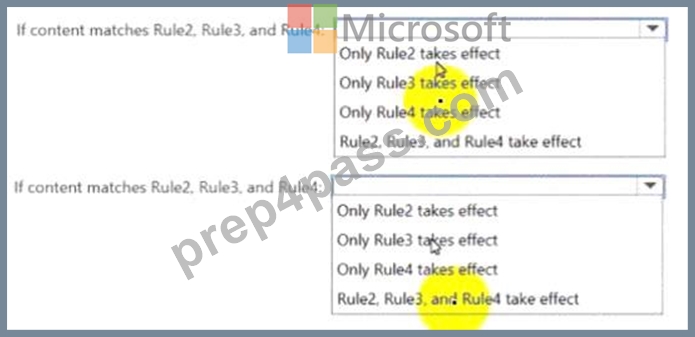
Answer:
Explanation: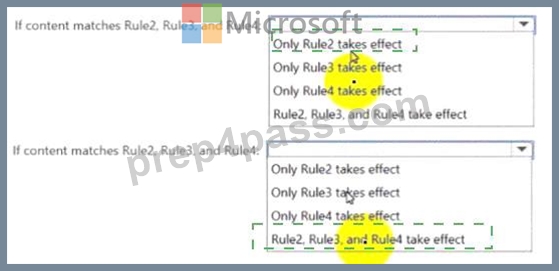
Explanation:
NEW QUESTION # 79
Hotspot Question
You have a Microsoft 365 ES subscription that contains a user named User1. The subscription contains an Endpoint data loss prevention (Endpoint DLP) policy as shown in the Actions exhibit.
(Click the Actions tab.)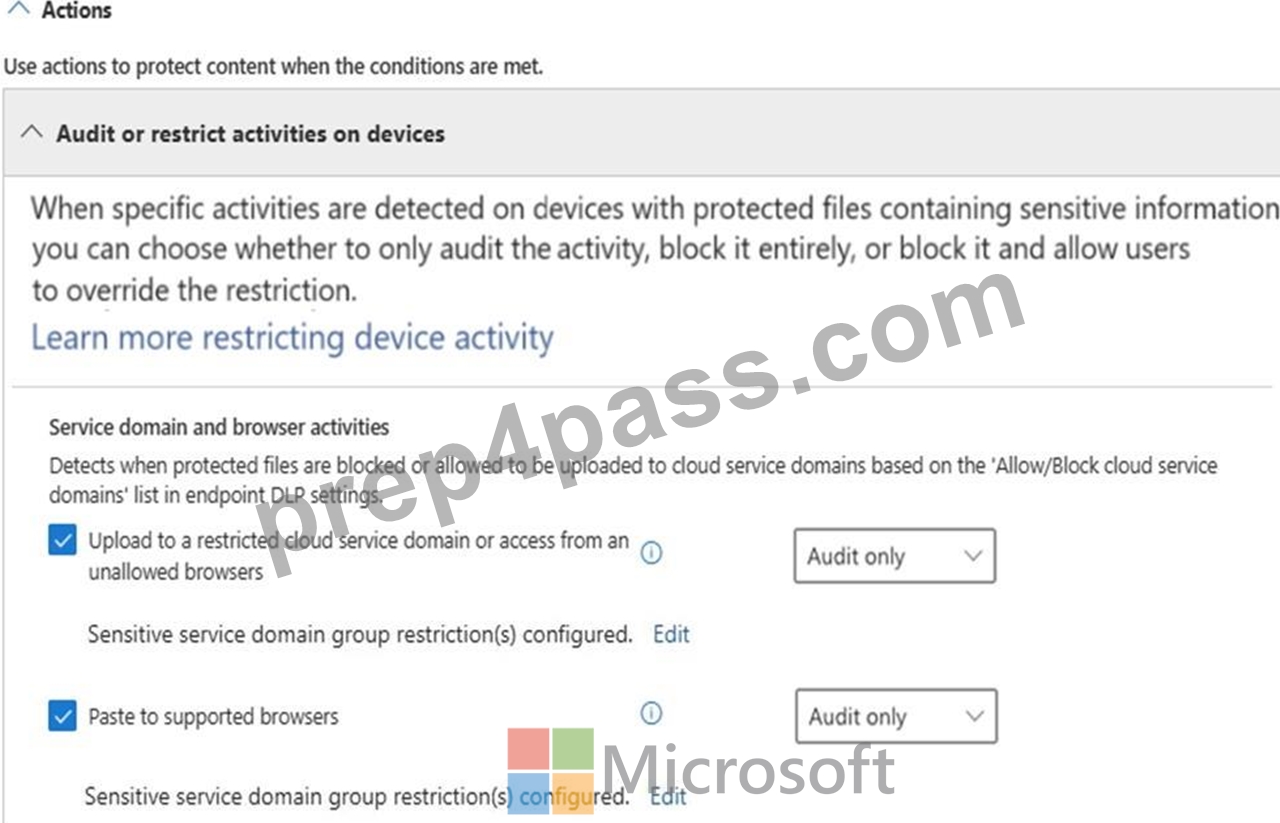
You configure the Upload to a restricted cloud service domain or access from an unallowed browsers settings as shown in the Upload restrictions exhibit. (Click the Upload restrictions tab.)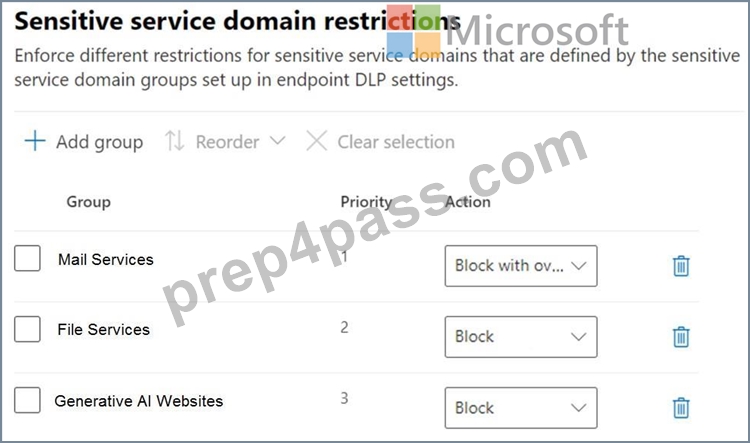
You configure the Paste to supported browsers settings as shown in the Paste restrictions exhibit. (Click the Paste restrictions tab.)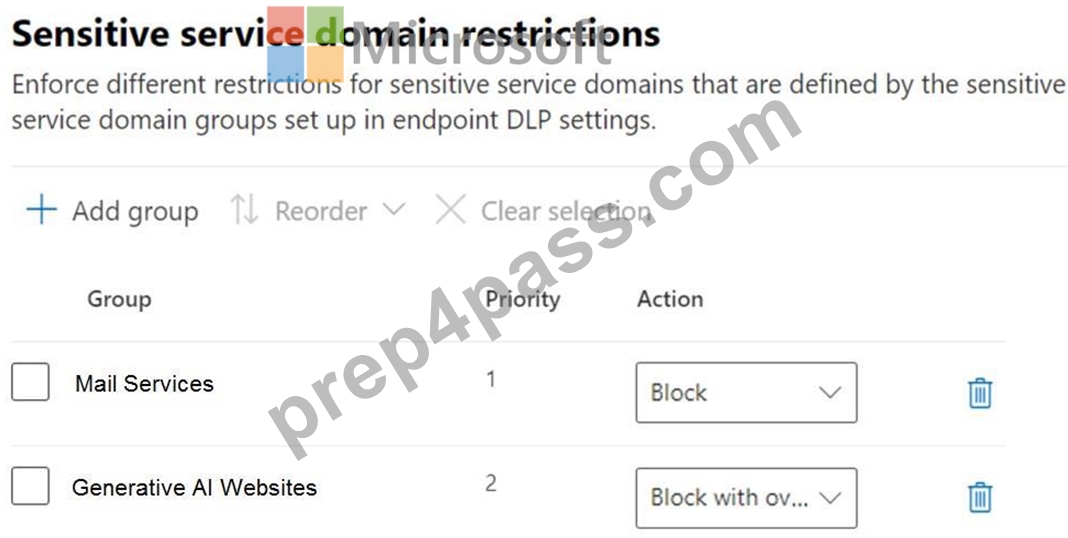
When User1 pastes content into ChatGPT, the user receives the error message shown in the Error exhibit. (Click the Error tab.)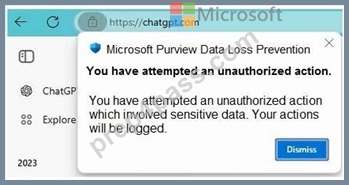
For each of the following statements, select Yes if the statement is true. Otherwise, select No.
NOTE: Each correct selection is worth one point.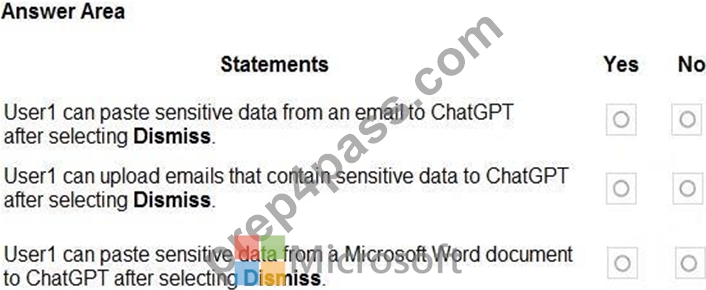
Answer:
Explanation: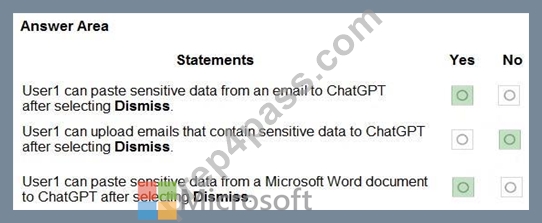
Explanation:
Box 1: Yes
We see:
Paste restrictions, Sensitive service domain restrictions, Generate AI Websites: Action: Block with ov..[Block with override].
User1 can override the block.
Box 2: No
We see:
Upload restrictions, Sensitive service domain restrictions, Generate AI Websites: Action: Block User1 will be blocked.
Box 3: Yes
We see:
Paste restrictions, Sensitive service domain restrictions, Generate AI Websites: Action: Block with ov..[Block with override].
User1 can override the block.
Reference:
https://learn.microsoft.com/en-us/purview/dlp-configure-endpoint-settings
NEW QUESTION # 80
You have a Microsoft 365 E5 subscription.
You plan to use insider risk management to collect and investigate forensic evidence.
You need to enable forensic evidence capturing.
What should you do first?
- A. Configure the information protection scanner.
- B. Enable Adaptive Protection.
- C. Claim capacity.
- D. Create priority user groups.
Answer: C
NEW QUESTION # 81
HOTSPOT
You have a Microsoft 365 subscription.
You plan to deploy an audit log retention policy.
You need to perform a search to validate whether the policy will be applied to the intended entries.
Which two fields should you configure for the search? To answer, select the appropriate fields in the answer area.
NOTE: Each correct selection is worth one point.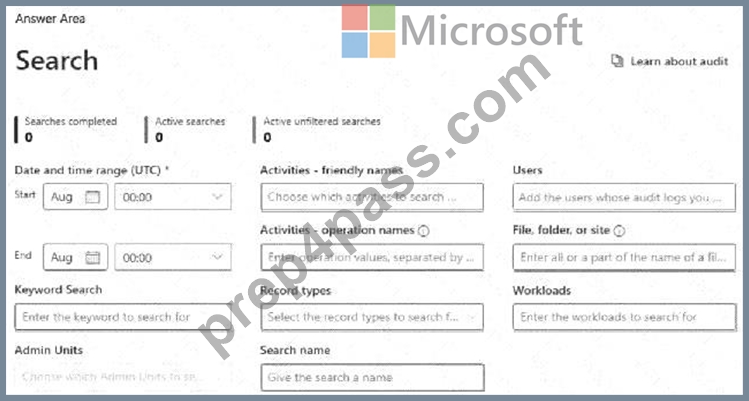
Answer:
Explanation: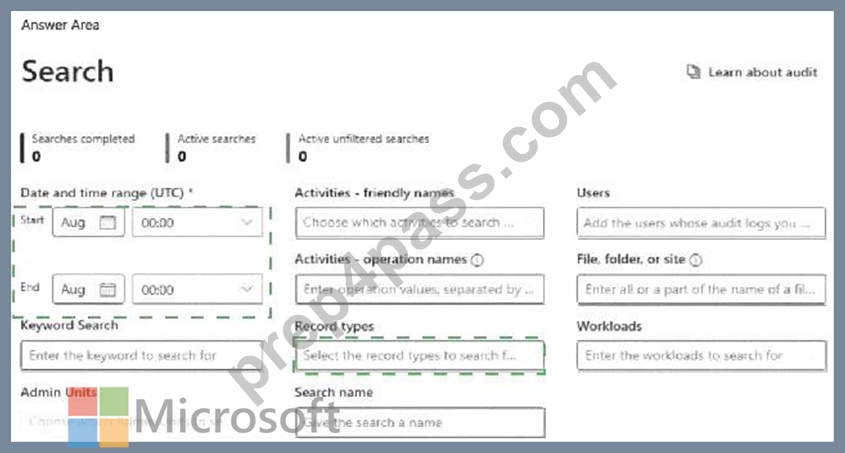
Explanation: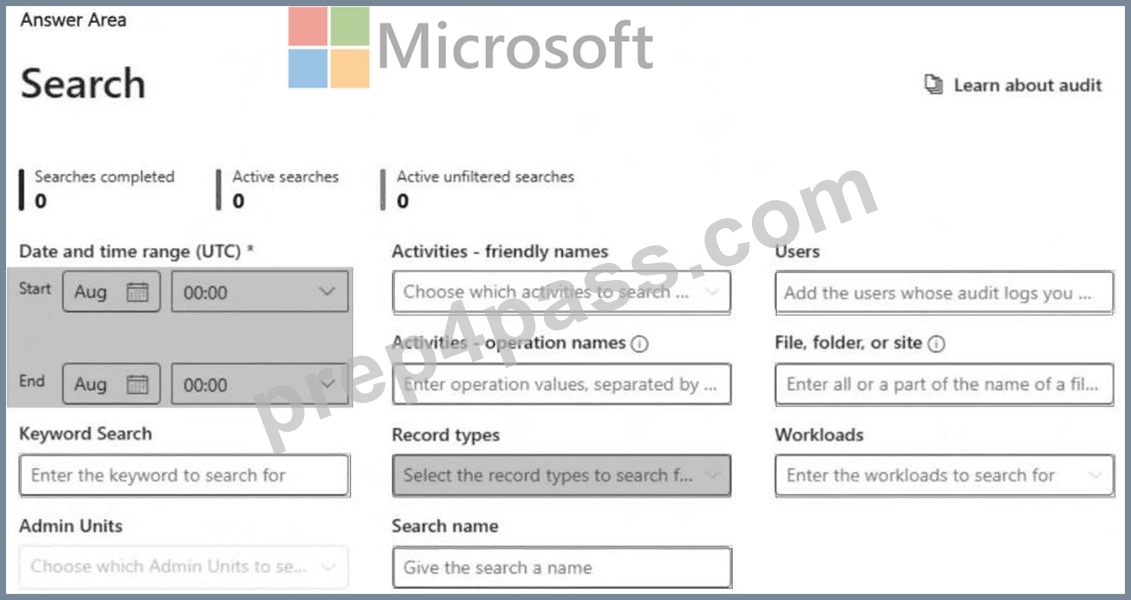
To validate whether an audit log retention policy will apply to the intended entries, you should configure the following fields:
# Date and time range (UTC) ensures that you are searching for audit logs within the time period when the policy should be applied. Audit logs are time-sensitive, and policies affect logs based on their timestamp.
# Record types allows you to filter and search for specific audit log categories (e.g., Exchange, SharePoint, Teams, etc.) that are affected by the retention policy. Selecting the correct record type ensures that the policy is evaluated against the relevant data.
NEW QUESTION # 82
Hotspot Question
You have a Microsoft 365 5 subscription that contains the devices shown in the following table.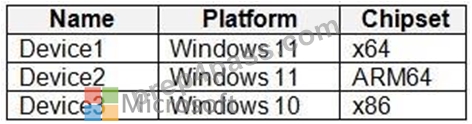
You publish Microsoft Purview Information Protection sensitivity labels.
You plan to deploy the information protection client to the devices. The solution must ensure that the labels can be applied to sensitive images and documents.
On which devices can you install the information protection client, and what should users use to apply labels? To answer, select the appropriate options in the answer area.
NOTE: Each correct selection is worth one point.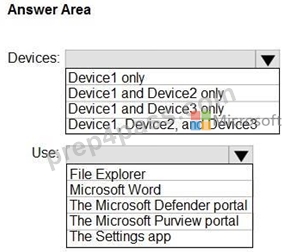
Answer:
Explanation: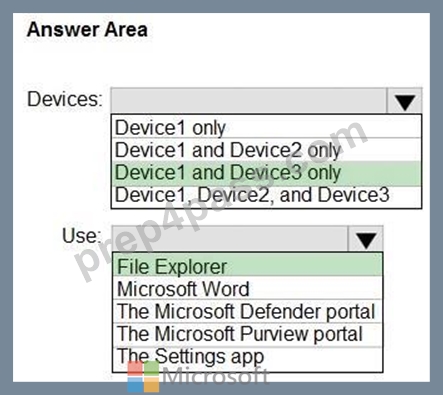
Explanation:
Box 1: Device1 and Device3 only
Requirements for deploying the information protection client
To use the Microsoft Purview Information Protection client, install this client on Windows computers where you want to use the client components.
Box 2: File Explorer
The Microsoft Purview Information Protection client can be installed and used with File Explorer in Windows. You can apply sensitivity labels and protection to files directly within File Explorer.
Reference:
https://learn.microsoft.com/en-us/purview/information-protection-client
NEW QUESTION # 83
You have a Microsoft 36S ES subscription.
You need to create the Microsoft Purview insider risk management policies shown in the following table.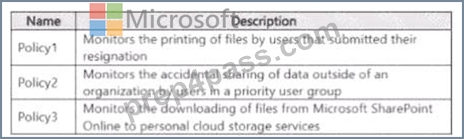
Which policy template should you use for each policy? To answer, drag the appropriate policy templates to the correct polices Each template may be used once more than once or not at all. You may need to drag the split bar between panes or scroll to view..
Answer:
Explanation:
Explanation: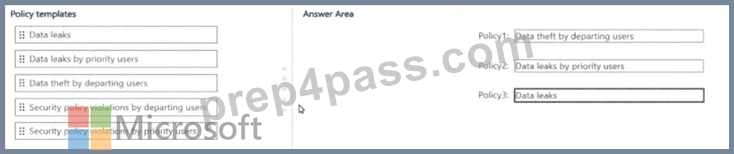
NEW QUESTION # 84
You have a Microsoft 365 subscription.
You have a Microsoft SharePoint Online site named Site1. Site1 has a document library that contains the files shown in the following table.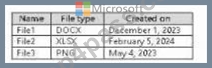
From the Microsoft Purview compliance portal, for Site1 you create a content search named Search1 that has the date in the YYYY-MM-DD format as shown in the following exhibit.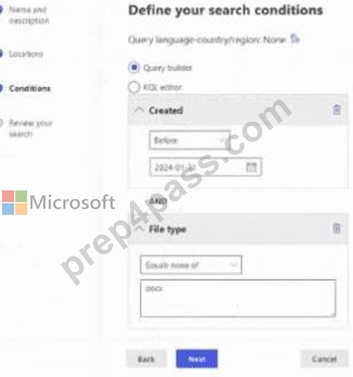
For each of the following statements, select Yes if the statement is true. Otherwise, select No.
NOTE: Each correct selection is worth one point.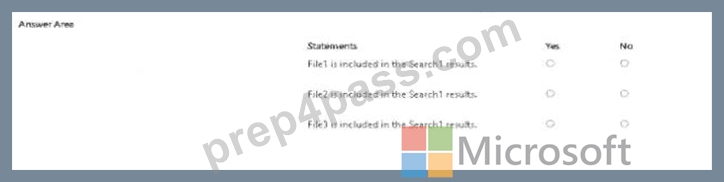
Answer:
Explanation: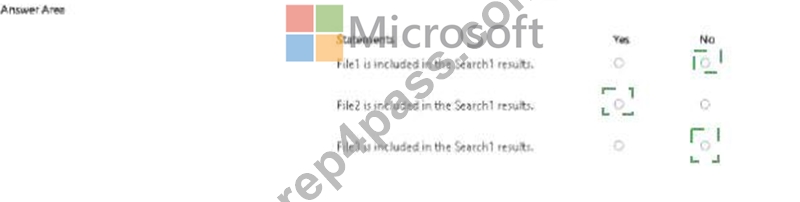
Explanation: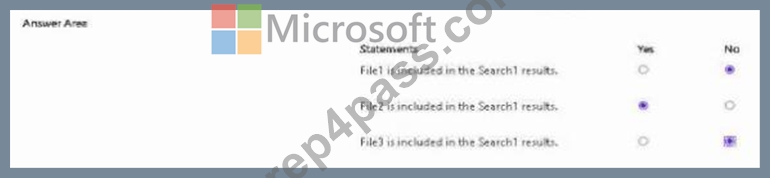
NEW QUESTION # 85
Drag and Drop Question
You have a Microsoft 365 5 subscription that uses Microsoft Purview insider risk management and contains three users named User1, User2, and User3.
All insider risk management policies have adaptive protection enabled and the default conditions for insider risk levels configured.
The users perform the following activities, which trigger insider risk policy alerts:
- User1 performs at least one data exfiltration activity that results in a high severity risk score.
- User2 performs at least three risky user activities within seven days, that each results in a high severity risk score.
- User3 performs at least two data exfiltration activities within seven days, that each results in a high severity risk score.
Which insider risk level is assigned to each user? To answer, drag the appropriate levels to the correct users. Each level may be used once, more than once, or not at all. You may need to drag the split bar between panes or scroll to view content.
NOTE: Each correct selection is worth one point.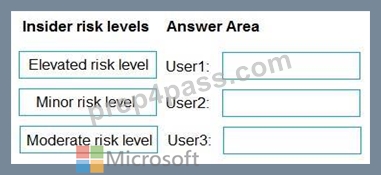
Answer:
Explanation: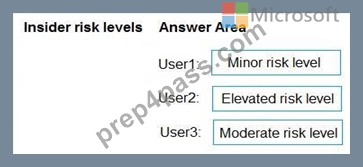
Explanation:
Box 1: Minor risk level
User1 performs at least one data exfiltration activity that results in a high severity risk score.
Minor:
This is the lowest risk level, assigned to users with low-severity alerts or those with at least one high-severity exfiltration activity.
Box 2: Elevated risk level
User2 performs at least three risky user activities within seven days, that each results in a high severity risk score.
Elevated:
This is the highest risk level, assigned to users with high-severity alerts, multiple high-severity insights, or confirmed high-severity alerts.
Box 3: Moderate risk level
User3 performs at least two data exfiltration activities within seven days, that each results in a high severity risk score.
Moderate:
This level indicates a medium risk, assigned to users with medium-severity alerts or those with at least two high-severity exfiltration activities.
Reference:
https://learn.microsoft.com/en-us/purview/insider-risk-management-adaptive-protection
NEW QUESTION # 86
You plan to create a new data loss prevention (DLP) policy named DLP1.
DLP1 will be applied to the Exchange email location.
You need to exclude two users named User1 and User2 from DLP1.
What should you do first?
- A. Create a distribution list that contains User1 and User2.
- B. Create an advanced DLP rule.
- C. Create a mail flow rule in Microsoft Exchange.
- D. Create an organization sharing policy in Microsoft Exchange.
Answer: A
Explanation:
Microsoft Purview Data Loss Prevention (DLP) policies have many components to configure. To create an effective policy, you need to understand what the purpose of each component is and how its configuration alters the behavior of the policy. This article provides a detailed anatomy of a DLP policy.
Reference:
https://learn.microsoft.com/en-us/purview/dlp-policy-reference
NEW QUESTION # 87
You have two Microsoft 365 subscriptions named Contoso and Fabrikam. The subscriptions contain the users shown in the following table.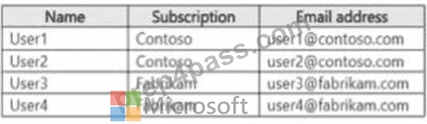
You have a sensitivity label named Sensitivity! as shown in the exhibit. (Click the Exhibit tab) you have the files shown in the following table.
For each of the following statements, select yes if the statement is true. Otherwise select No.
NOTE: Each correct selection is worth one point.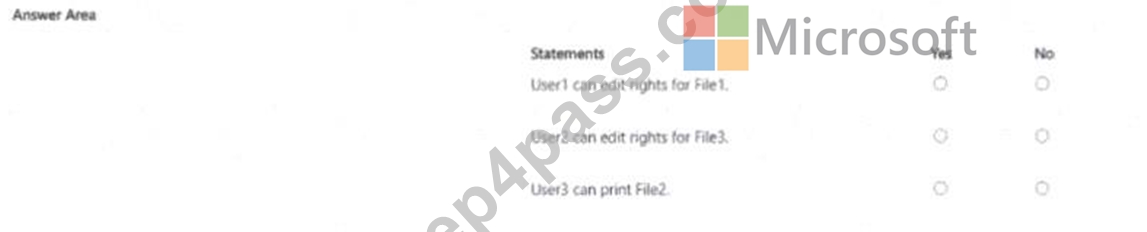
Answer:
Explanation: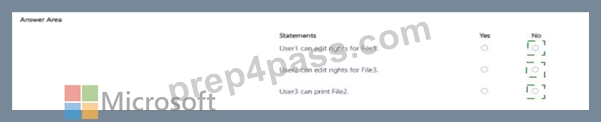
Explanation: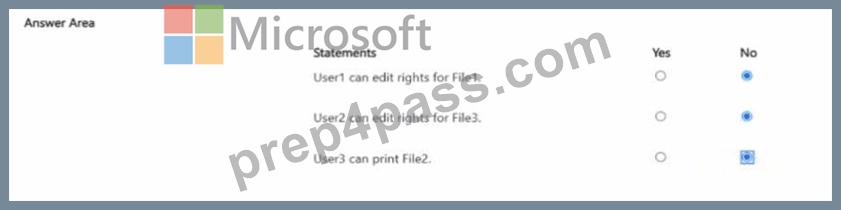
NEW QUESTION # 88
You have a Microsoft 365 E5 subscription that contains a user named User1.
You need to ensure that all email messages that contain attachments are encrypted automatically by using Microsoft Purview Message Encryption.
What should you create?
- A. a data loss prevention (DLP) policy
- B. an information barrier segment
- C. a sensitivity label
- D. a mail flow rule
Answer: D
Explanation:
Defining rules for Microsoft Purview Message Encryption
One way to enable Microsoft Purview Message Encryption is for Exchange Online and Exchange Online Protection administrators to define mail flow rules. These rules determine under what conditions email messages should be encrypted. When an encryption action is set for a rule, any messages that match the rule conditions are encrypted before they're sent.
Mail flow rules are flexible, letting you combine conditions so you can meet specific security requirements in a single rule. For example, you can create a rule to encrypt all messages that contain specified keywords and are addressed to external recipients. Microsoft Purview Message Encryption also encrypts replies from recipients of encrypted email.
Reference:
https://learn.microsoft.com/en-us/purview/ome
NEW QUESTION # 89
HOTSPOT
You have a Microsoft 365 E5 subscription that uses Microsoft Purview and just-in-time (JIT) protection. The subscription contains the users shown in the following table.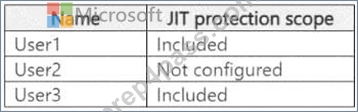
The subscription contains the devices shown in the following table.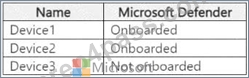
The devices contain the files shown in the following table.
For each of the following statements, select Yes if the statement is true. Otherwise, select No.
NOTE: Each correct selection is worth one point.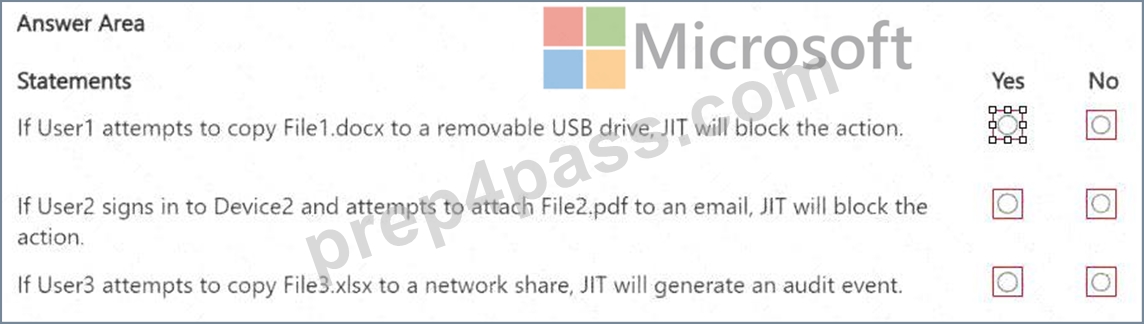
Answer:
Explanation: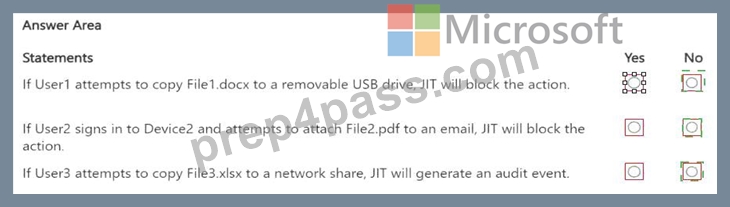
Explanation: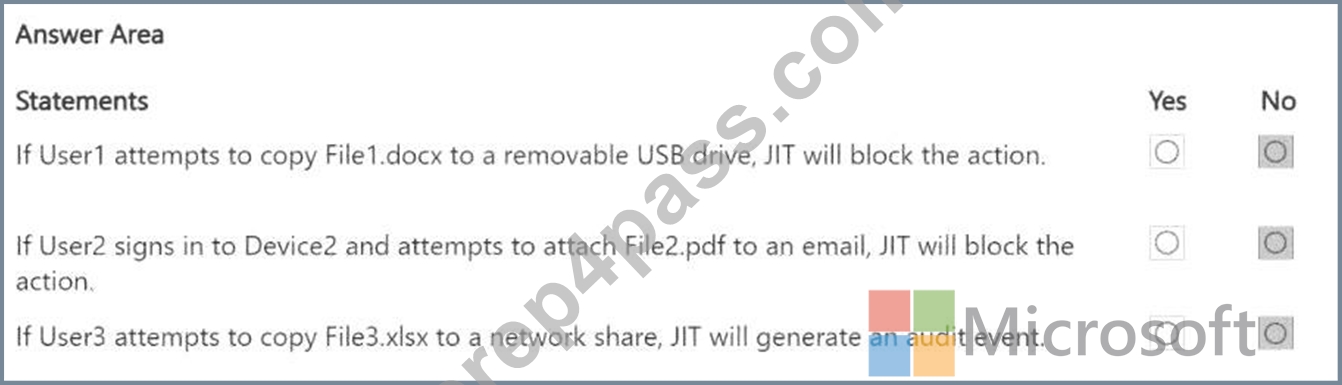
Statement 1 - No. User1 is included in JIT protection. File1.docx is on Device1, which is onboarded to Microsoft Defender. However, File1.docx has not been evaluated for file classification, meaning JIT cannot enforce protection on it. If User2 signs in to Device2 and attempts to attach File2.pdf to an email, JIT will block the action.
Statement 2 - No. User2 is not configured for JIT protection (JIT does not apply to them). File2.pdf has been evaluated for classification, but since User2 is not included in JIT protection, no blocking occurs. If User3 attempts to copy File3.xlsx to a network share, JIT will generate an audit event.
Statement 3 - No. User3 is included in JIT protection. However, Device3 is not onboarded to Microsoft Defender, meaning JIT protection cannot enforce actions on it. File3.xlsx has not been evaluated, so even if the device were onboarded, JIT would not have classification data to act upon.
NEW QUESTION # 90
HOTSPOT
You have a Microsoft SharePoint Online site that contains the following files.
Users are assigned roles for the site as shown in the following table.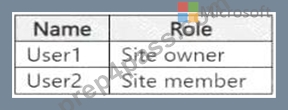
Which files can User1 and User2 open? To answer, select the appropriate options in the answer area.
NOTE: Each correct selection is worth one point.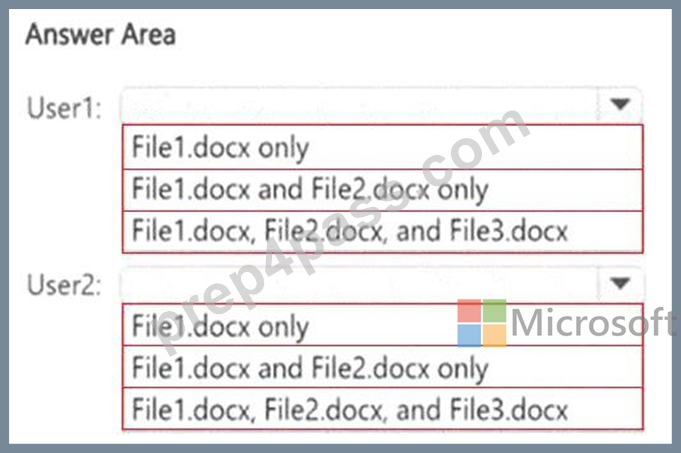
Answer:
Explanation: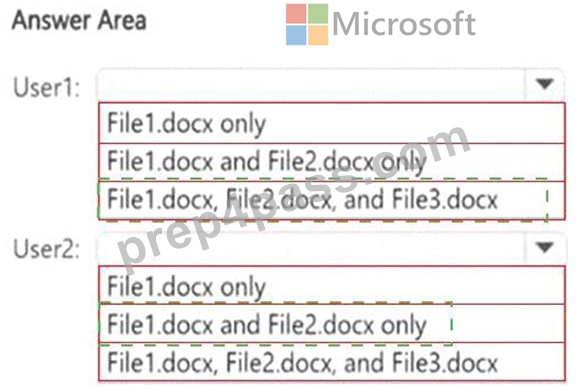
Explanation: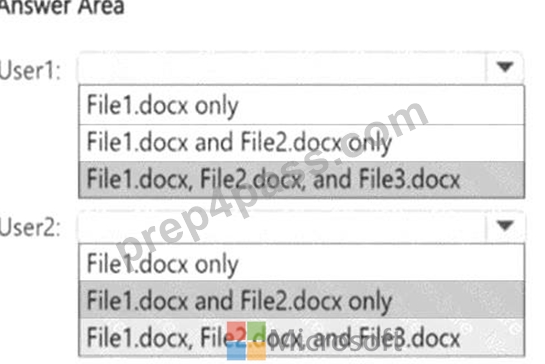
NEW QUESTION # 91
You have a Microsoft 365 E5 subscription that has a sensitivity label named Sensitivity1.
You plan to create an auto-labeling policy that will apply Sensitivity1 to Microsoft Exchange Online mailboxes.
On February 1, you create the auto-labeling policy and enable simulation mode by using the default settings. No modifications are made to the policy in simulation mode.
When will the policy first be turned on?
- A. February 2
- B. February 15
- C. never
- D. February 6
Answer: C
Explanation:
With Microsoft auto-labeling policies in simulation mode, the policy runs a trial run to test its configuration, but it doesn't automatically apply labels to content. Labels will only be applied automatically after the simulation is complete, you've reviewed the results, and you've explicitly enabled the policy for actual labeling.
Enabling for Labeling:
If the simulation results are satisfactory, you then need to enable the policy to start automatically labeling content. This is done by publishing the policy, which essentially switches it from simulation to active mode.
Reference:
https://learn.microsoft.com/en-us/purview/apply-sensitivity-label-automatically
NEW QUESTION # 92
You have a Microsoft 365 E5 tenant that uses a domain named contoso.com.
A user named User 1 sends link based, branded emails that are encrypted by using Microsoft Purview Advanced Message Encryption to the recipients shown in the following table.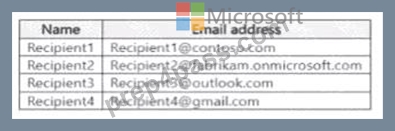
For which recipients Can User1 revoke the emails?
- A. Recipient1 only
- B. Reciptent1, Recipient2. Recipient3, and Recipient4
- C. Reciptent1 and Recipient4 only
- D. Recipient4 only
- E. Reclpient3 and Recipients only
Answer: B
Explanation:
Step 1 - Scenario
Tenant domain = contoso.com
Encryption method = Microsoft Purview Advanced Message Encryption (AME) using branded, link-based emails.
Recipients:
Recipient1 # Contoso internal user (same tenant).
Recipient2 # External Microsoft 365 user (Fabrikam).
Recipient3 # Outlook.com consumer email.
Recipient4 # Gmail.com consumer email.
The question asks: For which recipients can User1 revoke the emails?
Step 2 - Revocation in Advanced Message Encryption
Microsoft Purview AME allows senders to:
Revoke sent encrypted emails.
Revoke applies to all recipients who receive a link-based branded encrypted message.
When revoked, the secure message link no longer works, regardless of whether the recipient is internal, external Microsoft 365, Outlook.com, Gmail, or another email provider.
This differs from traditional RMS-based encryption where revocation is tenant-specific. In AME, the revocation is possible because the recipient must open the message through a secure browser portal (Office
365 Message Encryption portal).
Step 3 - Evaluate each recipient
Recipient1 (contoso.com, internal) # Yes, message can be revoked.
Recipient2 (fabrikam.onmicrosoft.com, external Microsoft 365) # Yes, message can be revoked because AME link enforcement works across tenants.
Recipient3 (outlook.com, consumer) # Yes, message can be revoked, they use the secure OME portal.
Recipient4 (gmail.com, consumer) # Yes, message can be revoked, they also use the secure OME portal.
Step 4 - Microsoft Reference
From Microsoft Docs:
"With Advanced Message Encryption, admins can configure branding and revocation for encrypted email messages. Revocation applies to encrypted emails sent to both internal and external recipients, including those using Outlook.com, Gmail.com, and other email services." Reference: Microsoft Purview Advanced Message Encryption
NEW QUESTION # 93
You receive an email that contains a list of words that will be used fora sensitive information type.
You need to create a file that can be used as the source of a keyword dictionary.
In which format should you save the list?
- A. an ACCDB database file that contains a table named Dictionary
- B. a TSV file that contains words separated by tabs
- C. a CSV file that contains words separated by commas
- D. an XLSX file that contains one word in each cell of the first row
Answer: C
Explanation:
Correct:
* a CSV file that contains words separated by commas
* a text file that has one word on each line
Incorrect:
* an ACCDB database file that contains a table named Dictionary
* a DOCX file that has one word on each line
* a JSON file that has an element for each word
* a TSV file that contains words separated by tabs
* an XML file that contains a keyword tag for each word
* an XLSX file that contains one word in each cell of the first row
Note:
To create a keyword dictionary for a sensitive information type in Microsoft Purview Data Loss Prevention (DLP), you must use a plain text (.txt) file (or a .CSV file) where each keyword is on a separate line.
Format Example (TXT file):
confidential
sensitive
classified
top secret
This format is simple, efficient, and directly compatible with Microsoft 365 DLP policies for keyword dictionaries.
How to use the keyword dictionary?
Create a text file with one keyword per line.
Upload it to Microsoft Purview under Data Classification > Sensitive Info Types.
Use the dictionary in a DLP policy to identify and protect sensitive information.
In steps:
Create a keyword dictionary using the Microsoft Purview portal
Use these steps to create or import keywords for a custom dictionary:
1. Sign in to the Microsoft Purview portal Information Protection > Classifiers > Sensitive info types.
2. Select + Create sensitive info type and then enter a Name and Description for your sensitive info type. Choose Next.
3. On the Define patterns for this sensitive info type page, choose + Create pattern.
4. In the New pattern window, select a Confidence level.
5. Choose Add a Primary element and select Keyword dictionary.
*-> 6. On the Add a keyword dictionary flyout, you can:
6a.Upload a dictionary file in TXT or CSV format.
6b. Choose from existing dictionaries.
or create a new dictionary by entering keywords manually and giving it a name.
Reference:
https://learn.microsoft.com/en-us/purview/sit-create-a-keyword-dictionary
NEW QUESTION # 94
......
Microsoft SC-401 Exam Syllabus Topics:
| Topic | Details |
|---|---|
| Topic 1 |
|
| Topic 2 |
|
| Topic 3 |
|
| Topic 4 |
|
Verified SC-401 Exam Dumps Q&As - Provide SC-401 with Correct Answers: https://www.prep4pass.com/SC-401_exam-braindumps.html
SC-401 Exam Questions | Real SC-401 Practice Dumps: https://drive.google.com/open?id=1gJL4owy8k4Pc9hJdae6lpLSMMcFsMIYT
