

2026 Realistic AZ-800 Dumps are Available for Instant Access
Download Exam AZ-800 Practice Test Questions with 100% Verified Answers
NEW QUESTION # 79
Your network contains an Active Directory domain, a web app named App1, and a perimeter network. The perimeter network contains a server named Server1 that runs Windows Server.
You plan to provide external access to App1.
You need to implement the Web Application Proxy role service on Server1.
Which role should you add to Server1, and which role should you add to the network? To answer, drag the appropriate roles to the correct targets. Each role may be used once, more than once, or not at all. You may need to drag the split bar between panes or scroll to view content.
Answer:
Explanation:
Explanation:
In the Administering Windows Server Hybrid Core Infrastructure materials, Web Application Proxy (WAP) is defined as a role service of the Remote Access role that is deployed on servers placed in a perimeter (DMZ) network to publish internal web applications for external users. The guide explains that WAP "acts as a reverse proxy and preauthentication endpoint for published applications" and that it is installed by adding the Remote Access role and selecting the Web Application Proxy role service. It further emphasizes that WAP
"integrates with Active Directory Federation Services (AD FS) to provide claims-based preauthentication and single sign-on for applications such as AD FS-protected web apps." Consequently, to make App1 available externally using least privilege and supported design, you deploy Remote Access (Web Application Proxy) on Server1 in the perimeter, and you ensure the AD FS role is available on the internal network as the federation service that WAP trusts. Other roles listed (for example, Network Policy and Access Services or Active Directory Certificate Services) are not required to stand up WAP publishing itself; certificates are consumed by WAP/AD FS, but the publishing function specifically relies on Remote Access (WAP) with AD FS as its preauthentication partner.
NEW QUESTION # 80
Your network contains a single domain Active Directory Domain Services (AD DS) forest named contoso.com. The forest contains a single Active Directory site.
You plan to deploy a read only domain controller (RODC) to a new datacenter on a server named Server1. A user named User1 is a member of the local Administrators group on Server1.
You need to recommend a deployment plan that meets the following requirements:
Ensures that a user named User1 can perform the RODC installation on Server1 Ensures that you can control the AD DS replication schedule to the Server1 Ensures that Server1 is in a new site named RemoteSite1 Uses the principle of least privilege Which three actions should you recommend performing in sequence? To answer, move the appropriate actions from the list of actions to the answer area and arrange them in the correct order.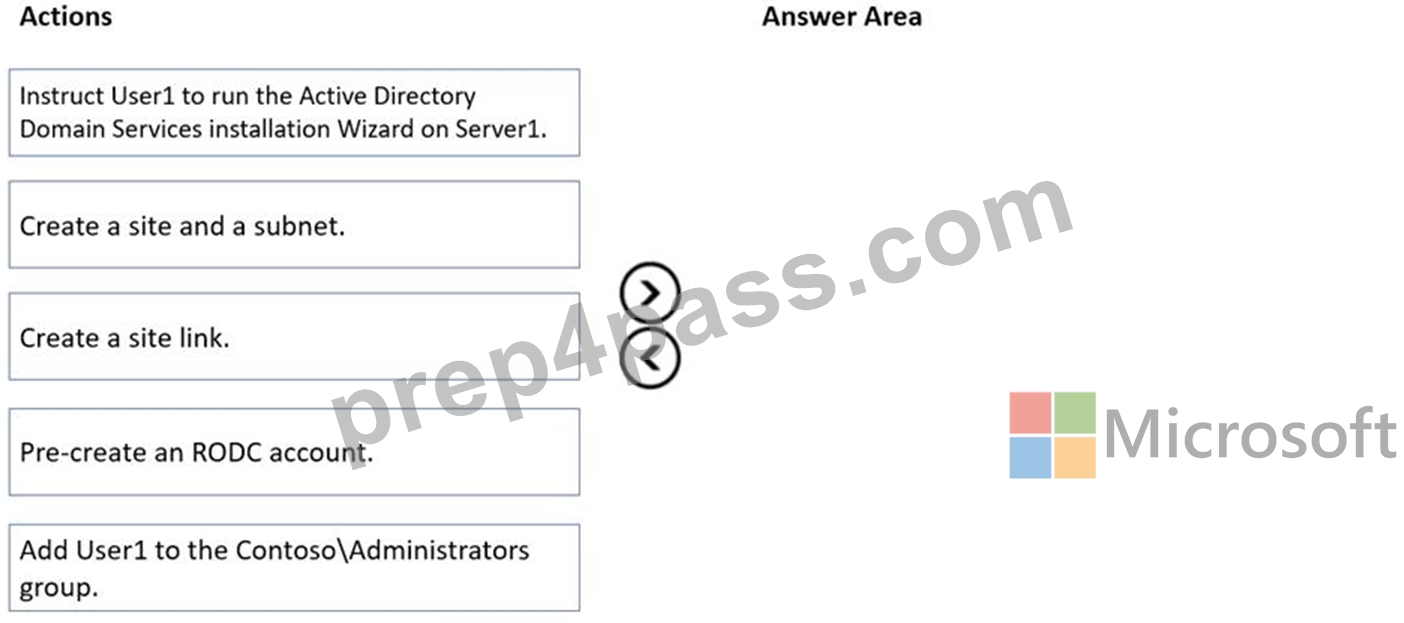
Answer:
Explanation: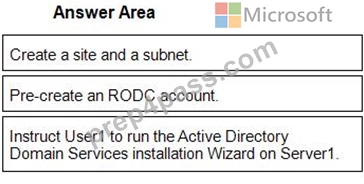
1 - Create a site and a subnet.
2 - Pre-create an RODC account.
3 - Instruct User1 to run the Active Directory Domain Services installation Wizard on Server1.
Reference:
https://mehic.se/2018/01/02/how-to-install-and-configure-read-only-domain-controller-rodc-2016/
NEW QUESTION # 81
Note: This question is part of a series of questions that present the same scenario. Each question in the series contains a unique solution that might meet the stated goals. Some question sets might have more than one correct solution, while others might not have a correct solution.
After you answer a question in this section, you will NOT be able to return to it. As a result, these questions will not appear in the review screen.
You are planning the deployment of DNS to a new network.
You have three internal DNS servers as shown in the following table.
The contoso.local zone contains zone delegations for east.contoso.local and west.contoso.local.
All the DNS servers use root hints.
You need to ensure that all the DNS servers can resolve the names of all the internal namespaces and internet hosts.
Solution: On Server2, you create a conditional forwarder for contoso.local and west.contoso.local.
On Server3, you create a conditional forwarder for contoso.local and east.contoso.local.
Does this meet the goal?
- A. Yes
- B. No
Answer: A
Explanation:
All servers are root hints, so all can resolve internet dns.The 2 child domains have conditional forwarder to the other child and server root domain, so all servers can do it.
NEW QUESTION # 82
You need to meet the security requirements for passwords.
Where should you configure the components for Azure AD Password Protection? lo answer, drag the appropriate components to the correct locations. Each component may be used once, more than once, or not at all. You may need to drag the split bar between panes or scroll to view content.
NOTE Each correct selection is worth one point.
Answer:
Explanation:
Reference:
https://docs.microsoft.com/en-us/azure/active-directory/authentication/concept-password-ban-bad-on-premises
NEW QUESTION # 83
Hotspot Question
You need to sync files from an on premises server named Server1 to Azure by using Azure File Sync.
You have a cloud tiering policy that is configured for 30 percent free space and 70 days.
Volume E on Server1 is 500 GB.
A year ago, you configured E:\Data on Server1 to sync by using Azure File Sync. The files that are visible in E:\Data are shown in the following table.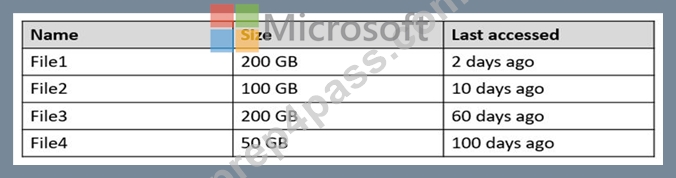
Volume E does NOT contain any other files.
Where are File1 and File3 located? To answer, select the appropriate options in the answer area.
NOTE: Each correct selection is worth one point.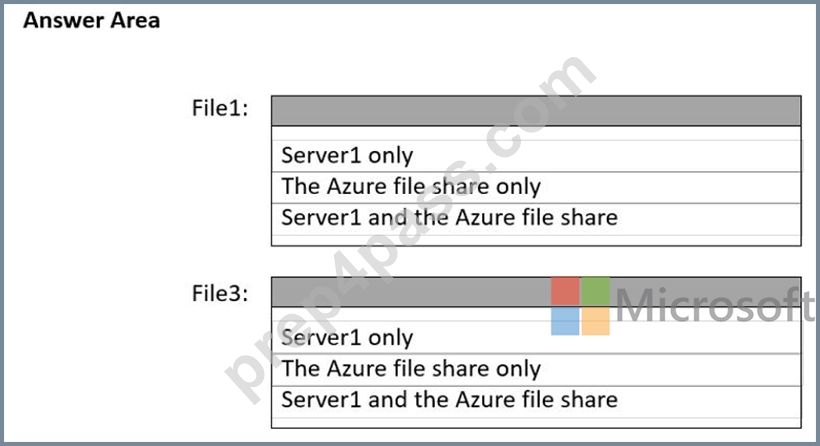
Answer:
Explanation: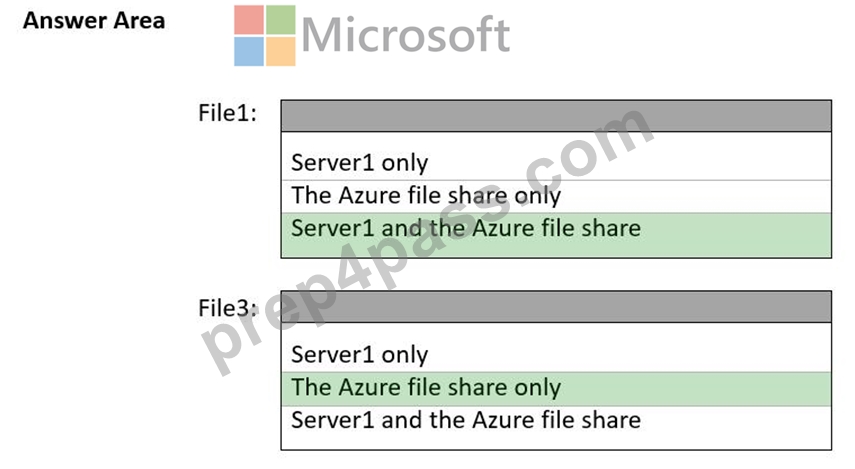
Explanation:
The volume free space policy will always take precedence; when there isn't enough free space on the volume to store as many days worth of files as described by the date policy, Azure File Sync will override the date policy and continue tiering the coldest files until the volume free space percentage is met.
https://docs.microsoft.com/en-us/azure/storage/file-sync/file-sync-cloud-tiering-policy
NEW QUESTION # 84
You have an Azure virtual machine named VM1 that runs Windows Server.
You need to configure the management of VM1 to meet the following requirements:
Require administrators to request access to VM1 before establishing a Remote Desktop connection.
Limit access to VM1 from specific source IP addresses.
Limit access to VM1 to a specific management port.
What should you configure?
- A. Microsoft Defender for Cloud
- B. Azure Front Door
- C. a network security group (NSG)
- D. Azure Active Directory (Azure AD) Privileged Identity Management (PIM)
Answer: A
Explanation:
https://docs.microsoft.com/en-us/azure/defender-fo
NEW QUESTION # 85
SIMULATION
You need to configure SRV1 as a DNS server. SRV1 must be able resolve names from the contoso.com domain by using DC1. All other names must be resolved by using the root hint servers.
To complete this task, sign in the required computer or computers.
Answer:
Explanation:
Phase 1: Create a secondary zone
Phase 2: Configure root hints
Phase 1: Create a secondary zone
Create a secondary zone
To create a secondary zone, select the relevant method and follow the steps.
Here's how to create a secondary look up zone using DNS Manager.
Step 1: From the Windows desktop, open the Start menu, select Windows Administrative Tools > DNS.
Step 2: In the console tree, connect to the DNS server [here Srv1] you wish to manage, expand the DNS server, right-click, then select New Zone.
Step 3: On the New Zone Wizard page, select Next.
Step 4: On the Zone Type page, select Secondary zone.
Step 5: On the Zone Name page, specify the name of the secondary zone. The name of the zone must match the name of the primary zone to replicate from. For example, south.contoso.com.
[Here: contoso.com]
Step 6: On the Master DNS Servers page, specify the IP addresses of one or more DNS servers that host copies of the primary zone. You need to ensure that the primary zone allows transfers to the DNS server hosting the secondary zone. For example, 172.23.90.124. [Here: dc1] Step 7: Select Finish on the Completing the New Zone Wizard.
Phase 2: Configure root hints
Root hints servers are used to help resolving DNS address information when the DNS server is unable to resolve the query locally from a hosted zone or the DNS server cache. Root hints name servers are populated by default in new installations.
You can edit the list of root name servers if required by navigating to the Root Hints tab of the DNS server properties dialog box or by using PowerShell.
Step 1: From the Windows desktop, open the Start menu, select Windows Administrative Tools > DNS.
Step 2: Select and hold (or right-click) your server, and then select Properties.
Step 3: Select the Root Hints tab, select the item to edit, and then select Edit.
Step 4: Enter the fully qualified domain name, then select Resolve. Verify the IP address, and if necessary edit the IP address.
Step 5: Select OK.
Review the updated root hint server in the list, when you're ready select OK. You'll notice the name server has a trailing dot (.).
Reference:
https://learn.microsoft.com/en-us/windows-server/networking/dns/manage-dns-zones
https://learn.microsoft.com/en-us/windows-server/networking/dns/quickstart-install-configure-dns- server
NEW QUESTION # 86
Hotspot Question
Your network contains an Azure Active Directory Domain Services (Azure AD DS) domain named contoso.com.
You need to configure a password policy for the local user accounts on the Azure virtual machines joined to contoso.com.
What should you do? To answer, select the appropriate options in the answer area.
NOTE: Each correct selection is worth one point.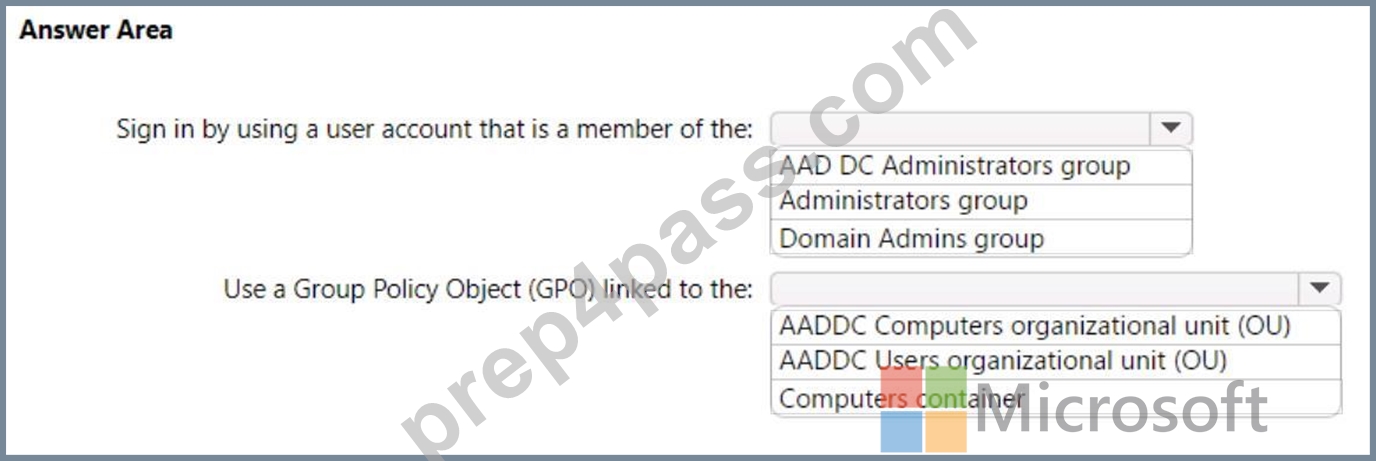
Answer:
Explanation: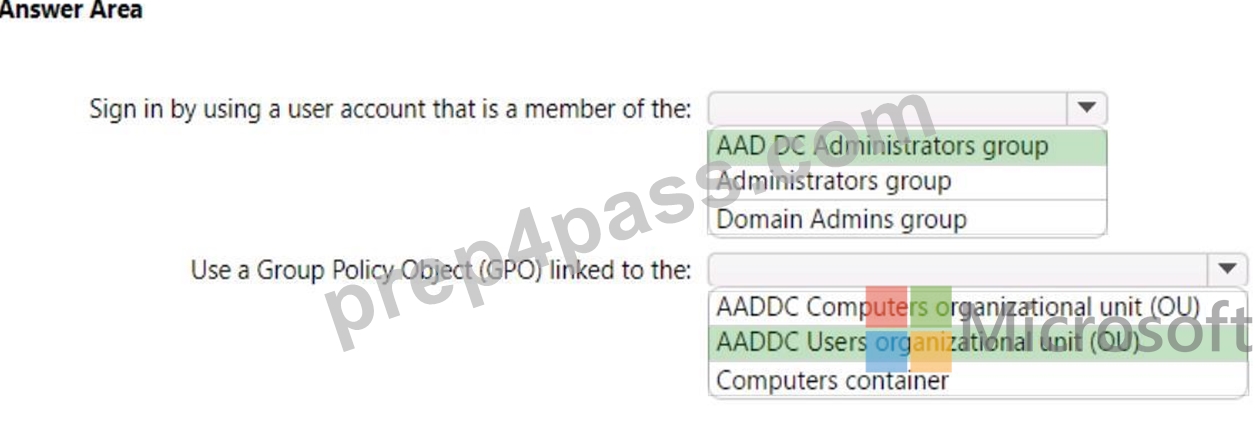
NEW QUESTION # 87
You have an Azure subscription. The subscription contains a virtual machine named VM1 that runs Windows Server and has the following disks:
* OSdislcDisk1
o Size: 512 GiB
o Free space: 260 GiB
o Encryption: SSE with PMK
o Storage type: Standard SSD
* Data disk: Disk2
o Size: 512 GiB
o Free space: 45 GiB
o Storage type: Standard HDD
o Encryption: Platform-managed key
You are planning a maintenance strategy for VM1.
You need to identify which task can be performed on Disk2 without causing downtime to VM1.
What should you do on Disk2?
- A. Change the encryption type.
- B. Increase the size.
- C. Decrease the size.
- D. Change the storage type to Premium SSD.
Answer: B
NEW QUESTION # 88
Note: This question is part of a series of questions that present the same scenario. Each question in the series contains a unique solution that might meet the stated goals. Some question sets might have more than one correct solution, while others might not have a correct solution.
After you answer a question in this section, you will NOT be able to return to it. As a result, these questions will not appear in the review screen.
You are planning the deployment of DNS to a new network.
You have three internal DNS servers as shown in the following table.
The contoso.local zone contains zone delegations for east.contoso.local and west.contoso.local. All the DNS servers use root hints.
You need to ensure that all the DNS servers can resolve the names of all the internal namespaces and internet hosts.
Solution: You configure Server2 and Server3 to forward DNS requests to 10.0.1.10.
Does this meet the goal?
- A. Yes
- B. No
Answer: B
NEW QUESTION # 89
You need to sync files from an on premises server named Server1 to Azure by using Azure File Sync.
You have a cloud tiering policy that is configured for 30 percent free space and 70 days.
Volume E on Server1 is 500 GB.
A year ago, you configured E:\Data on Server1 to sync by using Azure File Sync. The files that are visible in E:\Data are shown in the following table.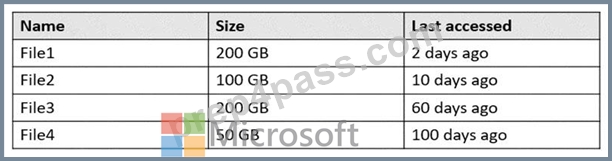
Volume E does NOT contain any other files.
Where are File1 and File3 located? To answer, select the appropriate options in the answer area.
NOTE: Each correct selection is worth one point.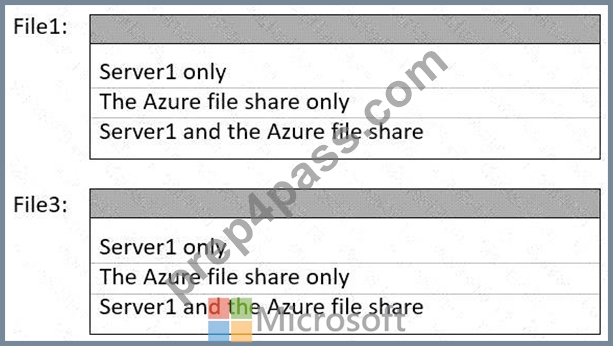
Answer:
Explanation: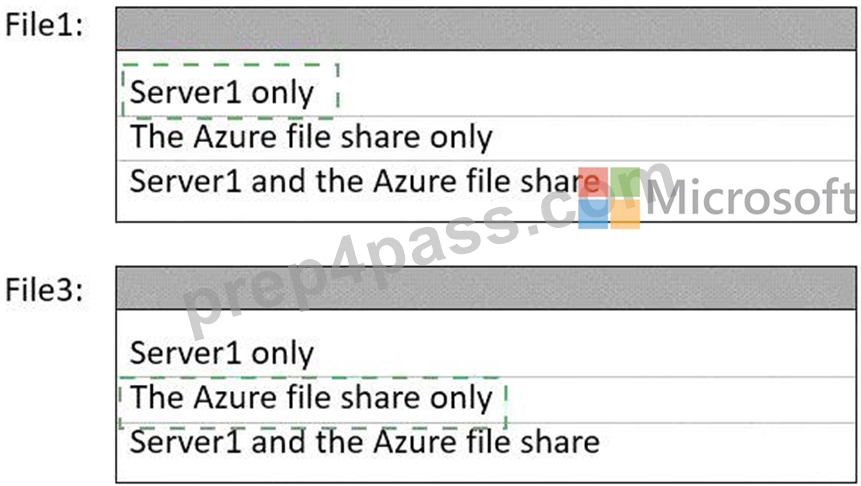
Explanation: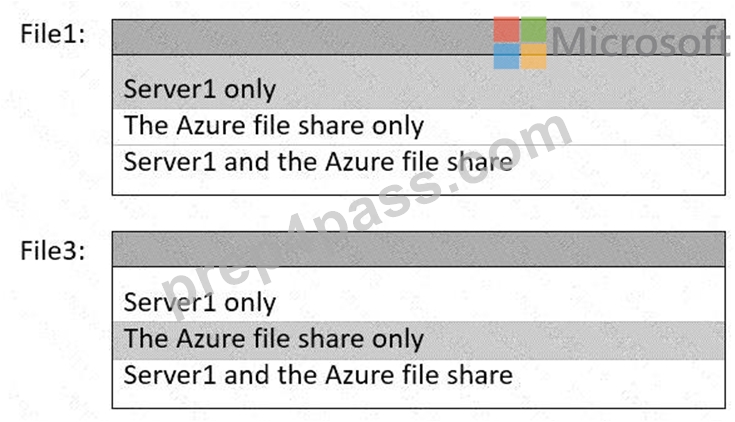
Reference:
https://docs.microsoft.com/en-us/windows-server/manage/windows-admin-center/azure/azure-file-sync
https://docs.microsoft.com/en-us/azure/storage/file-sync/file-sync-cloud-tiering-overview
NEW QUESTION # 90
Your network contains an Active Directory domain named contoso.com. The domain contains group managed service accounts (gMSAs). You have a server named Server1 that runs Windows Server and is in a workgroup. Server! hosts Windows containers.
You need to ensure that the Windows containers can authenticate to contoso.com.
Which three actions should you perform in sequence? To answer, move the appropriate actions from the list of actions to the answer area and arrange them in the correct order.
Answer:
Explanation:
Explanation:
NEW QUESTION # 91
Your network contains a Microsoft Entra Domain Services domain named sk230128outlook.onmicrosoft.
com. The domain contains a server named Server1 that runs Windows Server.
You have the users shown in the following table.
The domain contains the Group Policy Objects (GPOs) shown in the following exhibit.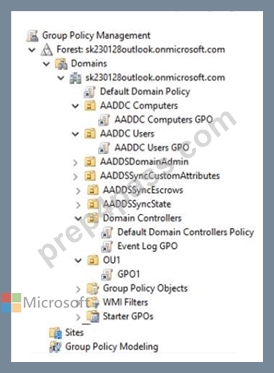
The minimum password length for each GPO is configured as shown in the following table.
For each of the following statements, select Yes if the statement is true. Otherwise, select No.
NOTE: Each correct selection is worth one point.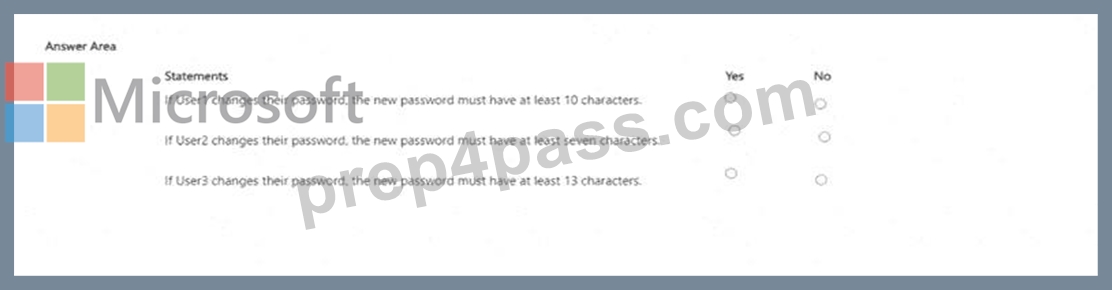
Answer:
Explanation: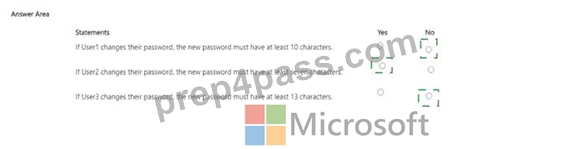
Explanation:
If User1 changes their password, the new password must have at least 10 characters. No If User2 changes their password, the new password must have at least seven characters. Yes If User3 changes their password, the new password must have at least 13 characters. No The Windows Server Hybrid Core Infrastructure materials explain that Account policies (Password Policy, Account Lockout Policy, and Kerberos Policy) are domain-wide and are processed only from the GPO linked at the domain root (typically the Default Domain Policy). The guide states that "password policy settings for domain user accounts are obtained from the domain account policy; GPOs linked to OUs do not change the domain password policy for user objects." It further clarifies that OU-linked GPOs containing Account Policy settings affect only the local Security Accounts Manager (SAM) of computers whose computer objects are in that OU-not the passwords of domain user accounts. In Microsoft Entra Domain Services (managed domains), you also see the built-in AADDC Users GPO and AADDC Computers GPO; however, the same scope rules apply: domain users' password length is determined by the domain account policy, while local accounts on member servers/workstations inherit Account Policy from the GPO that applies to the computer object's OU.
Applying these rules to the scenario:
* User1 is a domain user under AADDC Users OU. Even if that OU GPO set 10 characters, it does not override the domain account policy # No.
* User2 is a local user on Server1. The computer object (typically under AADDC Computers) receives its Account Policy from the AADDC Computers GPO, which sets minimum length = 7 # Yes.
* User3 is a domain user under OU1 with GPO1. OU-level Account Policy (e.g., 13 characters) does not affect domain user passwords # No.
NEW QUESTION # 92
Hotspot Question
Your network contains an Active Directory Domain Services (AD DS) domain named contoso.com.
You have a Microsoft Entra tenant.
You need to implement Microsoft Entra Connect Sync. The solution must meet the following requirements:
- Prevent the password hashes of contoso.com from being synced to the
Microsoft Entra tenant.
- Minimize user effort when authenticating to Microsoft Entra
registered apps.
- Minimize the number of on-premises infrastructure components.
What should you include in the solution for each requirement? To answer, select the appropriate options in the answer area.
NOTE: Each correct selection is worth one point.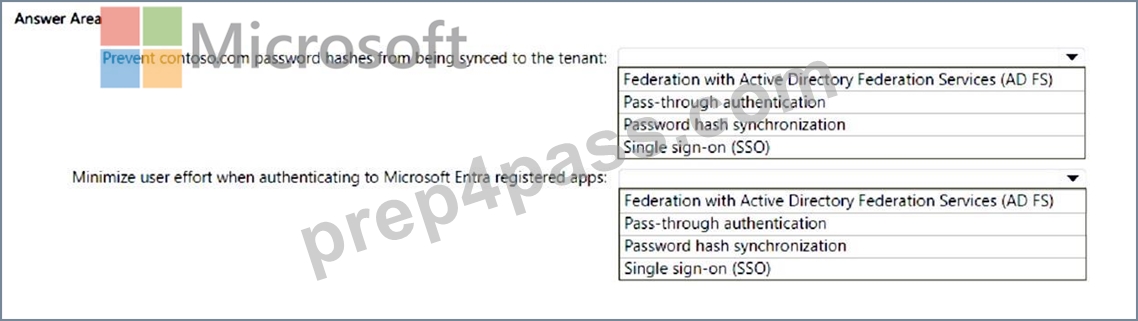
Answer:
Explanation: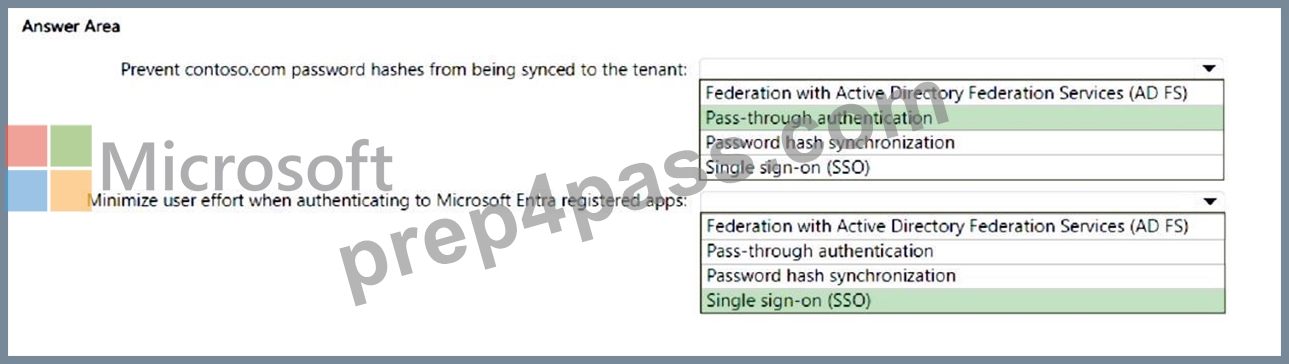
Explanation:
Box 1: Pass-through authentication.
This method allows users to authenticate using their on-premises passwords without syncing the password hashes to Microsoft Entra ID1.
Box 2: Single sign-on (SSO).
This feature allows users to sign in once and gain access to all their applications without needing to re-enter their credentials2.
https://learn.microsoft.com/en-us/entra/identity/hybrid/connect/how-to-connect-pta
https://learn.microsoft.com/en-us/entra/identity/hybrid/connect/choose-ad-authn
NEW QUESTION # 93
Note: This question is part of a series of questions that present the same scenario. Each question in the series contains a unique solution that might meet the stated goals. Some question sets might have more than one correct solution, while others might not have a correct solution.
After you answer a question in this section, you will NOT be able to return to it. As a result, these questions will not appear in the review screen.
You are planning the deployment of DNS to a new network.
You have three internal DNS servers as shown in the following table.
The contoso.local zone contains zone delegations for east.conloso.local and west.contoso.local. All the DNS servers use root hints.
You need to ensure that all the DNS servers can resolve the names of all the internal namespaces and internet hosts.
Solution: On Server2 and Server3, you configure a conditional forwarder for contoso.local.
Does this meet the goal?
- A. Yes
- B. No
Answer: A
Explanation:
The DNS chapters in Administering Windows Server Hybrid Core Infrastructure describe conditional forwarders as a way to direct queries for specific namespaces to authoritative DNS servers. The text notes:
"A conditional forwarder forwards queries for a designated DNS domain to specified DNS servers," which is used to "integrate split or private namespaces across sites or forests." In this design, Server1 hosts contoso.local and delegates east and west to Server2 and Server3. By configuring Server2 and Server3 with a conditional forwarder for contoso.local pointing to Server1, any query for contoso.local (including child names like east.contoso.local or west.contoso.local when not answered locally) is sent to Server1.
Server1, being authoritative for the parent, uses the existing delegations to return referrals/answers from the proper child zones. For Internet hosts, all three servers already use root hints, which the course material confirms remains valid alongside conditional forwarding. The documentation also stresses that "authoritative data is answered locally first; forwarding applies only to names the server is not authoritative for," so Server2 continues to answer east locally while leveraging Server1 to reach parent and sibling zones. This configuration ensures that all servers can resolve all internal namespaces and Internet hosts.
NEW QUESTION # 94
Your network contains an Active Directory Domain Services (AD DS) domain. The domain contains two servers named Server1 and Server2 and the users shown in the following table.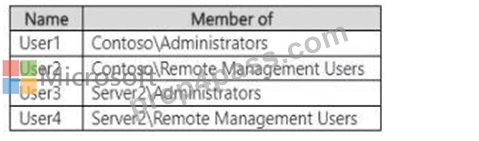
Which users can establish a PowerShell remoting session from Server1 to Server2?
- A. User1, User3. and User4 only
- B. User1, User2, User3, and User4
- C. User1 and User3 only
- D. User2 and User4 only
- E. User3 and User4 only
Answer: A
Explanation:
The remoting prerequisites in the AZ-800 curriculum state that WinRM/PowerShell remoting to a target computer is permitted for local Administrators and Remote Management Users on the target. The documentation notes: "Users who are members of the local Administrators group or Remote Management Users group on the destination can establish PowerShell remoting sessions." In a domain, high-privilege domain administrative groups are, by default, granted local administrator rights on domain-joined servers.
Applying this: User3 is in Server2\Administrators (local admin) # allowed. User4 is in Server2\Remote Management Users # allowed. User1 belongs to the domain Administrators group, which confers administrator privileges on domain-joined servers, enabling remoting to Server2. User2, however, is only in the domain "Remote Management Users" group, not the local group on Server2; domain membership alone does not grant the required local right. Therefore, the users who can open a PowerShell remoting session from Server1 to Server2 are User1, User3, and User4.
NEW QUESTION # 95
You plan w deploy an Azure virtual machine that win run Windows Server. The virtual machine will host an Active Directory Domain Services (AD DS) domain controller and a drive named f: on a new virtual disk.
You need to configure storage foe the virtual machine. The solution must meet the following requirements
* Maximize resiliency for AD DS.
* Prevent accidental data loss.
How should you configure the storage? To answer, select the appropriate options in the answer area.
NOTE: Each correct selection is worth one point.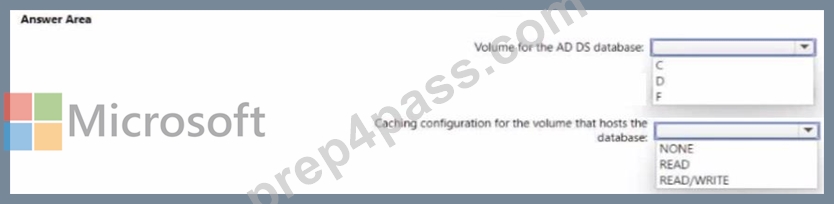
Answer:
Explanation: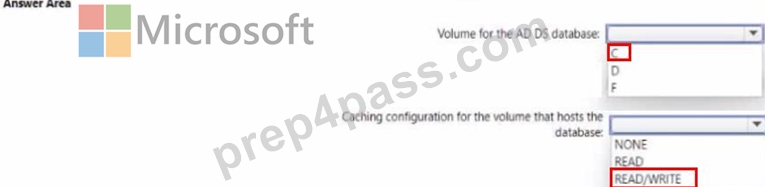
NEW QUESTION # 96
......
To prepare for the AZ-800 exam, candidates should have a solid understanding of Windows Server 2019 and Azure Stack HCI, as well as experience with managing hybrid IT environments. Microsoft offers a variety of training resources, including instructor-led courses, self-paced e-learning modules, and exam preparation guides. Additionally, candidates can take advantage of online forums and study groups to connect with other professionals and share tips and advice for passing the exam.
Microsoft AZ-800 exam is a certification that assesses an individual's knowledge and skills in administering Windows Server hybrid core infrastructure. It is designed for IT professionals who work with hybrid environments and are responsible for managing and maintaining Windows Server infrastructure. AZ-800 exam measures the candidate's ability to manage and operate Azure services, as well as on-premises Windows Server infrastructure.
Positive Aspects of Valid Dumps AZ-800 Exam Dumps! : https://www.prep4pass.com/AZ-800_exam-braindumps.html
Share Latest AZ-800Test Practice Test Questions, Exam Dumps: https://drive.google.com/open?id=1KMMPsmbxSky-puRWmcjRM8l5yaiVqsJe
