

Associate-Cloud-Engineer Practice Dumps - Verified By Prep4pass Updated 335 Questions
Updated Associate-Cloud-Engineer Exam Dumps - PDF Questions and Testing Engine
To prepare for the exam, candidates should have a strong understanding of cloud computing concepts, including virtualization, networking, storage, and security. They should also be familiar with GCP services and have experience deploying and managing them. Google recommends that candidates have at least six months of experience with GCP before taking the exam.
Google Associate-Cloud-Engineer exam is designed to test the candidate's knowledge of various Google Cloud Platform products and services such as Compute Engine, Kubernetes Engine, Cloud Storage, Stackdriver, and IAM. Associate-Cloud-Engineer exam also assesses the candidate’s ability to deploy and manage applications, monitor operations, and configure access and security controls.
NEW QUESTION # 143
You have a workload running on Compute Engine that is critical to your business. You want to ensure that the data on the boot disk of this workload is backed up regularly. You need to be able to restore a backup as quickly as possible in case of disaster. You also want older backups to be cleaned automatically to save on cost. You want to follow Google-recommended practices. What should you do?
- A. Create a cron job to create a new disk from the disk using gcloud.
- B. Create a Cloud Function to create an instance template.
- C. Create a snapshot schedule for the disk using the desired interval.
- D. Create a Cloud Task to create an image and export it to Cloud Storage.
Answer: C
Explanation:
Best practices for persistent disk snapshots
You can create persistent disk snapshots at any time, but you can create snapshots more quickly and with greater reliability if you use the following best practices.
Creating frequent snapshots efficiently
Use snapshots to manage your data efficiently.
Create a snapshot of your data on a regular schedule to minimize data loss due to unexpected failure.
Improve performance by eliminating excessive snapshot downloads and by creating an image and reusing it.
Set your snapshot schedule to off-peak hours to reduce snapshot time.
Snapshot frequency limits
Creating snapshots from persistent disks
You can snapshot your disks at most once every 10 minutes. If you want to issue a burst of requests to snapshot your disks, you can issue at most 6 requests in 60 minutes.
If the limit is exceeded, the operation fails and returns the following error:
https://cloud.google.com/compute/docs/disks/snapshot-best-practices
NEW QUESTION # 144
You need to assign a Cloud Identity and Access Management (Cloud IAM) role to an external auditor. The auditor needs to have permissions to review your Google Cloud Platform (GCP) Audit Logs and also to review your Data Access logs. What should you do?
- A. Assign the auditor the IAM role roles/logging.privateLogViewer. Direct the auditor to also review the logs for changes to Cloud IAM policy.
- B. Assign the auditor the IAM role roles/logging.privateLogViewer. Perform the export of logs to Cloud Storage.
- C. Assign the auditor's IAM user to a custom role that has logging.privateLogEntries.listpermission.
Perform the export of logs to Cloud Storage. - D. Assign the auditor's IAM user to a custom role that has logging.privateLogEntries.listpermission.Direct the auditor to also review the logs for changes to Cloud IAM policy.
Answer: A
Explanation:
Google Cloud provides Cloud Audit Logs, which is an integral part of Cloud Logging. It consists of two log streams for each project: Admin Activity and Data Access, which are generated by Google Cloud services to help you answer the question of who did what, where, and when? within your Google Cloud projects.
Ref: https://cloud.google.com/iam/docs/job-functions/auditing#scenario_external_auditors
NEW QUESTION # 145
You have successfully created a development environment in a project for an application. This application uses Compute Engine and Cloud SQL. Now, you need to create a production environment for this application. The security team has forbidden the existence of network routes between these 2 environments, and asks you to follow Google-recommended practices. What should you do?
- A. Ask the security team to grant you the Project Editor role in an existing production project used by another division of your company. Once they grant you that role, replicate the setup you have in the development environment in that project.
- B. Create a new project, modify your existing VPC to be a Shared VPC, share that VPC with your new project, and replicate the setup you have in the development environment in that new project, in the Shared VPC.
- C. Create a new project, enable the Compute Engine and Cloud SQL APIs in that project, and replicate the setup you have created in the development environment.
- D. Create a new production subnet in the existing VPC and a new production Cloud SQL instance in your existing project, and deploy your application using those resources.
Answer: B
NEW QUESTION # 146
Your company wants to standardize the creation and management of multiple Google Cloud resources using Infrastructure as Code. You want to minimize the amount of repetitive code needed to manage the environment. What should you do?
- A. Use the Cloud Console interface to provision and manage all related resources.
- B. Develop templates for the environment using Cloud Deployment Manager.
- C. Create a bash script that contains all requirement steps as gcloudcommands.
- D. Use curlin a terminal to send a REST request to the relevant Google API for each individual resource.
Answer: B
Explanation:
Explanation/Reference: https://cloud.google.com/deployment-manager/docs/fundamentals (see templates)
NEW QUESTION # 147
Your organization has strict requirements to control access to Google Cloud projects. You need to enable your Site Reliability Engineers (SREs) to approve requests from the Google Cloud support team when an SRE opens a support case. You want to follow Google-recommended practices. What should you do?
- A. Add your SREs to a group and then add this group to roles/iam roleAdmin role.
- B. Add your SREs to roles/accessapproval approver role.
- C. Add your SREs to roles/iam.roleAdmin role.
- D. Add your SREs to a group and then add this group to roles/accessapproval approver role.
Answer: D
NEW QUESTION # 148
You need to set up permissions for a set of Compute Engine instances to enable them to write data into a particular Cloud Storage bucket. You want to follow Google-recommended practices.
What should you do?
- A. Create a service account with an access scope.
Use the access scope `https://www.googleapis.com/ auth/devstorage.write_only'. - B. Create a service account and add it to the IAM role `storage.objectAdmin' for that bucket.
- C. Create a service account with an access scope.
Use the access scope `https://www.googleapis.com/ auth/cloud-platform'. - D. Create a service account and add it to the IAM role `storage.objectCreator' for that bucket.
Answer: C
NEW QUESTION # 149
You have an application that uses Cloud Spanner as a backend database. The application has a very predictable traffic pattern. You want to automatically scale up or down the number of Spanner nodes depending on traffic. What should you do?
- A. Create a Stackdriver alerting policy to send an alert to oncall SRE emails when Cloud Spanner CPU exceeds the threshold. SREs would scale resources up or down accordingly.
- B. Create a Stackdriver alerting policy to send an alert to Google Cloud Support email when Cloud Spanner CPU exceeds your threshold. Google support would scale resources up or down accordingly.
- C. Create a Stackdriver alerting policy to send an alert to webhook when Cloud Spanner CPU is over or under your threshold. Create a Cloud Function that listens to HTTP and resizes Spanner resources accordingly.
- D. Create a cron job that runs on a scheduled basis to review stackdriver monitoring metrics, and then resize the Spanner instance accordingly.
Answer: C
Explanation:
As to mexblood1's point, CPU utilization is a recommended proxy for traffic when it comes to Cloud Spanner. See: Alerts for high CPU utilization The following table specifies our recommendations for maximum CPU usage for both single-region and multi-region instances. These numbers are to ensure that your instance has enough compute capacity to continue to serve your traffic in the event of the loss of an entire zone (for single-region instances) or an entire region (for multi-region instances). - https://cloud.google.
com/spanner/docs/cpu-utilization
NEW QUESTION # 150
You are setting up a Windows VM on Compute Engine and want to make sure you can log in to the VM via RDP. What should you do?
- A. After the VM has been created, download the JSON private key for the default Compute Engine service account. Use the credentials in the JSON file to log in to the VM.
- B. After the VM has been created, use your Google Account credentials to log in into the VM.
- C. When creating the VM, add metadata to the instance using 'windows-password' as the key and a password as the value.
- D. After the VM has been created, use gcloud compute reset-windows-password to retrieve the login credentials for the VM.
Answer: A
NEW QUESTION # 151
You have developed a containerized web application that will serve internal colleagues during business hours. You want to ensure that no costs are incurred outside of the hours the application is used. You have just created a new Google Cloud project and want to deploy the application. What should you do?
- A. Deploy the container on Cloud Run (fully managed), and set the minimum number of instances to zero.
- B. Deploy the container on Cloud Run for Anthos, and set the minimum number of instances to zero.
- C. Deploy the container on App Engine flexible environment with autoscaling, and set the value min_instancesto zero in the app.yaml.
- D. Deploy the container on App Engine flexible environment with manual scaling, and set the value instancesto zero in the app.yaml.
Answer: A
Explanation:
Cloud Run can scale to 0:
https://cloud.google.com/run/docs/about-instance-autoscaling
And App Engine Flexible can't scale to 0, the minimum instance number is 1:
https://cloud.google.com/appengine/docs/the-appengine-environments#comparing_high- level_features
NEW QUESTION # 152
You've deployed a microservice called myapp1 to a Google Kubernetes Engine cluster using the YAML file specified below: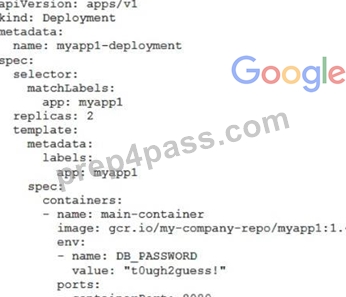
You need to refactor this configuration so that the database password is not stored in plain text.
You want to follow Google-recommended practices. What should you do?
- A. Store the database password inside a ConfigMap object.
Modify the YAML file to populate the DB_PASSWORD environment variable from the ConfigMap. - B. Store the database password inside a Secret object.
Modify the YAML file to populate the DB_PASSWORD environment variable from the Secret. - C. Store the database password in a file inside a Kubernetes persistent volume, and use a persistent volume claim to mount the volume to the container.
- D. Store the database password inside the Docker image of the container, not in the YAML file.
Answer: A
NEW QUESTION # 153
You are hosting an application on bare-metal servers in your own data center. The application needs access to Cloud Storage. However, security policies prevent the servers hosting the application from having public IP addresses or access to the internet. You want to follow Google-recommended practices to provide the application with access to Cloud Storage. What should you do?
- A. 1. Using Cloud VPN or Interconnect, create a tunnel to a VPC in GCP.2. Use Cloud Router to create a custom route advertisement for 199.36.153.4/30. Announce that network to your on-premises network through the VPN tunnel.3. In your on-premises network, configure your DNS server to resolve *.googleapis.com as a CNAME to restricted.googleapis.com.
- B. 1. Use nslookup to get the IP address for storage.googleapis.com.2. Negotiate with the security team to be able to give a public IP address to the servers.3. Only allow egress traffic from those servers to the IP addresses for storage.googleapis.com.
- C. 1. Using Cloud VPN, create a VPN tunnel to a Virtual Private Cloud (VPC) in Google Cloud Platform (GCP).2. In this VPC, create a Compute Engine instance and install the Squid proxy server on this instance.3. Configure your servers to use that instance as a proxy to access Cloud Storage.
- D. 1. Use Migrate for Compute Engine (formerly known as Velostrata) to migrate those servers to Compute Engine.2. Create an internal load balancer (ILB) that uses storage.googleapis.com as backend.3. Configure your new instances to use this ILB as proxy.
Answer: D
NEW QUESTION # 154
During a recent audit of your existing Google Cloud resources, you discovered several users with email addresses outside of your Google Workspace domain.
You want to ensure that your resources are only shared with users whose email addresses match your domain.
You need to remove any mismatched users, and you want to avoid having to audit your resources to identify mismatched users. What should you do?
- A. Set an organizational policy constraint to limit identities by domain to automatically remove mismatched users.
- B. Create a Cloud Scheduler task to regularly scan your resources and delete mismatched users.
- C. Set an organizational policy constraint to limit identities by domain, and then retroactively remove the existing mismatched users.
- D. Create a Cloud Scheduler task to regularly scan your projects and delete mismatched users.
Answer: C
Explanation:
https://cloud.google.com/resource-manager/docs/organization-policy/org-policy-constraints This list constraint defines the set of domains that email addresses added to Essential Contacts can have. By default, email addresses with any domain can be added to Essential Contacts. The allowed/denied list must specify one or more domains of the form @example.com. If this constraint is active and configured with allowed values, only email addresses with a suffix matching one of the entries from the list of allowed domains can be added in Essential Contacts. This constraint has no effect on updating or removing existing contacts.
constraints/essentialcontacts.allowedContactDomains
NEW QUESTION # 155
You are using Google Kubernetes Engine with autoscaling enabled to host a new application. You want to expose this new application to the public, using HTTPS on a public IP address. What should you do?
- A. Create a HAProxy pod in the cluster to load-balance the traffic to all the pods of the application.
Forward the public traffic to HAProxy with an iptable rule. Configure the DNS name of your application using the public IP of the node HAProxy is running on. - B. Create a Kubernetes Service of type NodePort to expose the application on port 443 of each node of the Kubernetes cluster. Configure the public DNS name of your application with the IP of every node of the cluster to achieve load-balancing.
- C. Create a Kubernetes Service of type NodePort for your application, and a Kubernetes Ingress to expose this Service via a Cloud Load Balancer.
- D. Create a Kubernetes Service of type ClusterIP for your application. Configure the public DNS name of your application using the IP of this Service.
Answer: C
Explanation:
Reference: https://cloud.google.com/kubernetes-engine/docs/tutorials/http-balancer Create a Kubernetes Service of type ClusterIP for your application. Configure the public DNS name of your application using the IP of this Service. is not right.
Kubernetes Service of type ClusterIP exposes the Service on a cluster-internal IP. Choosing this value makes the Service only reachable from within the cluster so you can not route external traffic to this IP.
Ref: https://kubernetes.io/docs/concepts/services-networking/service/
NEW QUESTION # 156
Your company has many legacy third-party applications that rely on a shared NFS server for file sharing between these workloads. You want to modernize the NFS server by using a Google Cloud managed service.
You need to select the solution that requires the least amount of change to the application. What should you do?
- A. Create a Cloud Storage bucket. Configure all applications to use Cloud Storage client libraries instead of the NFS server.
- B. Create a Compute Engine instance and configure an NFS server on the instance. Point all NFS mounts to the Compute Engine instance.
- C. Deploy a Filestore instance. Replace all NFS mounts with a Filestore mount.
- D. Configure Firestore. Configure all applications to use Firestore instead of the NFS server.
Answer: C
NEW QUESTION # 157
You and your team have been working on a new application over the past couple weeks. While it's still in development, it's becoming a bit costly for your limited budget. The entire team had a meeting on Friday to talk about how to save money until you're able to launch. One of your team members suggested shutting down some services overnight and during the weekend. Though no official decision was made before leaving for the weekend, a junior team member sent out an email saying he found a solution to the problem.
When arriving at the office on Monday, you find that your project is no longer in the drop-down inside the Console. What's the most likely reason for the missing project?
- A. The engineer clicked the "shut down" link thinking it was like a light switch that he could toggle on and off.
- B. The engineer removed the project and attached all of the resources directly to the Organization.
- C. Your trial credits expired, and the project was removed.
- D. The project was moved to another account.
Answer: A
NEW QUESTION # 158
......
New (2026) Google Associate-Cloud-Engineer Exam Dumps: https://www.prep4pass.com/Associate-Cloud-Engineer_exam-braindumps.html
Best Way To Study For Google Associate-Cloud-Engineer Exam Brilliant Associate-Cloud-Engineer Exam Questions PDF: https://drive.google.com/open?id=1Xrfm2PlaOSa1u9xzFSU-gnckX2d6lJmK
