

Fortinet New 2026 NSE5_FSW_AD-7.6 Test Tutorial (Updated 115 Questions)
NSE5_FSW_AD-7.6 Exam Questions Dumps, Selling Fortinet Products
NEW QUESTION # 27
Which two statements about DHCP snooping enabled on a FortiSwitch VLAN are true? (Choose two.)
- A. Enabling DHCP snooping on a FortiSwitch VLAN ensures requests and replies are seen by all DHCP servers.
- B. switch-controller-dhcp-snooping-verify-mac verifies the destination MAC address to protect against DHCP exhaustion attacks.
- C. Settings related to DHCP option 82 are only configurable through the CLI
- D. By default, all FortiSwitch ports are set to forward client DHCP requests to untrusted ports.
Answer: B,C
Explanation:
* Switch-controller-dhcp-snooping-verify-mac verifies the destination MAC address to protect against DHCP exhaustion attacks (B): This feature of DHCP snooping helps prevent DHCP exhaustion attacks by ensuring that the destination MAC addresses in DHCP packets match the MAC addresses learned by the switch. This check helps prevent attackers from overwhelming the DHCP server with requests from spoofed MAC addresses.
* Settings related to DHCP option 82 are only configurable through the CLI (D): DHCP Option 82 is used for "agent information," and it's typically used in network environments where additional information between DHCP clients and servers is necessary for policy and billing purposes.
Configuration of these settings in FortiSwitch is only available through the Command Line Interface (CLI), not the Graphical User Interface (GUI).
NEW QUESTION # 28
Which two are valid traffic processing actions that a FortiSwitch access control list (ACL) can apply to matching traffic? (Choose two answers)
- A. Redirect frames to another port.
- B. Drop frames.
- C. Encrypt frames.
- D. Assign traffic to a high-priority egress queue.
Answer: A,B
Explanation:
According to theFortiSwitchOS 7.6 Administration Guideand theNSE 5 FortiSwitch Study Guide, Access Control Lists (ACLs) are used to provide granular control over the traffic entering or leaving a switch port.
ACLs function by definingclassifiers(to match specific traffic based on criteria like MAC address, IP address, or VLAN ID) and then applying specificactionsto that matched traffic.
The documentation explicitly categorizes ACL actions into three distinct groups:
* Traffic Processing:This category includes actions that dictate the physical handling of the frame. Valid actions listed in the official documents under this header includecount(to track packet volume),drop(to block the traffic),redirect(to forward the frame to a specific physical port or interface instead of its original destination), andmirror(to send a copy to a monitoring port).
* Quality of Service (QoS):This category focuses on traffic prioritization and bandwidth management. It includes actions such asrate limiting,remarking CoS/DSCP values, andsetting the egress queue(e.g., assigning a packet to a specific queue number from 0 to 7).
* VLAN:This allows for modifications such as setting anouter VLAN tagon frames.
The question specifically asks for "traffic processing actions." Based on the 7.6 documentation,Redirect frames to another port(Option A) andDrop frames(Option D) are explicitly defined under the "Traffic Processing" action header. While "Assign traffic to a high-priority egress queue" (Option B) is a valid action an ACL can perform, it is technically categorized as aQoS action, not a traffic processing action.Encrypt frames(Option C) is not a supported ACL action on FortiSwitch hardware, as encryption is typically handled at higher layers or via dedicated MACsec configurations on specific models.
NEW QUESTION # 29
Refer to the exhibit.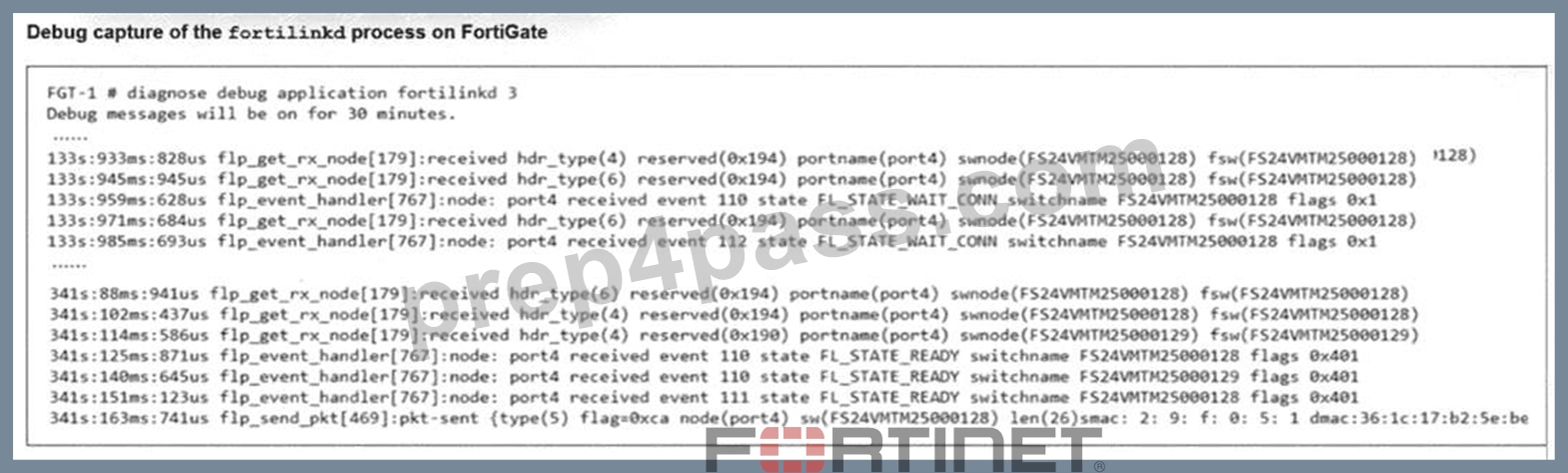
A periodic heartbeat message sent from a managed FortiSwitch and corresponding acknowledgments from FortiGate is shown. What does this behavior indicate? (Choose one answer)
- A. FortiSwitch is expecting an authorization from FortiGate.
- B. FortiSwitch has not been authorized yet.
- C. The FortiLink connection between FortiGate and FortiSwitch is healthy and active.
- D. FortiGate is unable to establish a FortiLink session with FortiSwitch.
Answer: C
Explanation:
According to theFortiOS 7.6 Study Guideand theFortiSwitch 7.6 FortiLink Guide, the health of the Control and Provisioning of Wireless Access Points (CAPWAP) based management tunnel between a FortiGate and a FortiSwitch is maintained through a continuous keepalive mechanism. The provided exhibit captures the fortilinkd process logs, which are essential for verifying the operational status of the FortiLink control plane.
The debug output reveals two critical indicators of a successful connection:
* State Transitions:The lines at timestamp 341s show the managed switch (FS24VMTM25000128) has reached theFL_STATE_READYstate. This state indicates that the discovery, authorization, and configuration synchronization phases are complete, and the switch is now fully operational under the FortiGate's management.
* Heartbeat Mechanism:The entry flp_send_pkt[469]:pkt-sent {type(5)} represents the transmission of a FortiLink heartbeat. TheseType 5 packetsare sent every few seconds to verify that the peer device is still reachable and responsive. In a healthy environment, the FortiGate sends these heartbeats, and the FortiSwitch responds (or vice versa depending on the specific sub-protocol phase), ensuring the management tunnel remains active.
The regular exchange of these messages as shown in the exhibit confirms that the FortiLink connection is healthy and active. If the switch were unauthorized or stuck in a negotiation phase, the state would be shown as FL_STATE_WAIT_AUTH or FL_STATE_DISCOVERY, and the periodic type(5) heartbeats would either be absent or not acknowledged.
NEW QUESTION # 30
Which packet capture method allows FortiSwitch to capture traffic on trunks and management interfaces?
- A. Sniffer profile
- B. sFlow
- C. TCP dump
- D. SPAN
Answer: A
Explanation:
FortiSwitch supports packet capture through various methods, but the Sniffer profile is specifically capable of capturing traffic on both trunks and management interfaces.Here's why:
* Sniffer Profile (B):
* Versatile Capture:The sniffer profile in FortiSwitch is designed to capture traffic across different types of interfaces, including trunks (where multiple VLANs are present) and management interfaces (used for controlling and monitoring the switch).
* Configuration Flexibility:You can configure sniffer profiles to target specific traffic, offering flexibility in monitoring and troubleshooting network issues on both data and management planes.
* Other Options:
* SPAN (A)is used mainly for mirroring traffic to another port for analysis but is typically limited in its ability to capture management interface traffic.
* sFlow (C)andTCP dump (D)are useful tools but do not specifically align with the capability to universally capture traffic across trunks and management interfaces in the context described.
References:For further details on configuring and utilizing sniffer profiles on FortiSwitch, refer to the FortiSwitch management documentation:Fortinet Product Documentation
NEW QUESTION # 31
On supported FortiSwitch models, which access control list (ACL) stage is recommended for applying actions before the switch performs any layer 2 or layer 3 processing? (Choose one answer)
- A. Forwarding
- B. Ingress
- C. Egress
- D. Prelookup
Answer: D
Explanation:
According to theFortiSwitchOS 7.6 Administration Guideand theNSE 5 FortiSwitch 7.6 Administrator Study Guide, FortiSwitch supports a multi-stage ACL pipeline that allows for granular traffic control at different points in a packet's journey through the switch.1The documentation identifies three primary stages for ACL application:Prelookup,Ingress, andEgress.
* Prelookup (Option D):This is the earliest stage in the switching pipeline. The documentation explicitly states thatPrelookup ACLsare processedbefore any Layer 2 or Layer 3 lookupsare performed by the switch hardware. This stage is highly recommended for high-performance security actions, such as dropping unwanted traffic immediately upon arrival, because it prevents the switch from wasting internal resources (CPU and ASIC lookup cycles) on frames that are destined to be discarded anyway.
* Ingress (Option A):This stage occursafterthe switch has completed its Layer 2 (MAC table) and Layer
3 (routing table) lookups butbeforethe packet is queued for the egress port. While powerful, actions here occur after initial processing has already taken place.
* Egress (Option C):This stage is processed just before the frame leaves the switch through the destination port. It is typically used for final modifications or filtering based on the outgoing interface context.
Therefore, to achieve the goal of applying actionsbeforeany Layer 2 or Layer 3 processing occurs, the Prelookupstage is the technically correct and recommended choice in FortiSwitchOS 7.6.Forwarding (Option B)is a general functional stage of a switch but is not a specific ACL stage type in the FortiSwitch configuration hierarchy.
NEW QUESTION # 32
Which is a requirement to enable SNMP v2c on a managed FortiSwitch?
- A. Configure SNMP agent and communities.
- B. Enable an SNMP v3 to handle traps messages with SNMP hosts.
- C. Create an SNMP user to use for authentication and encryption.
- D. Specify an SNMP host to send traps to.
Answer: A
Explanation:
To enable SNMP v2c on a managed FortiSwitch, the essential requirement involves configuring the SNMP agent and community strings:
* Configure SNMP Agent and Communities (D):
* SNMP Agent:Activating the SNMP agent on FortiSwitch allows it to respond to SNMP requests.
* Community Strings:SNMP v2c uses community strings for authentication. These strings function as passwords to grant read-only or read-write access to the SNMP data.
* Understanding Other Options:
* Create an SNMP user (A)is necessary for SNMP v3, not v2c, as it involves user-based authentication and encryption.
* Specify an SNMP host (B)is typically a part of SNMP configuration but not a requirement just to enable SNMP.
* Enable SNMP v3 (C)is not related to enabling SNMP v2c.
References:For detailed instructions on configuring SNMP on FortiSwitch, you can refer to the SNMP configuration section in the FortiSwitch administration guide available on:Fortinet Product Documentation
NEW QUESTION # 33
Refer to the exhibit.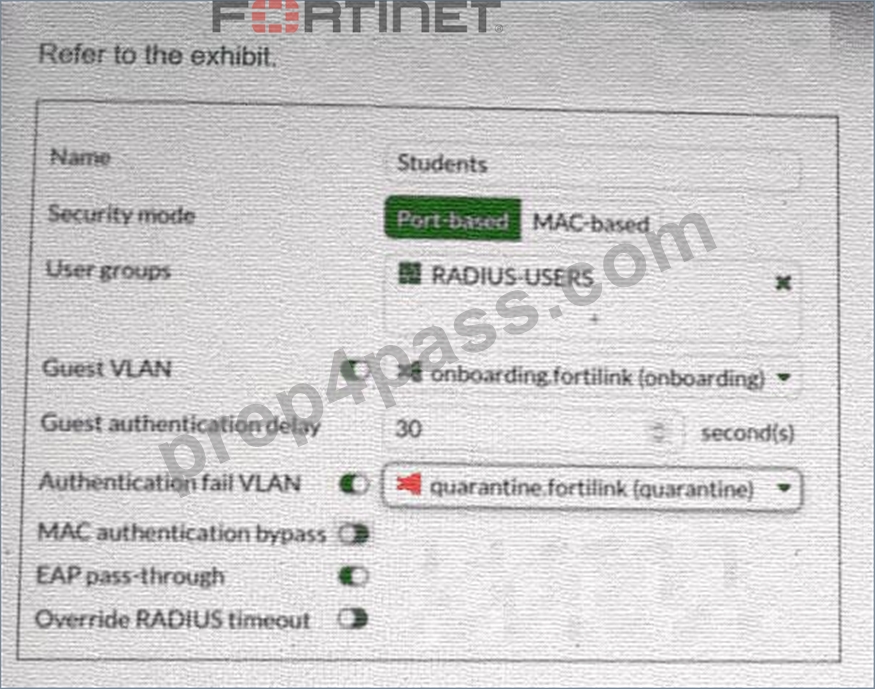
FortiSwitch 802.1X port security configuration is shown. A user connects their laptop to the port and attempts to authenticate using 802.1X, but enters the wrong credentials multiple times. What will the result to the device be? (Choose one answer)
- A. The device will be assigned to the default management VLAN.
- B. The port will shut down for security reasons.
- C. The device will be placed into the VLAN quarantine.
- D. The device will be placed into the VLAN onboarding.
Answer: C
Explanation:
According to theFortiSwitchOS 7.6 Administration Guideand theFortiSwitch 7.6 Study Guide, 802.1X port security allows administrators to define specific actions based on the outcome of an authentication attempt. The configuration exhibit shows a security policy named "Students" with two specialized VLAN assignments enabled: aGuest VLANand anAuthentication fail VLAN.
In FortiSwitchOS 7.6, these two settings serve distinct purposes based on the client's behavior:
* Guest VLAN (Option C):This is used when a connected device doesnothave an 802.1X supplicant (software) or does not respond to EAP (Extensible Authentication Protocol) requests within the specified "Guest authentication delay". In this scenario, the device is moved to the "onboarding" VLAN to allow for basic network access or software downloads.
* Authentication fail VLAN (Option A):This is triggered specifically when a devicedoesattempt to authenticate via 802.1X but the authentication server (RADIUS) returns anAccess-Rejectmessage, typically due toincorrect credentials.
As stated in the scenario, the userattemptsto authenticate but enters thewrong credentials. According to the policy shown in the exhibit, theAuthentication fail VLANis enabled and set to"quarantine.fortilink (quarantine)". Therefore, the FortiSwitch will logically move the port's traffic into the quarantine VLAN, isolating the user from the production network due to the failed login attempt. Option B is incorrect as there is no "shutdown" action configured, and Option D refers to a default state that is overridden by the explicit failure policy.
NEW QUESTION # 34
Refer to the exhibit.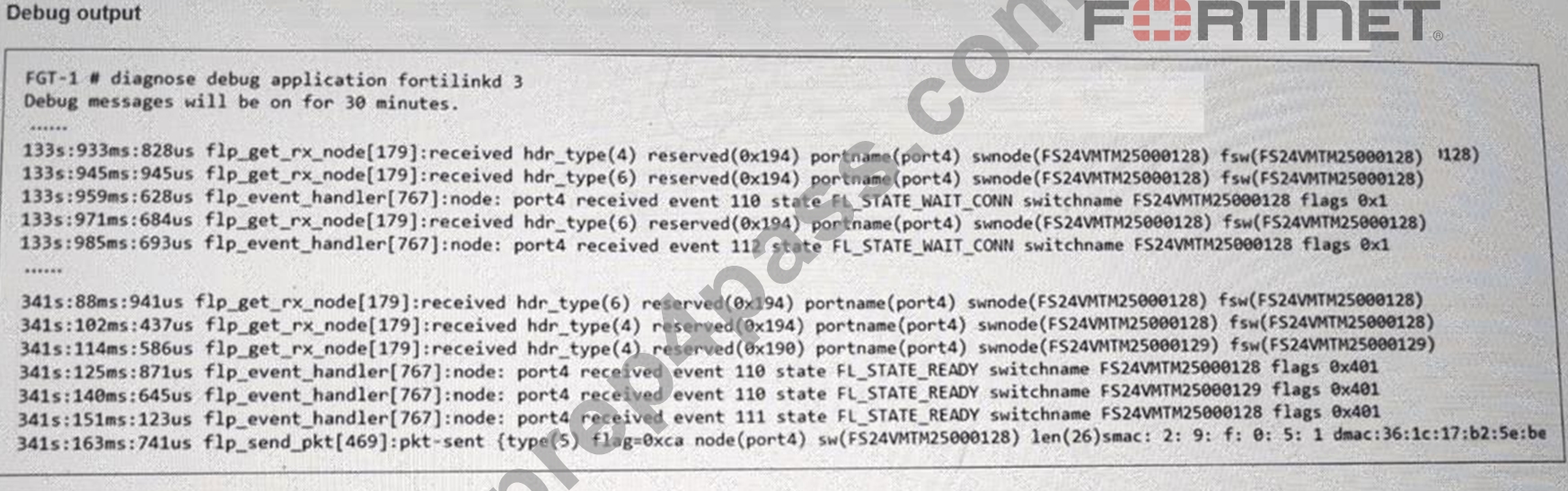
You have just authorized a new FortiSwitch on your FortiGate, and it appears online in the GUI. To verify that FortiLink connectivity is healthy, what should you check next? (Choose one answer)
- A. Check that the switch automatically disables all unused ports.
- B. Verify that FortiGate has pushed a new firmware image to FortiSwitch immediately.
- C. Ensure the FortiSwitch is automatically sending log events to FortiAnalyzer.
- D. Look for FortiLink heartbeat messages sent from FortiSwitch to FortiGate every few seconds and confirm FortiGate acknowledges them.
Answer: D
Explanation:
According to theFortiOS 7.6 Study Guideand theFortiSwitch 7.6 FortiLink Guide, the health and stability of the control plane between a FortiGate and a managed FortiSwitch are maintained through a continuous keepalive mechanism. Once a FortiSwitch is authorized and transitions to theFL_STATE_READYstate (as shown in the debug output in the exhibit), the devices must ensure the management tunnel remains active.
The primary mechanism for this is theFortiLink heartbeat. The documentation specifies that a managed FortiSwitch sends heartbeat messages to the FortiGate every few seconds over the FortiLink interface. The FortiGate, acting as the controller, must acknowledge these heartbeats to confirm that the switch is still reachable and responding to management commands. If the FortiGate fails to receive a certain number of consecutive heartbeats, it will consider the switch "offline" in the GUI, even if physical link lights remain green.
Checking for these heartbeat exchanges is a critical troubleshooting step to verify that theCAPWAP(Control and Provisioning of Wireless Access Points) based management tunnel is functioning correctly without intermittent drops. Option A is incorrect as port disabling is a configuration choice, not a health check. Option C is incorrect because firmware updates are manual or scheduled, not automatic upon authorization. Option D is a logging function that relies on a healthy management tunnel but is not a direct measure of the FortiLink's operational health.
NEW QUESTION # 35
Refer to the exhibits.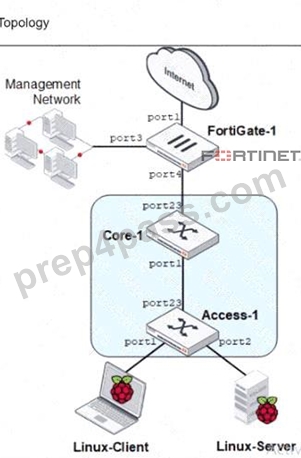
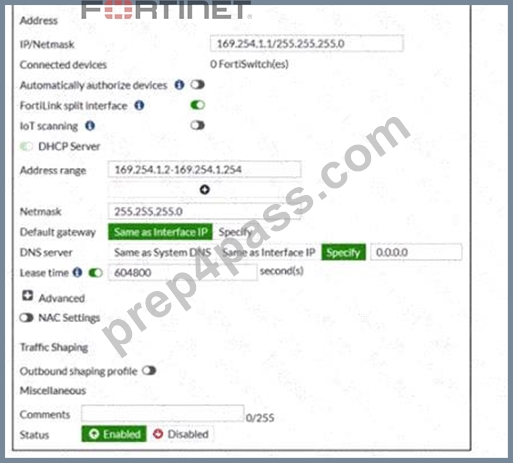
You are asked to ensure that managed FortiSwitch devices are reachable by other devices, such as SNMP and other management tools across your network.
Which setting must you configure to ensure traffic from other devices in the network reaches FortiSwitch?
- A. Change the FortiLink interface IP address and DHCP server address range.
- B. Select a specific default gateway provided to FortiSwitch as an upstream device.
- C. Recreate the FortiLink interface with a nonaggregate setting.
- D. Enable NAC settings to select the onboarding VLAN.
Answer: A
NEW QUESTION # 36
Refer to the exhibit.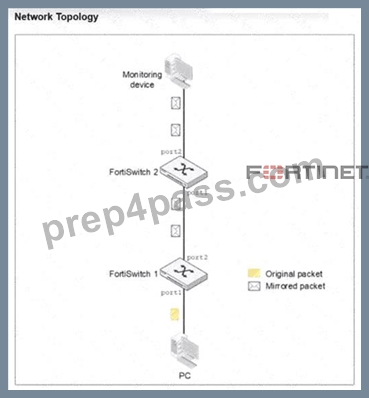
You configured Switched Port Analyzer (SPAN) to monitor traffic from a source port on FortiSwitch 1, but the monitoring device is connected to FortiSwitch 2. After port mirroring configuration on FortiSwitch 1, the monitoring device is not receiving any mirrored traffic.
What is the most likely reason the mirrored traffic is not reaching the monitoring device? (Choose one answer)
- A. SPAN traffic must be filtered with an access control list (ACL).
- B. The SPAN session must be restarted after configuration.
- C. The monitoring device must use a management IP in the same subnet.
- D. SPAN does not support forwarding mirrored traffic across multiple switches.
Answer: D
Explanation:
Comprehensive and Detailed Explanation From Exact Extract of knowledge of FortiAnalyzer 7.6 Study guide documents:
* Standard SPAN Limitation: Switched Port Analyzer (SPAN) is a local port mirroring technology. By design, SPAN copies traffic from one or more source ports (or VLANs) to a destination port on the same physical switch.
* Traffic Forwarding: Standard SPAN traffic is not encapsulated and does not have the necessary headers to be routed or switched across a network fabric or trunk links between multiple switches.
Therefore, if the source port is on FortiSwitch 1 and the monitoring device is on FortiSwitch 2, the mirrored frames will not reach the destination.
* Alternative Solutions: To monitor traffic across multiple switches (multi-hop), technologies such as Remote SPAN (RSPAN)orEncapsulated Remote SPAN (ERSPAN)must be used. RSPAN uses a specific VLAN to carry the mirrored traffic across switches, while ERSPAN encapsulates the traffic in GRE packets so it can be routed across Layer 3 boundaries.
* Troubleshooting Conclusion: Since the scenario describes a standard SPAN configuration and the traffic is failing to traverse from FortiSwitch 1 to FortiSwitch 2, the most likely reason is that basic SPAN does not support forwarding mirrored traffic across multiple switches.
NEW QUESTION # 37
Which two statements about 802.1X authentication on FortiSwitch ports are true? (Choose two.)
- A. A security policy is used to apply 802.1 authentication on a port.
- B. All hosts behind an authenticated port are allowed access after a successful authentication.
- C. All devices connecting to FortiSwitch must support 802.1X authentication.
- D. A local user database must be used to authenticate devices using the 802.1X authentication protocol.
Answer: B,C
Explanation:
* All hosts behind an authenticated port are allowed access after a successful authentication (A): Once a device on a port successfully authenticates using 802.1X, all other devices connected behind that port also gain network access. This is typical in scenarios where a switch is behind an authenticated port and not each device individually authenticates.
* All devices connecting to FortiSwitch must support 802.1X authentication (D): For a network secured with 802.1X, all devices attempting to connect through the FortiSwitch must support and participate in
802.1X authentication to gain access. This ensures that all devices on the network are authenticated before they are allowed to communicate on the network.
NEW QUESTION # 38
Refer to the exhibit.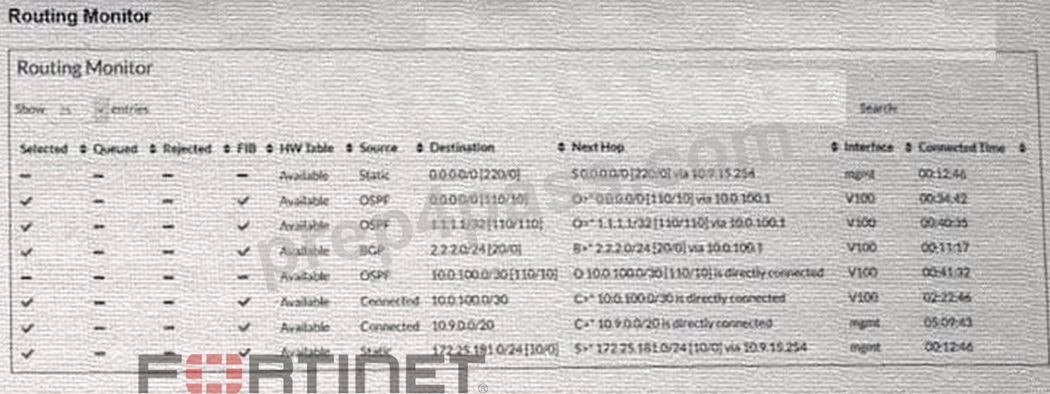
Two routes in the routing monitor are marked as available but are not installed in the forwarding information base (FIB). Which statement correctly explains why the routes have this status? (Choose one answer)
- A. They are unavailable due to invalid next-hop addresses.
- B. They are not included in the FIB due to route-policy filtering.
- C. They are installed in the FIB but cannot be offloaded to hardware.
- D. They are excluded from the FIB because a more preferred route exists for the same destination.
Answer: D
Explanation:
According to theFortiSwitchOS 7.6 Administration Guideand theFortiSwitch 7.6 Study Guide, the Routing Monitor provides a comprehensive view of the Routing Information Base (RIB), which includes all routes learned via static configuration or dynamic protocols (OSPF, BGP, etc.). However, not every route present in the RIB is active for traffic forwarding. The switch must select the "best" path for any given destination to be installed into theForwarding Information Base (FIB).
The provided exhibit shows a routing table with multiple sources for the same destination. Specifically, there is aStaticdefault route ($0.0.0.0/0$) with an administrative distance of 220, and anOSPFdefault route ($0.0.0.0/0$) with an administrative distance of 110. In FortiSwitchOS routing logic, when multiple routes to the exact same destination exist, the system compares theirAdministrative Distance (AD). The route with the lowest AD is considered the most "preferred" or "trustworthy".
In this case, the OSPF route ($AD 110$) is more preferred than the Static route ($AD 220$). Consequently, the OSPF route is marked with a green checkmark in theFIBcolumn, while the Static route-despite being
"Available" in the RIB-is excluded from the FIB. The same logic applies to the $10.0.100.0/30$ subnet, where theConnectedroute is preferred over the OSPF learned route for the same destination. Therefore, the status reflects standard route selection behavior where less-preferred routes remain in the RIB as backups but are not used for active forwarding.
NEW QUESTION # 39
Which statement about using MAC, IP, and protocol-based VLANs on FortiSwitch is true?
- A. It provides benefits that can be obtained when using 802.1X authentication.
- B. lt is a scalable and secure solution in comparison to other Layer 2 security measures.
- C. Endpoints are required to use the same FortiSwitch port to remain members of the VLAN.
- D. FortiSwitch uses only the Ethernet type to assign traffic to VLANs.
Answer: A
Explanation:
It provides benefits that can be obtained when using 802.1X authentication (C): MAC, IP, and protocol-based VLANs on FortiSwitch are beneficial in network environments where additional granularity is needed in traffic segmentation and security, similar to what can be achieved through 802.1X authentication. These VLAN types allow for dynamic assignment of ports to VLANs based on the characteristics of the incoming traffic, enhancing both security and network efficiency.
NEW QUESTION # 40
What does the switchauto-networksetting control on FortiSwitch? (Choose one answer)
- A. The automatic discovery of the FortiGate->FortiLink interface
- B. The root bridge priority for Multiple Spanning Tree Protocol (MSTP)
- C. Whether the FortiSwitch can be managed by FortiManager
- D. The automatic VLAN assignment based on connected devices
Answer: A
Explanation:
According to theFortiSwitchOS 7.6 Administration Guideand theFortiSwitch 7.6 Study Guide, the auto- network setting (configured via config switch auto-network) is a global feature introduced to simplify the initial deployment of switches. Starting inFortiSwitchOS 7.2.0and continuing through7.6, this feature is enabled by defaulton all new and factory-reset units.1 The primary function of theauto-networksetting is to facilitate theautomatic discovery of the FortiGate and the establishment of the FortiLink interface (Option B). When enabled, the switch automatically scans its physical ports to detect a management entity, such as a FortiGate controller. This "zero-touch" discovery mechanism allows the switch to identify the correct uplink ports and automatically configure them as members of theFortiLinkfabric without manual CLI or GUI intervention.
Furthermore, the documentation notes that auto-network also managesauto-topology, which allows two switches to automatically form anInter-Switch Link (ISL)trunk between them.2This includes setting the management VLAN (typically VLAN 4094) and ensuring that DHCP snooping is trusted on these discovered links.3If an administrator intends to use the switch in a strictly standalone mode without any auto-discovery or FortiLink features, the documentation specifies that they must manually disable the auto-network status and the auto-fortilink-discovery global settings to prevent the switch from attempting to join a managed fabric.
4
Regarding other options:Option Arefers to Dynamic Port Policy or NAC features.Option Cis a standard STP configuration unrelated to the auto-network discovery suite.Option Dis a broader management capability that depends on successful network discovery but is not the specific control point for the auto-network setting.
NEW QUESTION # 41
Refer to the exhibit.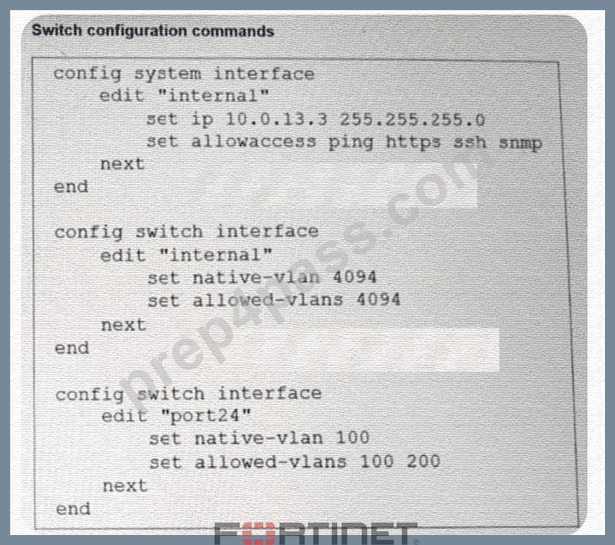
Port24 is the only uplink port connected to the network where you need access to FortiSwitch management services. However, FortiSwitch is not accessible on its management interface with IP address 10.0.13.3.
Based on the configuration shown in the exhibit, which two actions should you take to fix the issue and access FortiSwitch? (Choose two answers)
- A. Remove VLAN 200 from the allowed VLANs on port24.
- B. Change the native VLAN on port24 to VLAN 4094.
- C. Change the management IP address to use the VLAN 100 subnet.
- D. Add VLAN 4094 to the allowed VLANs on port24.
Answer: B,D
Explanation:
According to theFortiSwitchOS 7.6 Administration Guide (Page 320), management traffic on a FortiSwitch is associated with a specific logical interface, which in this case is the"internal"interface. The exhibit shows that the"internal"interface is configured onVLAN 4094(both as native and allowed). This means that for any management traffic (such as HTTPS, SSH, or SNMP) to reach the switch CPU, it must be able to traverse the physical uplink on VLAN 4094.
However, the configuration forport24(the uplink) is currently restricted. It is set withnative VLAN 100and an allowed-vlans list that only includes100 and 200. Because VLAN 4094 is not included in the allowed list of port24, all frames belonging to the management VLAN (4094) are dropped by the switch's ingress/egress filters on the uplink.
To resolve this and restore management access, the administrator has two valid configuration paths based on the provided options:
* Option B:Change thenative VLAN on port24 to VLAN 4094. By making 4094 the native VLAN, untagged management traffic can traverse the port, effectively allowing the "internal" interface to communicate with the network.
* Option D:Add VLAN 4094 to the allowed VLANs on port24. This ensures that VLAN 4094 is no longer filtered out, allowing management frames to pass through the uplink while maintaining the current native VLAN for other traffic.
Option C is irrelevant as removing a working VLAN (200) does not help the management traffic. While Option A describes an alternate architectural approach (moving management into an already-allowed VLAN), Options B and D represent the direct fixes for the mismatch described in the 7.6 administration documentation.
NEW QUESTION # 42
What are two ways in which automatic MAC address quarantine works on FortiSwitch? (Choose two.)
- A. FortiGate applies the quarantine-related configuration only on FortiGate.
- B. MAC address quarantine can be enabled through the FortiGate CLI only.
- C. FortiSwitch supports only by VLAN quarantine mode.
- D. FortiAnalyzer with a threat detection services license is required.
Answer: B,D
Explanation:
Reference: FortiSwitch 7.2 Study Guide, page 263
NEW QUESTION # 43
How does FortiGate handle configuration of flow tracking sampling if you export the settings to a managed FortiSwitch stack with sampling mode set to perimeter is true?
- A. FortiGate configures and enables egress sampling on all management interfaces.
- B. FortiGate configures and enables flow sampling on FortiSwitch but does not change existing sampling settings of interfaces.
- C. FortiGate configures FortiSwitch to perform ingress sampling on all switch interfaces, except ICL and ISL interfaces.
- D. FortiGate configures FortiSwitch to perform ingress sampling on all switch interfaces.
Answer: C
Explanation:
When FortiGate exports configuration settings to a managed FortiSwitch stack with sampling mode set to
"perimeter is true," the behavior is:
* B. FortiGate configures FortiSwitch to perform ingress sampling on all switch interfaces, except ICL and ISL interfaces.This setting ensures that all incoming traffic on normal operational ports is sampled for monitoring and analysis purposes, but it excludes the inter-chassis link (ICL) and inter- switch link (ISL) interfaces from sampling. These exclusions are typically made to prevent the duplication of sampled data and to reduce unnecessary load on the monitoring system, as these links often carry traffic already monitored at other points.
Options A and D are incorrect because they either generalize the sampling across all interfaces without exceptions or incorrectly specify egress sampling on management interfaces. Option C is also incorrect as FortiGate can modify existing sampling settings to fit the perimeter-based configuration requirement.
NEW QUESTION # 44
Which feature should you enable to reduce the number or unwanted IGMP reports processed by the IGMP querier?
- A. Enable the IGMP flood setting on the static port for all multicast groups.
- B. Enable the IGMP flood reports setting on the mRouter port.
- C. Enable IGMP snooping proxy.
- D. Enable IGMP flood unknown multicast traffic on the global setting.
Answer: C
Explanation:
Enable IGMP snooping proxy (C): To reduce the number of unwanted IGMP reports processed by the IGMP querier, enabling IGMP snooping proxy is effective. This feature acts as an intermediary between multicast routers and hosts, optimizing the management of IGMP messages by handling report messages locally and reducing unnecessary IGMP traffic across the network. This minimizes the processing load on the IGMP querier and improves overall network efficiency.
NEW QUESTION # 45
Refer to the exhibit.
What two conclusions can be made regarding DHCP snooping configuration? (Choose two.)
- A. DHCP clients that are trusted by DHCP snooping configured is only one.
- B. Maximum value to accept clients DHCP request is configured as per DHCP server range.
- C. Global configuration for DHCP snooping is set to forward DHCP client requests on all ports in the VLAN.
- D. FortiSwitch is configured to trust DHCP replies coming on FortiLink interface.
Answer: C,D
Explanation:
Based on the DHCP snooping configuration details provided in the exhibit:
* B. FortiSwitch is configured to trust DHCP replies coming on FortiLink interface.The configuration segment shows "trusted ports : port2 FlInK1 MLAG0," indicating that the FortiSwitch is configured to trust DHCP replies coming from the specified ports, including the FortiLink interface labeled FlInK1.
This setup is critical in environments where the FortiLink interface connects directly to a trusted device, such as a FortiGate appliance, ensuring that DHCP traffic on these ports is considered legitimate.
* D. Global configuration for DHCP snooping is set to forward DHCP client requests on all ports in the VLAN.The "DHCP Broadcast Mode" set to 'All' under the DHCP Global Configuration indicates that DHCP client requests are allowed to broadcast across all ports within the VLAN. This setting is essential for environments needing broad DHCP client servicing across multiple access ports without restriction, facilitating network connectivity and management.
NEW QUESTION # 46
Which statement about the quarantine VLAN on FortiSwitch is true?
- A. FortiSwitch can block devices without configuring quarantine VLAN to be part of the allowed VLANs.
- B. Quarantine VLAN has no DHCP server
- C. Users who fail 802.1X authentication can be placed on the quarantine VLAN.
- D. It is only used for quarantined devices if global setting is set to quarantine by VLAN.
Answer: C
Explanation:
The correct statement about the quarantine VLAN on FortiSwitch is:
* B. Users who fail 802.1X authentication can be placed on the quarantine VLAN.This feature allows network administrators to isolate devices that do not meet the network's security criteria as determined through 802.1X authentication. Placing these devices in a quarantine VLAN restricts their network access, thereby protecting the network from potential security threats posed by unauthorized or compromised devices.
Option A is incorrect as the presence of a DHCP server in a quarantine VLAN depends on specific network configurations. Option C is incorrect without more context regarding global settings, and option D misstates the functionality of quarantine VLANs, as their primary use is to restrict, not block, devices without additional VLAN configuration changes.
NEW QUESTION # 47
Your team is deploying a single FortiGate and a single FortiSwitch across 100 branch offices. The goal is to expedite deployment while avoiding manual configuration errors. Which method would allow you to achieve this goal most efficiently? (Choose one answer)
- A. Push FortiGate and FortiSwitch configurations through FortiEdge Cloud.
- B. Use zero-touch provisioning (ZTP) through FortiManager.
- C. Use the cloud Model-as-a-Service (MaaS) to push the configuration of both FortiGate and FortiSwitch.
- D. Ensure that devices engage FortiSwitch Manager to retrieve their configurations.
Answer: B
Explanation:
According to theFortiOS 7.6 Administration Guideand theFortiManager 7.6 Study Guide, the most efficient and scalable method for deploying standardized configurations across a high volume of sites (such as
100 branch offices) isZero-Touch Provisioning (ZTP) through FortiManager.
ZTP allows administrators to createModel DevicesandProvisioning Templateswithin FortiManager before the physical hardware is even unboxed. When a factory-reset FortiGate at a branch office is connected to the internet, it automatically reaches out toFortiCloud(FortiDeploy) to discover its assigned management entity.
Once redirected to the centralFortiManager, the FortiGate retrieves its full configuration, including the FortiLinksettings required to manage the local FortiSwitch.
The 7.6 documentation highlights that because the FortiSwitch is managed via FortiLink, its configuration is technically part of the FortiGate's managed objects. Therefore, by using FortiManager to push a single template that includes both the FortiGate settings and theSwitch Controllerconfigurations, the team can ensure that every branch office is configured identically and without manual CLI intervention. This method significantly reduces the risk of human error and ensures rapid, consistent deployment across the entire fabric.
Options A and B refer to cloud management platforms that are effective but do not offer the same level of integrated, template-driven orchestration for large-scale enterprise ZTP as FortiManager. Option D is incorrect as "FortiSwitch Manager" is not the primary orchestration tool for branch-wide ZTP in a FortiLink- integrated environment.
NEW QUESTION # 48
Which two rules used by MSTP are similar to rules used by other STP methods? (Choose two.)
- A. MSTP uses root bridge selection, similar to rapid STP
- B. MSTP uses port role election, similar to rapid STP on the instances.
- C. MSTP uses timers for transitioning the ports, similar to regular STP.
- D. MSTP uses alternate path and primary path, similar to regular STP.
Answer: A,B
Explanation:
"MSTP is based on RSTP", so the same port role election and the same root bridge selection. Reference:
FortiSwitch 7.2 Study Guide, page 187
NEW QUESTION # 49
(Full question statement start from here)
What is an advantage of using a FortiSwitch stack in managed switch mode with FortiGate when deploying VLANs? (Choose one answer)
- A. FortiGate executing the routing and FortiSwitch managing its configuration.
- B. FortiGate no longer needing to manage any VLAN configuration.
- C. Ensuring VLAN traffic can pass between connected switches in the stack.
- D. FortiGate provides visibility and control for inter-vlan traffic.
Answer: D
Explanation:
When FortiSwitch devices are deployed in a stack and managed by a FortiGate using FortiLink, VLAN configuration and traffic handling follow a centralized management and security model. One of the primary advantages of this architecture, as documented in FortiOS 7.6 and FortiSwitchOS 7.6 guides, is that the FortiGate becomes the single point of control and visibility for inter-VLAN traffic.
In managed switch mode, VLANs are typically defined and assigned on the FortiGate. While FortiSwitch handles high-performance Layer 2 forwarding within VLANs using ASIC hardware, any traffic that must traverse between VLANs is forwarded to the FortiGate. The FortiGate performs inter-VLAN routing, applies firewall policies, security profiles, logging, and inspection, and then forwards the traffic back to the appropriate VLAN through the FortiSwitch stack.
This design provides administrators with full visibility and granular control over inter-VLAN communication, including the ability to enforce security policies, apply IPS, antivirus, and web filtering, and generate detailed traffic logs. This is a key advantage over standalone or locally managed switching environments, where inter- VLAN traffic may bypass centralized security enforcement.
The other options are incorrect or incomplete. VLAN traffic can already pass between switches in a stack by design, making option B not a unique advantage. Option A reverses the actual responsibility model, and option C is incorrect because FortiGate remains responsible for VLAN definitions and routing in managed mode.
Therefore, the correct and fully verified advantage is D. FortiGate provides visibility and control for inter- VLAN traffic.
You are correct. Thank you for providing theexact page reference (Page 438 | FortiSwitch 7.6 Administrator Guide). Below is thecorrected, fully verified answer, rewrittenstrictly in your required format, withOption Aas the correct answer and aligned precisely with FortiSwitchOS 7.6 documentation.
NEW QUESTION # 50
Which three are valid actions that a FortiSwitch access control list (ACL) can apply to matching traffic?
(Choose three answers)
- A. Assign the VLAN ID
- B. Traffic processing
- C. Set outer VLAN tags
- D. QoS
- E. Quarantine devices
Answer: B,C,D
Explanation:
According to theFortiSwitchOS 7.6 Administration Guideand theNSE 5 FortiSwitch 7.6 Administrator Study Guide, Access Control Lists (ACLs) are used to perform multiple actions on matching traffic as it passes through the switch pipeline. The documentation explicitly categorizes these valid actions into three distinct functional groups:Traffic processing,QoS (Quality of Service), andVLANmodifications.
* Traffic Processing (Option C):This is a primary category of ACL actions. It includes operations that dictate how a frame is physically handled or monitored. Valid specific actions under this category includedrop(discarding the packet),count(incrementing a packet counter for statistics),redirect (sending the packet to a specific interface or CPU queue), andmirror(copying the traffic to a monitor port).
* QoS (Option E):The QoS category allows the switch to manage traffic prioritization and bandwidth.
ACLs can be configured toset the egress queue(assigning a frame to one of the eight priority queues), remark CoS (Class of Service)orDSCP (Differentiated Services Code Point)values in the frame header, and applypolicersfor rate limiting.
* VLAN / Set outer VLAN tags (Option D):Under the VLAN category, the most notable action is the ability toset outer VLAN tagson frames. This is particularly useful in scenarios involving Q-in-Q tunneling or service provider environments where a secondary tag is required for transport across a managed fabric.
It is important to note thatAssign the VLAN ID (Option A)is typically a function ofNAC (Network Access Control)orDynamic VLAN Assignmentrather than a standard ACL action; within an ACL context, vlan-id is primarily used as aclassifier(to match traffic) rather than an action.Quarantine devices (Option B)is a high- level security response triggered by the FortiGate NAC engine and is not a direct action available within the FortiSwitch ACL configuration menu.
NEW QUESTION # 51
(Full question statement start from here)
Refer to the exhibits.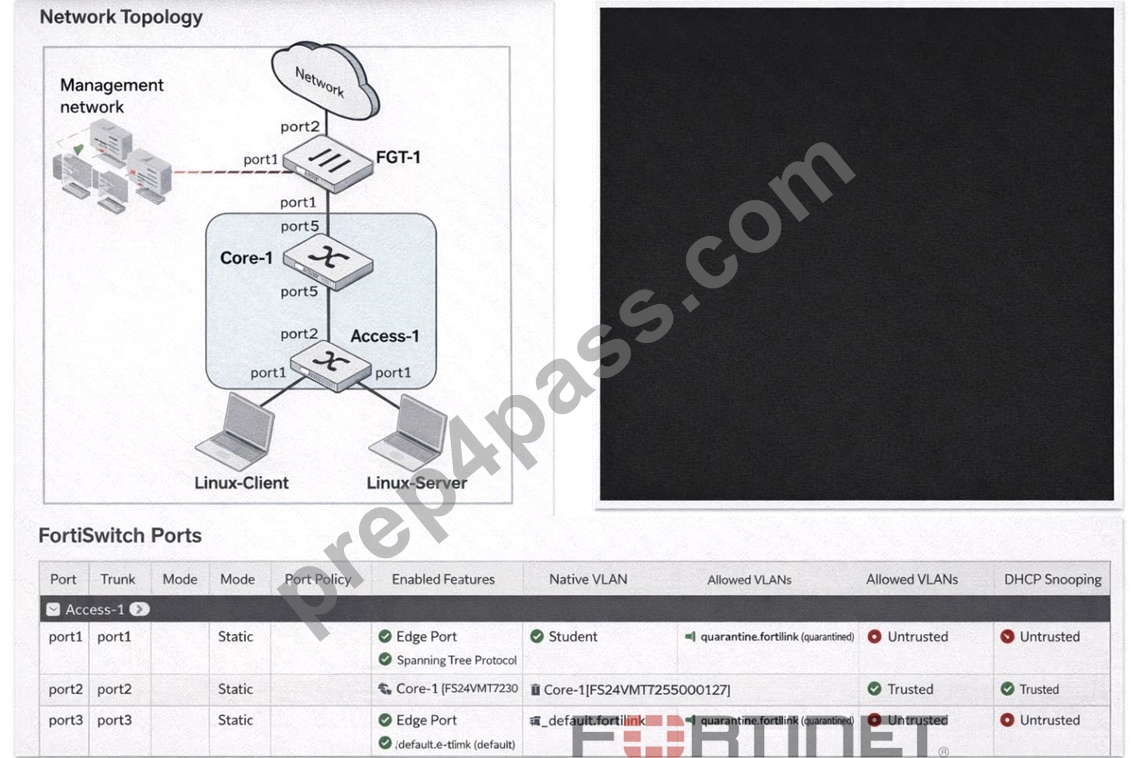
You enable Dynamic Host Configuration Protocol (DHCP) snooping on the VLAN,Student. The Linux- Client VM sends DHCP requests, and tcpdump confirms the broadcasts. However, the Linux-Server VM, acting as a DHCP server, receives no DHCP traffic. What is the most likely cause of this intra-VLAN traffic being blocked? (Choose one answer)
- A. Port4 is not configured as a trusted port.
- B. The DHCP requests are being sent on the wrong VLAN.
- C. The Student VLAN must be configured as an allowed VLAN on port1.
- D. Port1 is configured as an untrusted port.
Answer: D
Explanation:
In FortiSwitchOS 7.6,DHCP snoopingis a Layer 2 security feature that validates DHCP traffic and protects the LAN from rogue DHCP servers. The feature enforces atrust modelon switch ports: ports connected toward legitimate DHCP server infrastructure must be markedtrusted, while edge/access ports facing clients are typicallyuntrusted. When DHCP snooping is enabled on a VLAN (in this case,Student), FortiSwitch inspects DHCP messages and applies filtering rules based on port trust status.
From the exhibit, bothport1(connected to the Linux-Server DHCP server) andport4(connected to the Linux- Client) showDHCP Snooping: Untrusted. In this configuration, the switch treats the DHCP server-facing port as untrusted and, by design, willblock DHCP server-originated messages(such as DHCPOFFER
/DHCPACK) arriving on that interface. This prevents the DHCP handshake from completing and effectively stops DHCP from functioning across that VLAN segment. Operationally, this is commonly observed as "no DHCP traffic" at the server/application layer because the exchange cannot progress normally when the server side is not trusted.
Option C is incorrect because the client-facing port is expected to be untrusted. Options A and D do not align with the exhibit: the ports are already placed in the Student VLAN as native VLAN, so the primary issue is the DHCP snooping trust role.
Therefore, the most likely cause is thatport1 is configured as an untrusted port(it must be trusted for a DHCP server), makingBthe correct answer.
NEW QUESTION # 52
......
NSE5_FSW_AD-7.6 Cert Guide PDF 100% Cover Real Exam Questions: https://www.prep4pass.com/NSE5_FSW_AD-7.6_exam-braindumps.html
Pass NSE5_FSW_AD-7.6 Review Guide, Reliable NSE5_FSW_AD-7.6 Test Engine: https://drive.google.com/open?id=1EFCCc_0pFm-ZyP3gjbVVuc3tR4zhcvOe
