

100-150 Certification Exam Dumps Questions in here [Oct-2025]
Updated 100-150 Exam Practice Test Questions
NEW QUESTION # 27
Computers in a small office are unable to access companypro.net. You run the ipconfig command on one of the computers. The results are shown in the exhibit.
You need to determine if you can reach the router.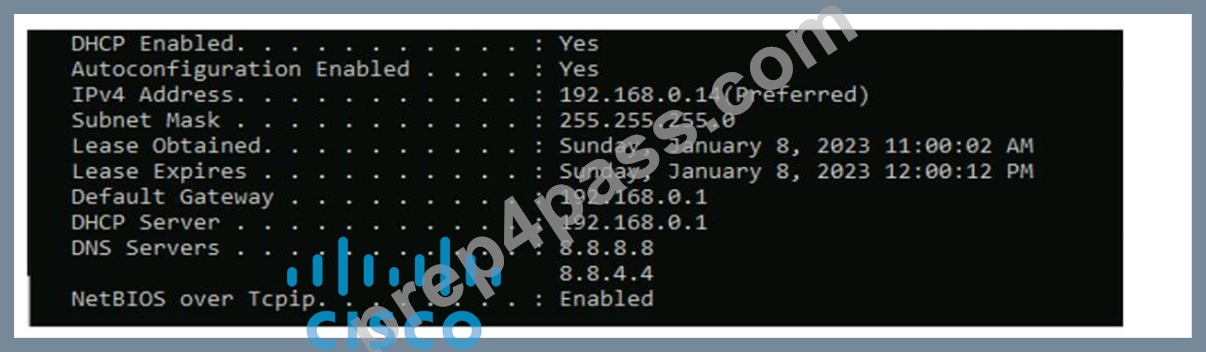
Which command should you use? Complete the command by selecting the correct options from each drop- down lists.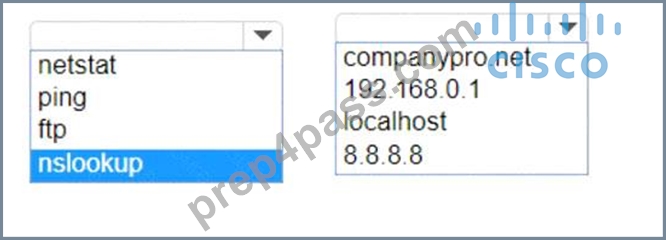
Answer:
Explanation: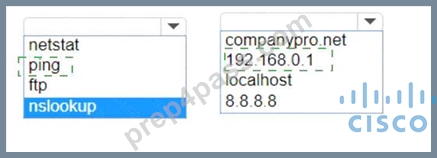
Explanation:
To determine if you can reach the router, you should use the ping command followed by the IP address of the router. The ping command is a network utility used to test the reachability of a host on an Internet Protocol (IP) network and to measure the round-trip time for messages sent from the originating host to a destination computer.
The Default Gateway in the ipconfig results is typically the router's IP address in a home or small office network. In this case, the Default Gateway is 192.168.0.1, which is the address you would ping to check connectivity to the router.
References :=
* How to Use the Ping Command
* Testing Network Connectivity with the Ping Command
To determine if you can reach the router, you should use the ping command with the IP address of the router.
* Command: ping
* Target: 192.168.0.1
So, the completed command is:
* ping 192.168.0.1
Step by Step Comprehensive and Detailed Explanation:
* ping: The ping command sends ICMP Echo Request messages to the target IP address and waits for an Echo Reply. It is commonly used to test the reachability of a network device.
* 192.168.0.1: This is the IP address of the default gateway (the router) as shown in the ipconfig output.
Pinging this address will help determine if the computer can communicate with the router.
References:
* Using the ping Command: ping Command Guide
NEW QUESTION # 28
A user reports that a company website is not available. The help desk technician issues a tracert command to determine if the server hosting the website is reachable over the network.
The output of the command is shown as follows: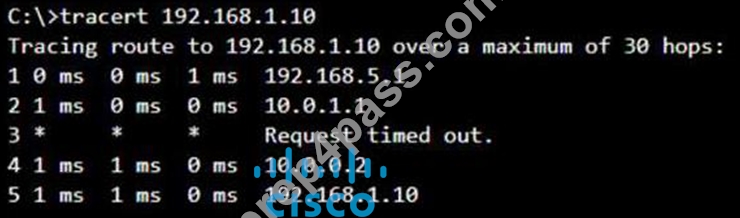
What can you tell from the command output?
- A. The server address 192.168.1.10 is being blocked by a firewall on the router at hop 3.
- B. The server with the address 192.168.1.10 is reachable over the network.
- C. The router at hop 3 is not forwarding packets to the IP address 192.168.1.10.
- D. Requests to the web server at 192.168.1.10 are being delayed and time out.
Answer: B
Explanation:
The tracert command output shows the path taken to reach the destination IP address, 192.168.1.10.
The command output indicates:
* Hops 1 and 2 are successfully reached.
* Hop 3 times out, meaning the router at hop 3 did not respond to the tracert request.
However, this does not necessarily indicate a problem with forwarding packets, as some routers may be configured to block or not respond to ICMP requests.
* Hops 4 and 5 are successfully reached, with hop 5 being the destination IP 192.168.1.10, indicating that the server is reachable.
Thus, the correct answer is C. The server with the address 192.168.1.10 is reachable over the network.
Reference: =
* Cisco Traceroute Command
* Understanding Traceroute
The tracert command output indicates that the server with the address 192.168.1.10 is reachable over the network. The asterisk (*) at hop 3 suggests that the probe sent to that hop did not return a response, which could be due to a variety of reasons such as a firewall blocking ICMP packets or the router at that hop being configured not to respond to ICMP requests. However, since the subsequent hops (4 and 5) are showing response times, it means that the packets are indeed getting through and the server is reachable12.
Reference: =
* How to Use Traceroute Command to Read Its Results
* How to Use the Tracert Command in Windows
NEW QUESTION # 29
You want to list the IPv4 addresses associated with the host name www.companypro.net.
Complete the command by selecting the correct option from each drop-down list.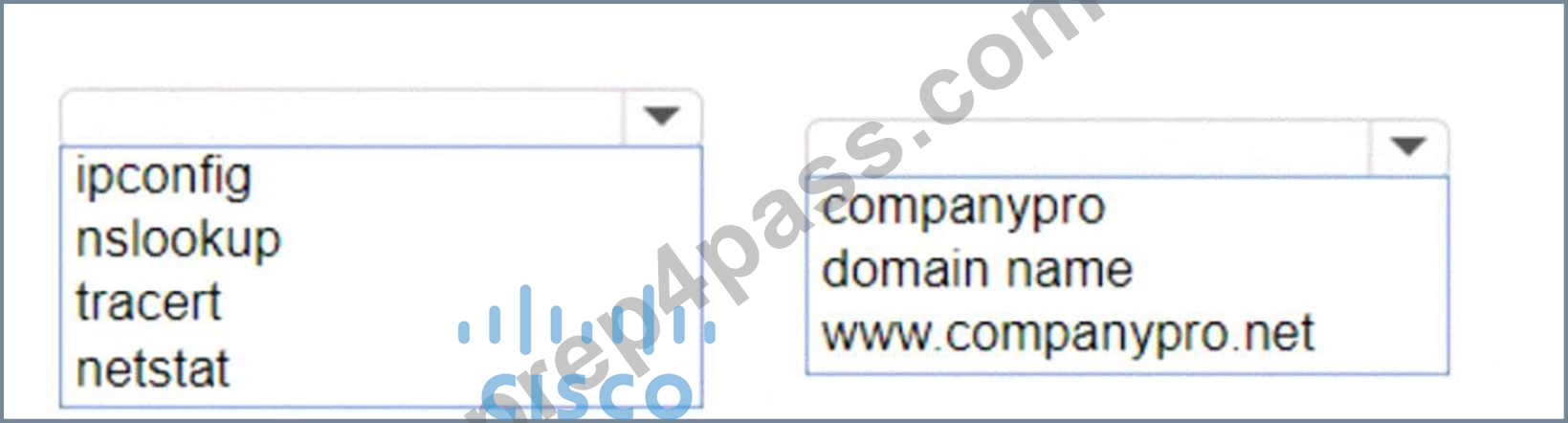
Answer:
Explanation: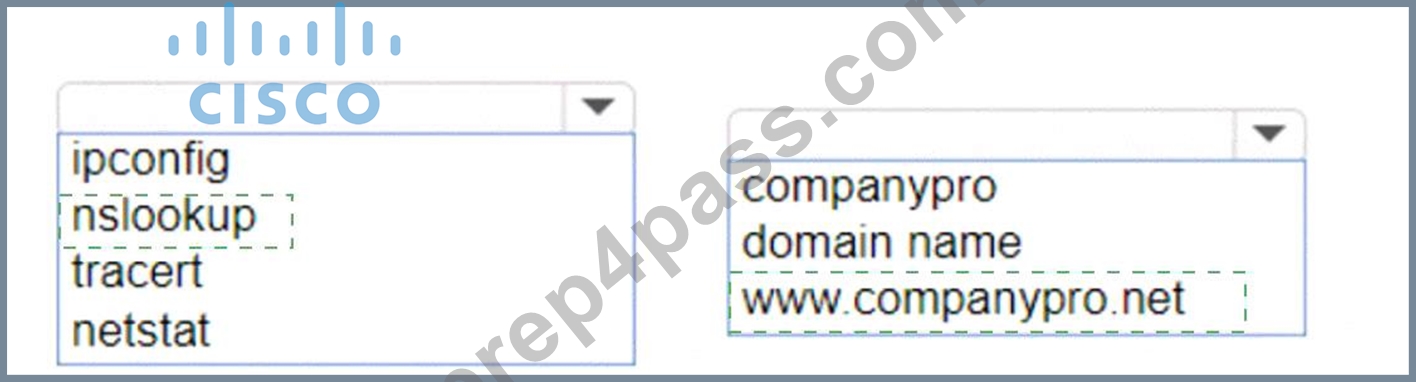
Explanation:
To list the IPv4 addresses associated with the host name www.companypro.net, you should use the following command:
nslookup www.companypro.net
This command will query the DNS servers to find the IP address associated with the hostname provided. If you want to ensure that it returns the IPv4 address, you can specify the -type=A option, which stands for Address records that hold IPv4 addresses1. However, the nslookup command by default should return the IPv4 address if available.
To list the IPv4 addresses associated with the host name www.companypro.net, you should use the nslookup command.
* Command: nslookup
* Target: www.companypro.net
So, the completed command is:
* nslookup www.companypro.net
* nslookup: This command is used to query the Domain Name System (DNS) to obtain domain name or IP address mapping or for any other specific DNS record.
* www.companypro.net: This is the domain name you want to query to obtain its associated IP addresses.
References:
* Using nslookup: nslookup Command Guide
NEW QUESTION # 30
Which two statements are true about the IPv4 address of the default gateway configured on a host? Note: You will receive partial credit for each correct selection. (Choose 2.)
- A. The default gateway is the Loopback0 interface IPv4 address of the router connected to the same local network as the host.
- B. Hosts learn the default gateway IPv4 address through router advertisement messages.
- C. The IPv4 address of the default gateway must be the first host address in the subnet.
- D. The default gateway is the IPv4 address of the router interface connected to the same local network as the host.
- E. The same default gateway IPv4 address is configured on each host on the local network.
Answer: D,E
Explanation:
* Statement B: "The same default gateway IPv4 address is configured on each host on the local network." This is true because all hosts on the same local network (subnet) use the same default gateway IP address to send packets destined for other networks.
* Statement D: "The default gateway is the IPv4 address of the router interface connected to the same local network as the host." This is true because the default gateway is the IP address of the router's interface that is directly connected to the local network.
* Statement A: "The IPv4 address of the default gateway must be the first host address in the subnet." This is not necessarily true. The default gateway can be any address within the subnet range.
* Statement C: "The default gateway is the Loopback0 interface IPv4 address of the router connected to the same local network as the host." This is not true; the default gateway is the IP address of the router's physical or logical interface connected to the local network.
* Statement E: "Hosts learn the default gateway IPv4 address through router advertisement messages." This is generally true for IPv6 with Router Advertisement (RA) messages, but not typically how IPv4 hosts learn the default gateway address.
Reference: * Cisco Default Gateway Configuration: Cisco Default Gateway
NEW QUESTION # 31
Which wireless security option uses a pre-shared key to authenticate clients?
- A. WPA2-Enterprise
- B. 802.1q
- C. 802.1x
- D. WPA2-Personal
Answer: D
Explanation:
WPA2-Personal, also known as WPA2-PSK (Pre-Shared Key), is the wireless security option that uses a pre-shared key to authenticate clients. This method is designed for home and small office networks and doesn't require an authentication server. Instead, every user on the network uses the same key or passphrase to connect1.
Reference: =
* What is a Wi-Fi Protected Access Pre-Shared Key (WPA-PSK)?
* Exploring WPA-PSK and WiFi Security
* WPA2-Personal: This wireless security option uses a pre-shared key (PSK) for authentication. Each client that connects to the network must use this key to gain access. It is designed for home and small office networks where simplicity and ease of use are important.
* WPA2-Enterprise: Unlike WPA2-Personal, WPA2-Enterprise uses 802.1x authentication with an authentication server (such as RADIUS) and does not rely on a pre-shared key.
* 802.1x: This is a network access control protocol for LANs, particularly wireless LANs. It provides an authentication mechanism to devices wishing to attach to a LAN or WLAN.
* 802.1q: This is a networking standard that supports VLAN tagging on Ethernet networks and is not related to wireless security.
Reference:
* Cisco Documentation on WPA2 Security: Cisco WPA2
* Understanding Wireless Security: Wireless Security Guide
NEW QUESTION # 32
A user initiates a trouble ticket stating that an external web page is not loading. You determine that other resources both internal and external are still reachable.
Which command can you use to help locate where the issue is in the network path to the external web page?
- A. ipconfig/all
- B. tracert
- C. ping -t
- D. nslookup
Answer: B
Explanation:
The tracert command is used to determine the route taken by packets across an IP network. When a user reports that an external web page is not loading, while other resources are accessible, it suggests there might be an issue at a certain point in the network path to the specific web page. The tracert command helps to diagnose where the breakdown occurs by displaying a list of routers that the packets pass through on their way to the destination. It can identify the network segment where the packets stop progressing, which is valuable for pinpointing where the connectivity issue lies. References := Cisco CCST Networking Certification FAQs - CISCONET Training Solutions, Command Prompt (CMD): 10 network-related commands you should know, Network Troubleshooting Commands Guide: Windows, Mac & Linux - Comparitech, How to Use the Traceroute and Ping Commands to Troubleshoot Network, Network Troubleshooting Techniques: Ping, Traceroute, PathPing.
*tracert Command: This command is used to determine the path packets take to reach a destination. It lists all the hops (routers) along the way and can help identify where the delay or failure occurs.
*ping -t: This command sends continuous ping requests and is useful for determining if a host is reachable but does not provide path information.
*ipconfig /all: This command displays all current TCP/IP network configuration values and can be used to verify network settings but not to trace a network path.
*nslookup: This command queries the DNS to obtain domain name or IP address mapping, useful for DNS issues but not for tracing network paths.
References:
*Microsoft tracert Command: tracert Command Guide
*Troubleshooting Network Issues with tracert: Network Troubleshooting Guide
NEW QUESTION # 33
During the data encapsulation process, which OSI layer adds a header that contains MAC addressing information and a trailer used for error checking?
- A. Session
- B. Data Link
- C. Network
- D. Transport
Answer: B
Explanation:
During the data encapsulation process, the Data Link layer of the OSI model is responsible for adding a header that contains MAC addressing information and a trailer used for error checking. The header typically includes the source and destination MAC addresses, while the trailer contains a Frame Check Sequence (FCS) which is used for error detection1.
The Data Link layer ensures that messages are delivered to the proper device on a LAN using hardware addresses and translates messages from the Network layer into bits for the Physical layer to transmit. It also controls how data is placed onto the medium and is received from the medium through the physical hardware.
Reference: =
The OSI Model - The 7 Layers of Networking Explained in Plain English
OSI Model - Network Direction
Which layer adds both header and trailer to the data?
What is OSI Model | 7 Layers Explained - GeeksforGeeks
NEW QUESTION # 34
Which two pieces of information should you include when you initially create a support ticket? (Choose 2.)
- A. The actions taken to resolve the fault
- B. A description of the conditions when the fault occurs
- C. The description of the top-down fault-finding procedure
- D. A detailed description of the fault
- E. Details about the computers connected to the network
Answer: B,D
Explanation:
Statement A: "A detailed description of the fault." This is essential for support staff to understand the nature of the problem and begin troubleshooting effectively.
Statement C: "A description of the conditions when the fault occurs." This helps in reproducing the issue and identifying patterns that might indicate the cause of the fault.
Statement B: "Details about the computers connected to the network." While useful, this is not as immediately critical as understanding the fault itself and the conditions under which it occurs.
Statement D: "The actions taken to resolve the fault." This is important but typically follows the initial report.
Statement E: "The description of the top-down fault-finding procedure." This is more of a troubleshooting methodology than information typically included in an initial support ticket.
Reference: Best Practices for Submitting Support Tickets: Support Ticket Guidelines
NEW QUESTION # 35
You want to store files that will be accessible by every user on your network.
Which endpoint device do you need?
- A. Server
- B. Switch
- C. Access point
- D. Hub
Answer: A
Explanation:
To store files that will be accessible by every user on a network, you would need a server.
A server is a computer system that provides data to other computers.
It can serve data to systems on a local network (LAN) or a wide network (WAN) over the internet.
In this context, a file server would be set up to store and manage files, allowing users on the network to access them from their own devices1.
Reference:
What is a Server?
Understanding Servers and Their Functions
A server is a computer designed to process requests and deliver data to other computers over a local network or the internet. In this case, to store files that will be accessible by every user on the network, a file server is the appropriate endpoint device. It provides a centralized location for storing and managing files, allowing users to access and share files easily.
A). Access point: Provides wireless connectivity to a network.
C). Hub: A basic networking device that connects multiple Ethernet devices together, making them act as a single network segment.
D). Switch: A networking device that connects devices on a computer network by using packet switching to forward data to the destination device.
Thus, the correct answer is B. Server.
Reference: =
File Server Overview (Cisco)
Server Roles in Networking (Cisco)
NEW QUESTION # 36
Move each cloud computing service model from the list on the left to the correct example on the right Note: You will receive partial credit for each correct answer.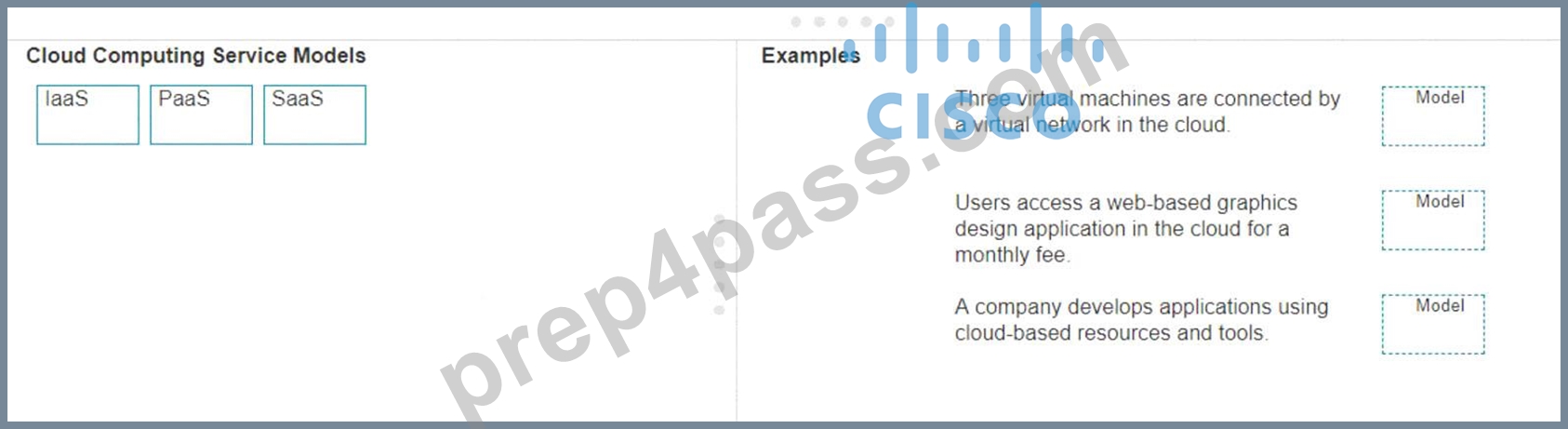
Answer:
Explanation: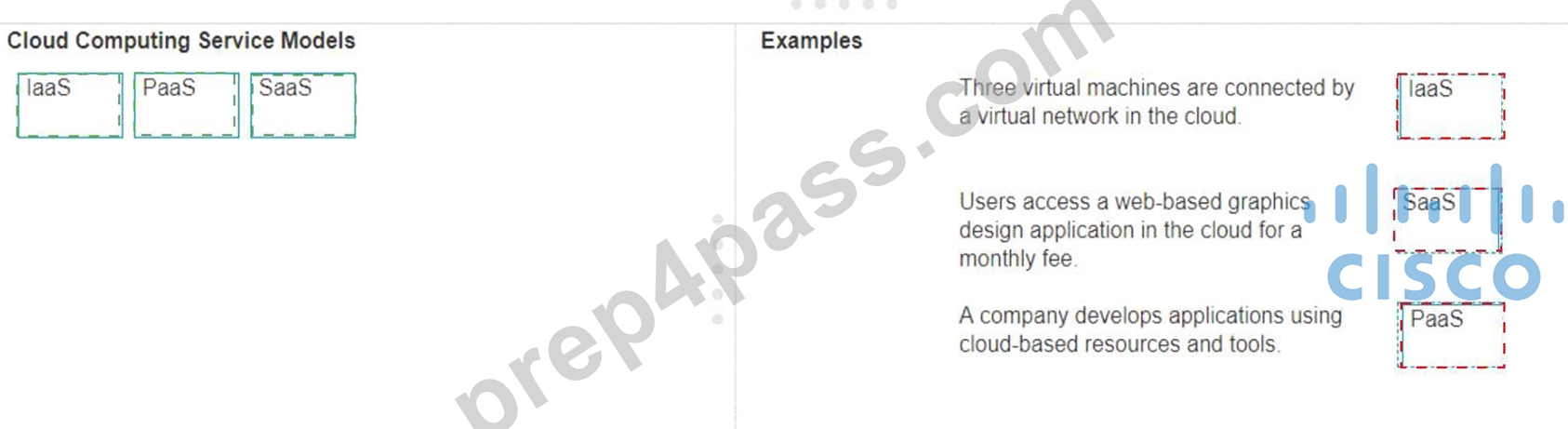
Explanation:
* Three virtual machines are connected by a virtual network in the cloud.
* Model: IaaS (Infrastructure as a Service)
* Explanation: IaaS provides virtualized computing resources over the internet, including virtual machines, storage, and networks.
* Users access a web-based graphics design application in the cloud for a monthly fee.
* Model: SaaS (Software as a Service)
* Explanation: SaaS delivers software applications over the internet, typically on a subscription basis, accessible via a web browser.
* A company develops applications using cloud-based resources and tools.
* Model: PaaS (Platform as a Service)
* Explanation: PaaS provides a platform allowing customers to develop, run, and manage applications without dealing with the infrastructure.
* IaaS (Infrastructure as a Service): Provides virtualized hardware resources that customers can use to build their own computing environments.
* PaaS (Platform as a Service): Offers a platform with tools and services to develop, test, and deploy applications.
* SaaS (Software as a Service): Delivers fully functional applications over the internet that users can access and use without managing the underlying infrastructure.
References:
* Cloud Service Models: Understanding IaaS, PaaS, SaaS
* NIST Definition of Cloud Computing: NIST Cloud Computing
NEW QUESTION # 37
Which component of the AAA service security model provides identity verification?
- A. Accounting
- B. Auditing
- C. Authentication
- D. Authorization
Answer: C
Explanation:
The AAA service security model consists of three components:
Authentication, Authorization, and Accounting.
* Authentication: This is the process of verifying the identity of a user or device. It ensures that only legitimate users can access the network or service.
* Authorization: This determines what an authenticated user is allowed to do or access within the network.
* Auditing/Accounting: This component tracks the actions of the user, including what resources they access and what changes they make.
Thus, the correct answer is C. Authentication.
Reference: =
* Cisco AAA Overview
* Understanding AAA (Authentication, Authorization, and Accounting)
NEW QUESTION # 38
How does low bandwidth affect network performance?
- A. Has no effect on latency
- B. Increases latency
- C. Increases throughput
- D. Decreases latency
Answer: B
NEW QUESTION # 39
HOTSPOT
You purchase a new Cisco switch, turn it on, and connect to its console port. You then run the following command: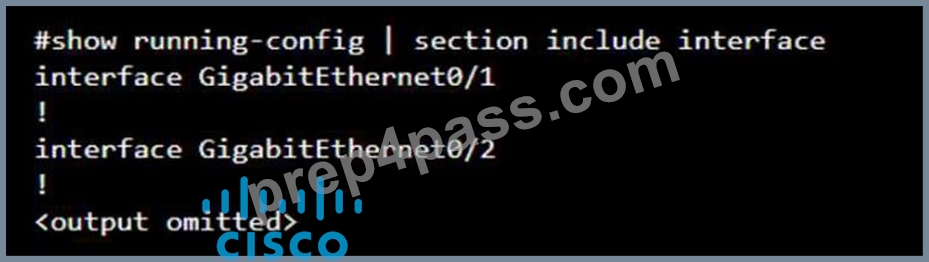
For each statement about the output, select True or False. Note: You will receive partial credit for each correct selection.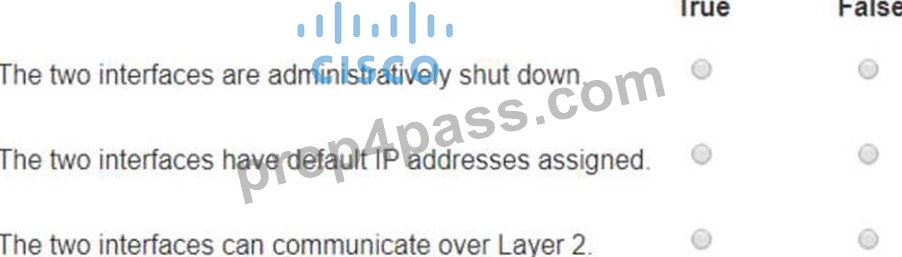
Answer:
Explanation: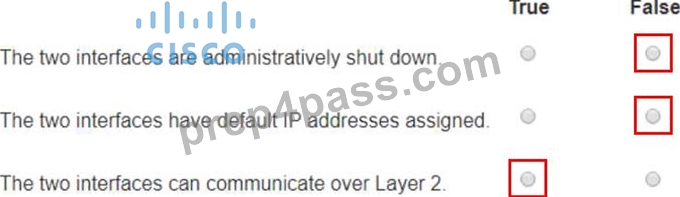
Explanation:
The two interfaces are administratively shut down:
False: The output does not show any "shutdown" command under the interfaces, which would indicate that they are administratively shut down. Therefore, they are likely in their default state, which is administratively up.
The two interfaces have default IP addresses assigned:
False: The output does not show any IP address configuration. In the default state, interfaces do not have IP addresses assigned unless explicitly configured.
The two interfaces can communicate over Layer 2:
True: By default, interfaces on a switch are Layer 2 interfaces capable of forwarding Ethernet frames. As there is no configuration provided that changes this, it can be assumed they can communicate over Layer 2.
Interface Status: The absence of the "shutdown" command means the interfaces are not administratively shut down.
IP Address Assignment: There is no evidence in the output that IP addresses have been assigned to the interfaces, which would typically be shown as "ip address" entries.
Layer 2 Communication: Switch interfaces in their default state operate at Layer 2, enabling them to forward Ethernet frames and participate in Layer 2 communication.
Reference: Cisco IOS Interface Configuration: Cisco Interface Configuration
Understanding Cisco Switch Interfaces: Cisco Switch Interfaces
NEW QUESTION # 40
Examine the following output: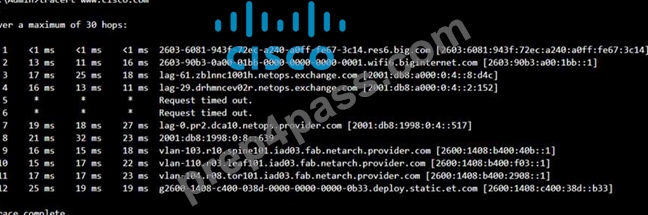
Which two conclusions can you make from the output of the tracert command? Note: You will receive partial credit for each correct answer. (Choose 2.)
- A. The device sending the trace has IPv6 address 2600:1408:c400:38d :: b33.
- B. The IPv6 address associated with the www.cisco.com server is 2600:1408: c400: 38d: : b33.
- C. The trace successfully reached the www.cisco.com server.
- D. The routers at hops 5 and 6 are offline.
- E. The trace failed after the fourth hop.
Answer: B,C
Explanation:
* Statement A: "The trace successfully reached the www.cisco.com server." This is true as indicated by the "Trace complete" message at the end, showing that the trace has reached its destination.
* Statement C: "The IPv6 address associated with the www.cisco.com server is
2600:1408:c400:38d::b33." This is true because the final hop in the trace, which is the destination, has this IPv6 address.
* Statement B: "The trace failed after the fourth hop." This is incorrect as the trace continues beyond the fourth hop, despite some intermediate timeouts.
* Statement D: "The routers at hops 5 and 6 are offline." This is not necessarily true. The routers might be configured to not respond to traceroute requests.
* Statement E: "The device sending the trace has IPv6 address 2600:1408:c400:38d::b33." This is incorrect; this address belongs to the destination server, not the sender.
Reference: * Understanding Traceroute: Traceroute Guide
NEW QUESTION # 41
Examine the connections shown in the following image. Move the cable types on the right to the appropriate connection description on the left. You may use each cable type more than once or not at all.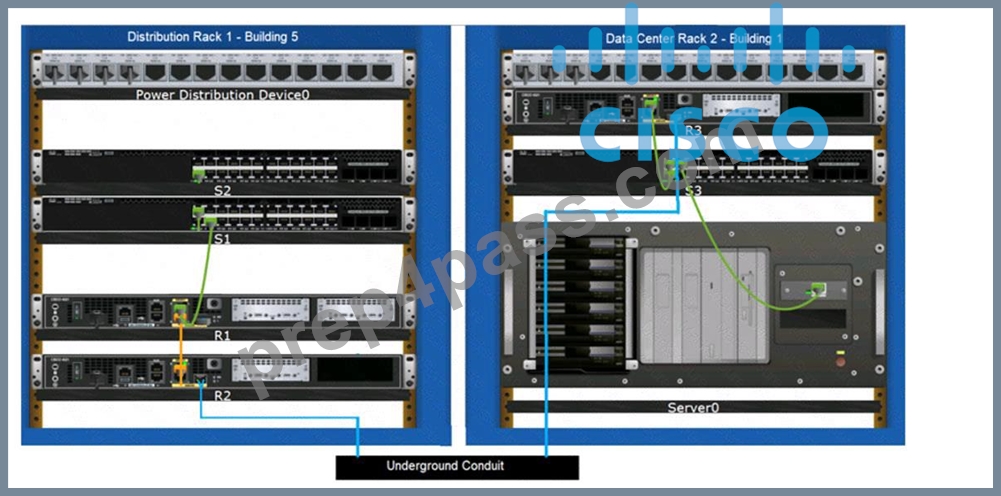
Answer:
Explanation: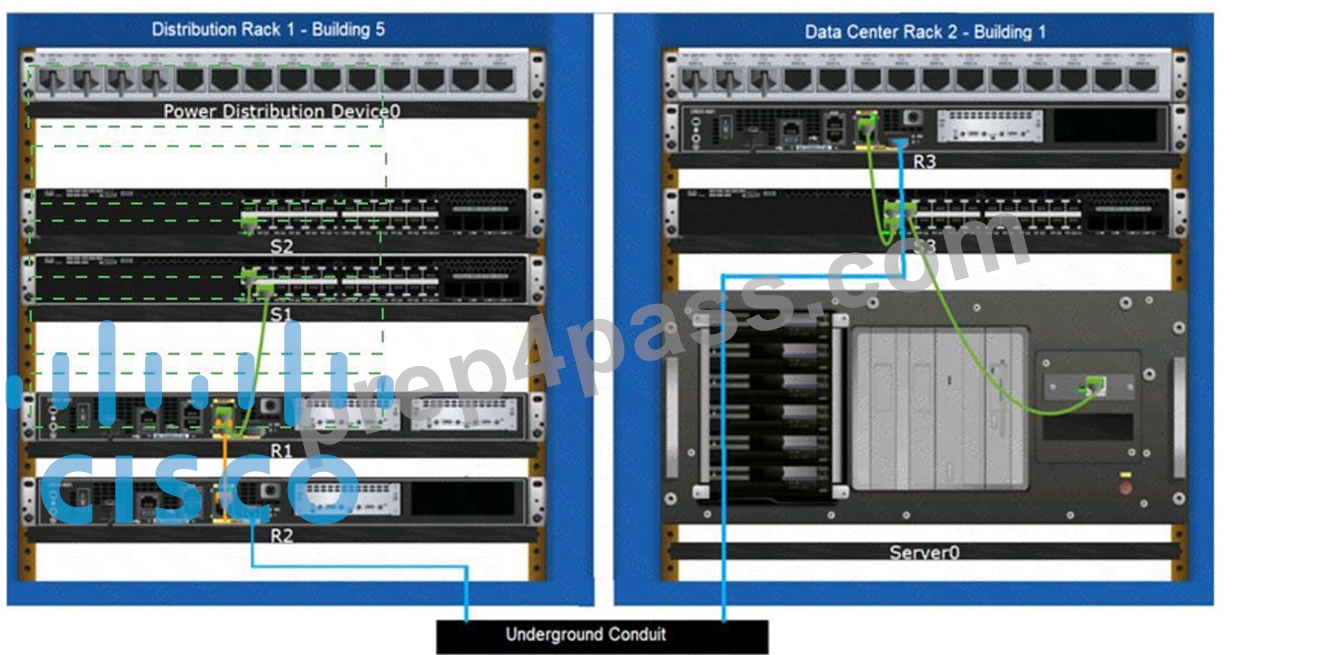
Explanation:
Based on the image description provided, here are the cable types matched with the appropriate connection descriptions:
Connects Switch S1 to Router R1 Gi0/0/1 interface Cable Type: = Straight-through UTP Cable Connects Router R2 Gi0/0/0 to Router R3 Gi0/0/0 via underground conduit Cable Type: = Fiber Optic Cable Connects Router R1 Gi0/0/0 to Router R2 Gi0/0/1 Cable Type: = Crossover UTP Cable Connects Switch S3 to Server0 network interface card Cable Type: = Straight-through UTP Cable The choices are based on standard networking practices where:
* Straight-through UTP cables are typically used to connect a switch to a router or a network interface card.
* Fiber optic cables are ideal for long-distance, high-speed data transmission, such as connections through an underground conduit.
* Crossover UTP cables are used to connect similar devices, such as router-to-router connections.
These matches are consistent with the color-coded cables in the image: green for switch connections, yellow for router-to-router connections within the same rack, and blue for inter-rack connections. The use of these cables follows the Ethernet cabling standards.
* Connects Switch S1 to Router R1 Gi0/0/1 interface:
* Cable Type: Straight-through UTP Cable
* Explanation: A straight-through UTP cable is typically used to connect different types of devices, such as a switch to a router.
* Connects Router R2 Gi0/0/0 to Router R3 Gi0/0/0 via underground conduit:
* Cable Type: Fiber Optic Cable
* Explanation: Fiber optic cables are used for long-distance connections, such as those through an underground conduit between buildings.
* Connects Router R1 Gi0/0/0 to Router R2 Gi0/0/1:
* Cable Type: Crossover UTP Cable
* Explanation: A crossover UTP cable is typically used to connect similar devices directly, such as router to router connections.
* Connects Switch S3 to Server0 network interface card:
* Cable Type: Straight-through UTP Cable
* Explanation: A straight-through UTP cable is typically used to connect a switch to an end device, such as a server.
* Straight-through UTP Cable: Used to connect different devices (e.g., switch to router, switch to server).
* Crossover UTP Cable: Used to connect similar devices directly (e.g., router to router, switch to switch).
* Fiber Optic Cable: Used for long-distance and high-speed connections, often between buildings or data centers.
References:
* Network Cable Types and Uses: Cisco Network Cables
* Understanding Ethernet Cabling: Ethernet Cable Guide
NEW QUESTION # 42
What is the purpose of assigning an IP address to the management VLAN interface on a Layer 2 switch?
- A. To enable the switch to resolve URLs for the attached the devices
- B. To enable the switch to act as a default gateway for the attached devices
- C. To enable access to the CLI on the switch through Telnet or SSH
- D. To enable the switch to provide DHCP services to other switches in the network
Answer: C
Explanation:
The primary purpose of assigning an IP address to the management VLAN interface on a Layer 2 switch is to facilitate remote management of the switch. By configuring an IP address on the management VLAN, network administrators can access the switch's Command Line Interface (CLI) remotely using protocols such as Telnet or Secure Shell (SSH). This allows for convenient configuration changes, monitoring, and troubleshooting without needing physical access to the switch1.
References :=
*Understanding the Management VLAN
*Cisco - VLAN Configuration Guide
*Remote Management of Switches
Assigning an IP address to the management VLAN interface (often the VLAN 1 interface by default) on a Layer 2 switch allows network administrators to remotely manage the switch using protocols such as Telnet or SSH. This IP address does not affect the switch's ability to route traffic between VLANs but provides a means to access and configure the switch through its Command Line Interface (CLI).
*A: The switch does not act as a default gateway; this is typically a function of a Layer 3 device like a router.
*B: The switch does not resolve URLs; this is typically a function of DNS servers.
*C: The switch can relay DHCP requests but does not typically provide DHCP services itself; this is usually done by a dedicated DHCP server or router.
Thus, the correct answer is D. To enable access to the CLI on the switch through Telnet or SSH.
References :=
*Cisco VLAN Management Overview
*Cisco Catalyst Switch Management
NEW QUESTION # 43
A local company requires two networks in two new buildings. The addresses used in these networks must be in the private network range.
Which two address ranges should the company use? (Choose 2.)
Note: You will receive partial credit for each correct selection.
- A. 192.16.0.0 to 192.16.255.255
- B. 192.168.0.0 to 192.168.255.255
- C. 172.16.0.0 to 172.31.255.255
- D. 11.0.0.0 to 11.255.255.255
Answer: B,C
Explanation:
The private IP address ranges that are set aside specifically for use within private networks and not routable on the internet are as follows:
* Class A: 10.0.0.0 to 10.255.255.255
* Class B: 172.16.0.0 to 172.31.255.255
* Class C: 192.168.0.0 to 192.168.255.255
These ranges are defined by the Internet Assigned Numbers Authority (IANA) and are used for local communications within a private network123.
Given the options: A. 172.16.0.0 to 172.31.255.255 falls within the Class B private range. B. 192.16.0.0 to
192.16.255.255 is not a recognized private IP range. C. 11.0.0.0 to 11.255.255.255 is not a recognized private IP range. D. 192.168.0.0 to 192.168.255.255 falls within the Class C private range.
Therefore, the correct selections that the company should use for their private networks are A and D.
References :=
* Reserved IP addresses on Wikipedia
* Private IP Addresses in Networking - GeeksforGeeks
* Understanding Private IP Ranges, Uses, Benefits, and Warnings
NEW QUESTION # 44
What is the purpose of assigning an IP address to the management VLAN interface on a Layer 2 switch?
- A. To enable the switch to resolve URLs for the attached the devices
- B. To enable the switch to act as a default gateway for the attached devices
- C. To enable access to the CLI on the switch through Telnet or SSH
- D. To enable the switch to provide DHCP services to other switches in the network
Answer: C
Explanation:
The primary purpose of assigning an IP address to the management VLAN interface on a Layer 2 switch is to facilitate remote management of the switch. By configuring an IP address on the management VLAN, network administrators can access the switch's Command Line Interface (CLI) remotely using protocols such as Telnet or Secure Shell (SSH). This allows for convenient configuration changes, monitoring, and troubleshooting without needing physical access to the switch1.
Reference: =
* Understanding the Management VLAN
* Cisco - VLAN Configuration Guide
* Remote Management of Switches
Assigning an IP address to the management VLAN interface (often the VLAN 1 interface by default) on a Layer 2 switch allows network administrators to remotely manage the switch using protocols such as Telnet or SSH. This IP address does not affect the switch's ability to route traffic between VLANs but provides a means to access and configure the switch through its Command Line Interface (CLI).
* A: The switch does not act as a default gateway; this is typically a function of a Layer 3 device like a router.
* B: The switch does not resolve URLs; this is typically a function of DNS servers.
* C: The switch can relay DHCP requests but does not typically provide DHCP services itself; this is usually done by a dedicated DHCP server or router.
Thus, the correct answer is D. To enable access to the CLI on the switch through Telnet or SSH.
Reference: =
* Cisco VLAN Management Overview
* Cisco Catalyst Switch Management
NEW QUESTION # 45
A user initiates a trouble ticket stating that an external web page is not loading. You determine that other resources both internal and external are still reachable.
Which command can you use to help locate where the issue is in the network path to the external web page?
- A. ipconfig/all
- B. tracert
- C. ping -t
- D. nslookup
Answer: B
Explanation:
The tracert command is used to determine the route taken by packets across an IP network. When a user reports that an external web page is not loading, while other resources are accessible, it suggests there might be an issue at a certain point in the network path to the specific web page. The tracert command helps to diagnose where the breakdown occurs by displaying a list of routers that the packets pass through on their way to the destination. It can identify the network segment where the packets stop progressing, which is valuable for pinpointing where the connectivity issue lies.
Reference: =
Cisco CCST Networking Certification FAQs - CISCONET Training Solutions, Command Prompt (CMD): 10 network-related commands you should know, Network Troubleshooting Commands Guide: Windows, Mac & Linux - Comparitech, How to Use the Traceroute and Ping Commands to Troubleshoot Network, Network Troubleshooting Techniques: Ping, Traceroute, PathPing.
* tracert Command: This command is used to determine the path packets take to reach a destination. It lists all the hops (routers) along the way and can help identify where the delay or
failure occurs.
* ping -t: This command sends continuous ping requests and is useful for determining if a host is reachable but does not provide path information.
* ipconfig /all: This command displays all current TCP/IP network configuration values and can be used to verify network settings but not to trace a network path.
* nslookup: This command queries the DNS to obtain domain name or IP address mapping, useful for DNS issues but not for tracing network paths.
Reference:
* Microsoft tracert Command: tracert Command Guide
* Troubleshooting Network Issues with tracert: Network Troubleshooting Guide
NEW QUESTION # 46
Which command will display all the current operational settings configured on a Cisco router?
- A. show protocols
- B. show startup-config
- C. show running-config
- D. show version
Answer: C
Explanation:
Router
The show running-config command is used on a Cisco router to display the current operational settings that are actively configured in the router's RAM. This command outputs all the configurations that are currently being executed by the router, which includes interface configurations, routing protocols, access lists, and other settings. Unlike show startup-config, which shows the saved configuration that the router will use on the next reboot, show running-config reflects the live, current configuration in use.
References := The information is supported by multiple sources that detail the use of Cisco commands, particularly the show running-config command as the standard for viewing the active configuration on a Cisco device123.
* show running-config: This command displays the current configuration running on the router. It includes all the operational settings and configurations applied to the router.
* show protocols: This command shows the status of configured protocols on the router but not the entire configuration.
* show startup-config: This command displays the configuration saved in NVRAM, which is used to initialize the router on startup, but not necessarily the current running configuration.
* show version: This command provides information about the router's software version, hardware components, and uptime but does not display the running configuration.
References:
* Cisco IOS Commands: Cisco IOS Commands
NEW QUESTION # 47
Which component of the AAA service security model provides identity verification?
- A. Accounting
- B. Auditing
- C. Authentication
- D. Authorization
Answer: C
Explanation:
The AAA service security model consists of three components: Authentication, Authorization, and Accounting.
*Authentication: This is the process of verifying the identity of a user or device. It ensures that only legitimate users can access the network or service.
*Authorization: This determines what an authenticated user is allowed to do or access within the network.
*Auditing/Accounting: This component tracks the actions of the user, including what resources they access and what changes they make.
Thus, the correct answer is C. Authentication.
References :=
*Cisco AAA Overview
*Understanding AAA (Authentication, Authorization, and Accounting)
NEW QUESTION # 48
Move each network type from the list on the left to the correct example on the right.
Answer:
Explanation:
* Two home office computers are connected to a switch by Ethernet cables.
* Network Type: LAN (Local Area Network)
* Explanation: A LAN connects devices within a limited area such as a home, office, or building, using Ethernet cables or Wi-Fi.
* Three government buildings in the same city connect to a cable company over coaxial cables.
* Network Type: MAN (Metropolitan Area Network)
* Explanation: A MAN connects networks across a city or campus, often using fiber optic or coaxial cables.
* A cell phone connects to a Bluetooth headset.
* Network Type: PAN (Personal Area Network)
* Explanation: A PAN connects devices within a personal workspace, typically using wireless technologies like Bluetooth.
* A financial institution connects its branches through a telecommunications service provider.
* Network Type: WAN (Wide Area Network)
* Explanation: A WAN connects multiple LANs over long distances, often using leased lines or satellite links provided by telecommunications companies.
* LAN (Local Area Network): Used for connecting devices within a small geographical area such as a single building or home.
* MAN (Metropolitan Area Network): Covers a larger geographical area than a LAN, typically a city or campus.
* PAN (Personal Area Network): Connects devices within the range of an individual person, such as connecting a phone to a Bluetooth headset.
* WAN (Wide Area Network): Spans large geographical areas, connecting multiple LANs across cities, countries, or continents.
References:
* Network Types Overview: Cisco Networking Basics
* Understanding Different Network Types: Network Types Guide
NEW QUESTION # 49
......
Verified 100-150 dumps Q&As 100% Pass in First Attempt Guaranteed Updated Dump: https://drive.google.com/open?id=1q81VW19x3h-fHKU5Re_LCRI153guEZNI
Pass CCST 100-150 Exam With 45 Questions: https://www.prep4pass.com/100-150_exam-braindumps.html
