

Associate-Cloud-Engineer Practice Exam Tests Latest Updated on Oct-2021
Pass Associate-Cloud-Engineer Exam in First Attempt Guaranteed Dumps!
Exam highlights
The Google Associate Cloud Engineer certification exam is 2 hours long and covers mostly two question formats, which are multiple choice and multiple select. The applicants can take the test as an online proctored option (remotely) or as an onsite proctored exam at one of the centers across the world. You can go through the official website for details of the test-taking process. To register for this exam, the individuals must pay the fee of $125. This fee applies to a single try. If you do not pass your Google exam at the first attempt, you have to try again and pay another fee for registration. The test is available in the English, Spanish, Japanese, and Indonesian languages.
NEW QUESTION 28
You are hosting an application on bare-metal servers in your own data center. The application needs access to Cloud Storage. However, security policies prevent the servers hosting the application from having public IP addresses or access to the internet. You want to follow Google- recommended practices to provide the application with access to Cloud Storage. What should you do?
- A. 1. Using Cloud VPN, create a VPN tunnel to a Virtual Private Cloud (VPC) in Google Cloud Platform (GCP).
2. In this VPC, create a Compute Engine instance and install the Squid proxy server on this instance.
3. Configure your servers to use that instance as a proxy to access Cloud Storage. - B. 1. Using Cloud VPN or Interconnect, create a tunnel to a VPC in GCP.
2. Use Cloud Router to create a custom route advertisement for 199.36.153.4/30. Announce that network to your on-premises network through the VPN tunnel.
3. In your on-premises network, configure your DNS server to resolve *.googleapis.com as a CNAME to restricted.googleapis.com. - C. 1. Use nslookup to get the IP address for storage.googleapis.com.
2. Negotiate with the security team to be able to give a public IP address to the servers.
3. Only allow egress traffic from those servers to the IP addresses for storage.googleapis.com. - D. 1. Use Migrate for Compute Engine (formerly known as Velostrata) to migrate those servers to Compute Engine.
2. Create an internal load balancer (ILB) that uses storage.googleapis.com as backend.
3. Configure your new instances to use this ILB as proxy.
Answer: B
Explanation:
https://cloud.google.com/vpc/docs/configure-private-google-access-hybrid
NEW QUESTION 29
You have just created a new project which will be used to deploy a globally distributed application. You will use Cloud Spanner for data storage. You want to create a Cloud Spanner instance. You want to perform the first step in preparation of creating the instance. What should you do?
- A. Enable the Cloud Spanner API
- B. Grant yourself the IAM role of Cloud Spanner Admin
- C. Configure your Cloud Spanner instance to be multi-regional
- D. Create a new VPC network with subnetworks in all desired regions
Answer: C
NEW QUESTION 30
You've been running App Engine applications in a Standard Environment for a few weeks. With several successful deployments, you've just deployed a broken version, and the developers have gone home for the day. What is the fastest way to get the site back into a functioning state?
- A. In the UI, click the Rollback button on the versions page.
- B. Use the gcloud app rollback command.
- C. In the UI, click Traffic Splitting and direct 100% of the traffic to the previous version.
- D. Have the developers fix the issue and deploy.
Answer: C
NEW QUESTION 31
You are deploying an application to App Engine. You want the number of instances to scale based on request rate. You need at least 3 unoccupied instances at all times. Which scaling type should you use?
- A. Manual Scaling with 3 instances.
- B. Basic Scaling with max_instancesset to 3.
- C. Automatic Scaling with min_idle_instancesset to 3.
- D. Basic Scaling with min_instancesset to 3.
Answer: C
Explanation:
Explanation/Reference: https://cloud.google.com/appengine/docs/standard/python/how-instances-are-managed
NEW QUESTION 32
You have sensitive data stored in three Cloud Storage buckets and have enabled data access logging. You want to verify activities for a particular user for these buckets, using the fewest possible steps. You need to verify the addition of metadata labels and which files have been viewed from those buckets. What should you do?
- A. View the bucket in the Storage section of the GCP Console.
- B. Using the GCP Console, filter the Activity log to view the information.
- C. Using the GCP Console, filter the Stackdriver log to view the information.
- D. Create a trace in Stackdriver to view the information.
Answer: B
NEW QUESTION 33
You have an application running in Google Kubernetes Engine (GKE) with cluster autoscaling enabled. The application exposes a TCP endpoint. There are several replicas of this application. You have a Compute Engine instance in the same region, but in another Virtual Private Cloud (VPC), called gce-network, that has no overlapping IP ranges with the first VPC. This instance needs to connect to the application on GKE. You want to minimize effort. What should you do?
- A. 1. In GKE, create a Service of type NodePortthat uses the application's Pods as backend.
2. Create a Compute Engine instance called proxy with 2 network interfaces, one in each VPC.
3. Use iptables on this instance to forward traffic from gce-network to the GKE nodes.
4. Configure the Compute Engine instance to use the address of proxyin gce-networkas endpoint. - B. 1. In GKE, create a Serviceof type LoadBalancerthat uses the application's Pods as backend.
2. Add a Cloud Armor Security Policy to the load balancer that whitelists the internal IPs of the MIG's instances.
3. Configure the Compute Engine instance to use the address of the load balancer that has been created. - C. 1. In GKE, create a Serviceof type LoadBalancerthat uses the application's Pods as backend.
2. Add an annotation to this service: cloud.google.com/load-balancer-type: Internal
3. Peer the two VPCs together.
4. Configure the Compute Engine instance to use the address of the load balancer that has been created. - D. 1. In GKE, create a Serviceof type LoadBalancer that uses the application's Pods as backend.
2. Set the service's externalTrafficPolicyto Cluster.
3. Configure the Compute Engine instance to use the address of the load balancer that has been created.
Answer: D
NEW QUESTION 34
You are the team lead of a group of 10 developers. You provided each developer with an individual Google Cloud Project that they can use as their personal sandbox to experiment with different Google Cloud solutions. You want to be notified if any of the developers are spending above $500 per month on their sandbox environment. What should you do?
- A. Create a single billing account for all sandbox projects and enable BigQuery billing exports.
Create a Data Studio dashboard to plot the spending per project. - B. Create a single budget for all projects and configure budget alerts on this budget.
- C. Create a budget per project and configure budget alerts on all of these budgets.
- D. Create a separate billing account per sandbox project and enable BigQuery billing exports.
Create a Data Studio dashboard to plot the spending per billing account.
Answer: C
Explanation:
https://cloud.google.com/billing/docs/how-to/budgets
NEW QUESTION 35
You create a new Google Kubernetes Engine (GKE) cluster and want to make sure that it always runs a supported and stable version of Kubernetes. What should you do?
- A. Select the latest available cluster version for your GKE cluster.
- B. Enable the Node Auto-Upgrades feature for your GKE cluster.
- C. Select "Container-Optimized OS (cos)" as a node image for your GKE cluster.
- D. Enable the Node Auto-Repair feature for your GKE cluster.
Answer: B
NEW QUESTION 36
You want to configure autohealing for network load balancing for a group of Compute Engine instances that run in multiple zones, using the fewest possible steps. You need to configure re-creation of VMs if they are unresponsive after 3 attempts of 10 seconds each. What should you do?
- A. Create an HTTP load balancer with a backend configuration that references an existing instance group. Set the health check to healthy (HTTP)
- B. Create a managed instance group. Verify that the autoscaling setting is on.
- C. Create an HTTP load balancer with a backend configuration that references an existing instance group. Define a balancing mode and set the maximum RPS to 10.
- D. Create a managed instance group. Set the Autohealing health check to healthy (HTTP)
Answer: B
NEW QUESTION 37
You're deploying an application to a Compute Engine instance, and it's going to need to make calls to read from Cloud Storage and Bigtable. You want to make sure you're following the principle of least privilege. What's the easiest way to ensure the code can authenticate to the required Google Cloud APIs?
- A. Register the application with the Binary Registration Service and apply the required roles.
- B. Create a new service account and key with the required limited permissions. Set the instance to use the new service account. Edit the code to use the service account key.
- C. Use the default Compute Engine service account and set its scopes. Let the code find the default service account using "Application Default Credentials".
- D. Create a new user account with the required roles. Store the credentials in Cloud Key Management Service and download them to the instance in code.
Answer: C
NEW QUESTION 38
You recently deployed a new version of an application to App Engine and then discovered a bug in the release. You need to immediately revert to the prior version of the application. What should you do?
- A. On the App Engine Versions page of the GCP Console, route 100% of the traffic to the previous version.
- B. On the App Engine page of the GCP Console, select the application that needs to be reverted and click Revert.
- C. Deploy the original version as a separate application.
Then go to App Engine settings and split traffic between applications so that the original version serves 100% of the requests. - D. Run gcloud app restore.
Answer: A
Explanation:
You can migrate all the traffic back to the previous version.Refer GCP documentation - App Engine Overview Having multiple versions of your app within each service allows you to quickly switch between different versions of that app for rollbacks, testing, or other temporary events
NEW QUESTION 39
You are building an application that processes data files uploaded from thousands of suppliers.
Your primary goals for the application are data security and the expiration of aged data. You need to design the application to:
- Restrict access so that suppliers can access only their own data.
- Give suppliers write access to data only for 30 minutes.
- Delete data that is over 45 days old.
You have a very short development cycle, and you need to make sure that the application requires minimal maintenance. Which two strategies should you use? (Choose two.)
- A. Develop a script that loops through all Cloud Storage buckets and deletes any buckets that are older than 45 days.
- B. Use signed URLs to allow suppliers limited time access to store their objects.
- C. Set up an SFTP server for your application, and create a separate user for each supplier.
- D. Build a Cloud function that triggers a timer of 45 days to delete objects that have expired.
- E. Build a lifecycle policy to delete Cloud Storage objects after 45 days.
Answer: A,E
NEW QUESTION 40
Your customer has implemented a solution that uses Cloud Spanner and notices some read latency-related performance issues on one table. This table is accessed only by their users using a primary key. The table schema is shown below.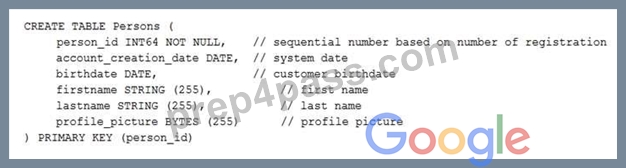
You want to resolve the issue. What should you do?
- A. Create a secondary index using the following Data Definition Language (DDL):
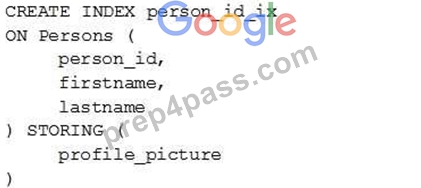
- B. Remove the profile_picture field from the table.
- C. Add a secondary index on the person_id column.
- D. Change the primary key to not have monotonically increasing values.
Answer: A
NEW QUESTION 41
You've created the code for a Cloud Function that will respond to HTTP triggers and return some data in JSON format. You have the code locally, it's tested and working. Which command can you use to create the function inside Google Cloud?
- A. gcloud functions deploy
- B. gcloud function create
- C. gcloud functions create
- D. gcloud function deploy
Answer: A,D
NEW QUESTION 42
You want to configure a solution for archiving data in a Cloud Storage bucket. The solution must be cost-effective. Data with multiple versions should be archived after 30 days. Previous versions are accessed once a month for reporting. This archive data is also occasionally updated at month-end. What should you do?
- A. Add a bucket lifecycle rule that archives data from regional storage after 30 days to Nearline Storage.
- B. Add a bucket lifecycle rule that archives data from regional storage after 30 days to Coldline Storage.
- C. Add a bucket lifecycle rule that archives data with newer versions after 30 days to Nearline Storage.
- D. Add a bucket lifecycle rule that archives data with newer versions after 30 days to Coldline Storage.
Answer: C
NEW QUESTION 43
You need to verify the assigned permissions in a custom IAM role. What should you do?
- A. Use the GCP Console, API section to view the information.
- B. Use the "gcloud init" command to view the information.
- C. Use the GCP Console, IAM section to view the information.
- D. Use the GCP Console, Security section to view the information.
Answer: C
Explanation:
A is correct because this is the correct console area to view permission assigned to a custom role in a particular project.
B is not correct because 'gcloud init' will not provide the information required.
C and D are not correct because these are not the correct areas to view this information
NEW QUESTION 44
You want to configure 10 Compute Engine instances for availability when maintenance occurs.
Your requirements state that these instances should attempt to automatically restart if they crash.
Also, the instances should be highly available including during system maintenance. What should you do?
- A. Create an instance group for the instances.
Set the `Autohealing' health check to healthy (HTTP). - B. Create an instance template for the instances.
`Automatic Restart' to off. Set `On-host maintenance' to Terminate VM instances.
Add the instance template to an instance group. - C. Create an instance group for the instance.
Verify that the `Advanced creation options' setting for `do not retry machine creation' is set to off. - D. Create an instance template for the instances.
Set the `Automatic Restart' to on. Set the `On-host maintenance' to Migrate VM instance.
Add the instance template to an intsance group.
Answer: B
NEW QUESTION 45
You have been asked to deploy a highly available Kubernetes cluster using Google Kubernetes Engine by your manager. While spinning up the cluster you realize you do not see option of creating master. What can be the reason?
- A. None of the above.
- B. GKE does not use master node to control child nodes.
- C. Master node is created automatically by GKE.
- D. You need to spin up a compute instance and set it up as master node.
Answer: C
NEW QUESTION 46
Your company uses BigQuery for data warehousing. Over time, many different business units in your company have created 1000+ datasets across hundreds of projects. Your CIO wants you to examine all datasets to find tables that contain an employee_ssn column. You want to minimize effort in performing this task. What should you do?
- A. Write a Cloud Dataflow job that loops through all the projects in your organization and runs a query on INFORMATION_SCHEMA.COLUMNS view to find employee_ssn column.
- B. Go to Data Catalog and search for employee_ssn in the search box.
- C. Write a script that loops through all the projects in your organization and runs a query on INFORMATION_SCHEMA.COLUMNS view to find the employee_ssn column.
- D. Write a shell script that uses the bq command line tool to loop through all the projects in your organization.
Answer: A
NEW QUESTION 47
A customer has a legacy application with a large amount of data. The files accessed by the application are approximately 10 GB each, but are rarely accessed. However, when files are accessed, they are retrieved sequentially. The customer is migrating the application to AWS and would like to use Amazon EC2 and Amazon EBS.
What is the Least expensive EBS volume type for this use case?
- A. General Purpose SSD (gp2)
- B. Throughput Optimized HDD (st1)
- C. Provisioned IOPS SSD (io1)
- D. Cold HDD (sc1)
Answer: B
Explanation:
Throughput Optimized HDD (st1) volumes provide low-cost magnetic storage that defines performance in terms of throughput rather than IOPS. This volume type is a good fit for large, sequential workloads such as Amazon EMR, ETL, data warehouses, and log processing. Bootable st1 volumes are not supported.
Throughput Optimized HDD (st1) volumes, though similar to Cold HDD (sc1) volumes, are designed to support frequently accessed data.
This volume type is optimized for workloads involving large, sequential I/O, and we recommend that customers with workloads performing small, random I/O use gp2.
Reference: https://docs.aws.amazon.com/AWSEC2/latest/UserGuide/EBSVolumeTypes.html
NEW QUESTION 48
You need to create a Compute Engine instance in a new project that doesn't exist yet. What should you do?
- A. Using the Cloud SDK, create the new instance, and use the --project flag to specify the new project.
Answer yes when prompted by Cloud SDK to enable the Compute Engine API. - B. Enable the Compute Engine API in the Cloud Console, use the Cloud SDK to create the instance, and then use the --project flag to specify a new project.
- C. Enable the Compute Engine API in the Cloud Console. Go to the Compute Engine section of the Console to create a new instance, and look for the Create In A New Project option in the creation form.
- D. Using the Cloud SDK, create a new project, enable the Compute Engine API in that project, and then create the instance specifying your new project.
Answer: D
NEW QUESTION 49
You deployed a new application inside your Google Kubernetes Engine cluster using the YAML file specified below.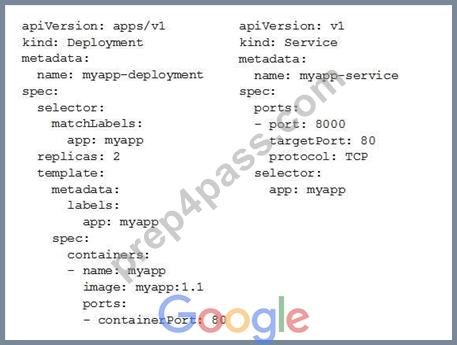
You check the status of the deployed pods and notice that one of them is still in PENDING status:
You want to find out why the pod is stuck in pending status. What should you do?
- A. View logs of the container in myapp-deployment-58ddbbb995-lp86mpod and check for warning messages.
- B. Review details of myapp-deployment-58ddbbb995-lp86mPod and check for warning messages.
- C. Review details of the myapp-service Service object and check for error messages.
- D. Review details of the myapp-deploymentDeployment object and check for error messages.
Answer: B
Explanation:
Explanation/Reference: https://cloud.google.com/run/docs/gke/troubleshooting
NEW QUESTION 50
The core business of your company is to rent out construction equipment at a large scale. All the equipment that is being rented out has been equipped with multiple sensors that send event information every few seconds. These signals can vary from engine status, distance traveled, fuel level, and more. Customers are billed based on the consumption monitored by these sensors.
You expect high throughput ?up to thousands of events per hour per device ?and need to retrieve consistent data based on the time of the event. Storing and retrieving individual signals should be atomic. What should you do?
- A. Create a file in Cloud Storage per device and append new data to that file.
- B. Ingest the data into Cloud Bigtable. Create a row key based on the event timestamp.
- C. Ingest the data into Datastore. Store data in an entity group based on the device.
- D. Create a file in Cloud Filestore per device and append new data to that file.
Answer: C
NEW QUESTION 51
You have a development project with appropriate IAM roles defined. You are creating a production project and want to have the same IAM roles on the new project, using the fewest possible steps. What should you do?
- A. Use gcloud iam roles copy and specify the production project as the destination project.
- B. Use gcloud iam roles copy and specify your organization as the destination organization.
- C. In the Google Cloud Platform Console, use the `create role' functionality and select all applicable permissions.
- D. In the Google Cloud Platform Console, use the `create role from role' functionality.
Answer: A
Explanation:
Cloud SDK gcloud iam roles copy can be used to copy the roles to different organization or project.Refer GCP documentation - Cloud SDK IAM Copy Rolegcloud iam roles copy - create a role from an existing role--dest-organization=DEST_ORGANIZATION (The organization of the destination role)--dest-project=DEST_PROJECT (The project of the destination role).
NEW QUESTION 52
......
Google Cloud Certified Free Certification Exam Material from Prep4pass with 245 Questions: https://www.prep4pass.com/Associate-Cloud-Engineer_exam-braindumps.html
Associate-Cloud-Engineer Dumps Full Questions - Exam Study Guide: https://drive.google.com/open?id=1Xrfm2PlaOSa1u9xzFSU-gnckX2d6lJmK
