

Prepare AD0-E908 Exam Questions [2025] Recently Updated Questions
Give push to your success with AD0-E908 exam questions
NEW QUESTION # 13
A project manager needs to share a Custom Form that was created to support their portfolio. What should the project manager understand about this requirement?
- A. Sharing is not an editable function with Custom Forms. When a new form is created, it is permanently visible to everyone in the system
- B. Sharing is possible, but only at the user object level and only within the same team. These restrictions exist for data security purposes
- C. Sharing is possible for a Custom Form author to limit who can view, share, and edit by person, role, group, team, and company.
Answer: C
Explanation:
In Adobe Workfront, Custom Forms can be shared by their authors with specific permissions. The author of a Custom Form has the ability to control who can view, share, and edit the form. These permissions can be set for individuals, roles, groups, teams, and even across the entire company. This functionality is critical for maintaining control over who can access and modify the forms, ensuring that only authorized users have the appropriate level of access.
References
* This information is consistent with the permissions settings outlined in the Workfront documentation and in various training resources provided by Adobe.
NEW QUESTION # 14
An Adobe Workfront System Administrator has been asked to configure timesheet profiles that generate automatically and are sent to managers for approval.
Which two elements of timesheet profiles need to be configured to accomplish this accurately? (Choose two.)
- A. Provide detailed description of the timesheet profile
- B. Specify time interval of automatic timesheet generation (i.e., weekly)
- C. Set approver field to Their Manager"
- D. Specify projects to appear on the timesheet
Answer: B,C
Explanation:
To configure timesheet profiles that generate automatically and are sent to managers for approval, the system administrator needs to:
* Specify Time Interval: Define the time interval for automatic timesheet generation, such as weekly.
This setting ensures that timesheets are created at regular intervals without manual intervention.
* Set Approver: Set the approver field to "Their Manager." This configuration ensures that the timesheets are automatically routed to the respective managers for approval.
References
* Workfront's timesheet profile setup documentation provides detailed steps for configuring automatic timesheet generation and approval workflows.
NEW QUESTION # 15
A project manager is reviewing an issue with a document attached The manager notices that the issue is connected to the wrong project What will happen to the document when the issue is moved to the correct project?
- A. The document will not move to the new issue.
- B. The document and any approvals associated with the document will move along with the new issue.
- C. The document is copied to the new issue, leaving the original on the project.
Answer: B
Explanation:
When an issue with a document attached is moved to a different project in Adobe Workfront, the document and any approvals associated with it will also move to the new project along with the issue. This ensures that all related information and approvals are retained and correctly associated with the issue in its new context.
* Move the Issue:
* Navigate to the issue that needs to be moved.
* Select the option to move the issue to another project.
* Verify Document Movement:
* After moving the issue, check the new project to ensure the document is correctly associated with the issue.
* Verify that any approvals linked to the document are also moved and remain intact.
References:
* This behavior is confirmed in the Workfront documentation and issue management training guides, which explain how documents and approvals are handled when moving issues (Workfront Training Deck - Worker 2.15.23).
NEW QUESTION # 16
A customer wants to use custom statuses to move a project's tasks through different process stages. Not every user in the system needs to use these custom statuses.
What must an admin-level user do to support this customer requirement?
- A. Create a Group utilizing Agile functionality and custom statuses on the Storyboard
- B. Create custom statuses in the Setup area for the Group associated with the projects.
- C. Create custom statuses associated with the users' Status Settings in their profile.
Answer: B
Explanation:
* Identify the Requirement: The customer wants to use custom statuses for project tasks, but not all users need to use these statuses.
* Creating Custom Statuses:
* Navigate to Setup: Go to the Setup area in Workfront.
* Custom Statuses: Within the Setup area, select "Statuses".
* Create New Status: Add new custom statuses that are relevant to the project's workflow stages.
* Associating Custom Statuses with Groups:
* Select Group: Identify the group associated with the projects that need these custom statuses.
* Assign Statuses to Group: In the Group settings, assign the newly created custom statuses. This ensures that only users within this group will have access to and can use these statuses.
* Implementation and Training:
* Communicate with Users: Inform the relevant users about the new custom statuses and how they will be used within their projects.
* Provide Training: Offer training to ensure users understand how and when to use the custom
* statuses appropriately.
References: Detailed instructions on creating and managing custom statuses can be found in the Workfront Documentation and training sessions.
NEW QUESTION # 17
Refer to the exhibit.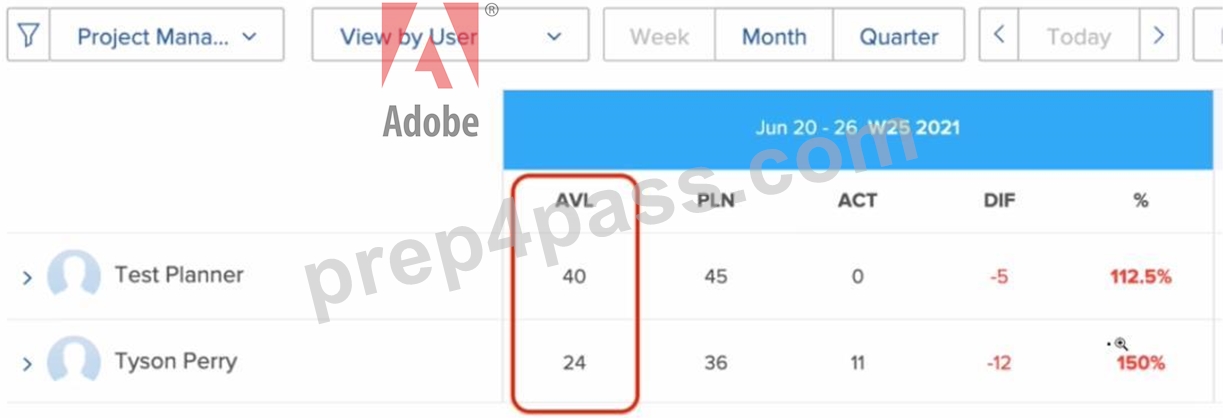
Which two settings can affect a user's total number of hours shown in the available hours (AVL) column?
(Choose two.)
- A. Less than 40 hours worth of planned hours being assigned to a specific user
- B. Days being entered in the Time Off menu within a user's settings
- C. FTE (Full Time Equivalent) within the User's setting being less than 1
- D. Specified users being marked as deactivated
Answer: B,C
Explanation:
The total number of available hours (AVL) for a user in Workfront can be affected by the following settings:
* Time Off: If days are entered in the Time Off menu within a user's settings, these days will be excluded from the total available hours, reducing the AVL value.
* FTE (Full Time Equivalent): If a user's FTE setting is less than 1, this indicates that the user is working part-time. This setting will proportionally reduce the number of available hours shown in the AVL column.
References
* These settings are documented in Workfront's user management and scheduling documentation, where the impact of time off and FTE adjustments on user availability is detailed.
NEW QUESTION # 18
A marketing team is trying to create a new project template for a repeatable workflow. They need to capture phases within each project and ensure tasks support critical-path timelines.
Which two items need to be completed for the efficient use of a project template? (Choose two.)
- A. Job Roles
- B. Predecessors
- C. Task Planned Hours
- D. Milestone Tasks
Answer: B,D
Explanation:
For efficient use of a project template that captures phases within each project and supports critical-path timelines, the following elements are essential:
* Predecessors: These define the relationships between tasks, ensuring that the sequence of tasks reflects their dependencies. This is crucial for maintaining the integrity of the critical path.
* Milestone Tasks: These are key tasks that mark significant points or stages in the project timeline.
Including milestone tasks helps in tracking progress and ensuring that critical deadlines are met.
References
* The importance of predecessors and milestone tasks in project templates is emphasized in Workfront's project management guidelines and best practices for creating reusable workflows.
NEW QUESTION # 19
A Workfront Admin has a request to set up an Automated Workflow Template. How can they ensure the design team can view the new templates?
- A. Share the new Automated Workflow template with the Group
- B. Do nothing, the new Automated Workflow template is shared by default
- C. Share the new Automated Workflow template with the Design Team
Answer: C
Explanation:
* Identify the Requirement: The admin needs to set up an Automated Workflow Template and ensure
* that the design team can view the new templates.
* Understanding Sharing Mechanisms in Workfront: Workfront allows administrators to share templates, projects, and reports with specific users or groups to ensure visibility and collaboration.
* Creating the Automated Workflow Template:
* Navigate to Templates: In Workfront, go to the Templates section.
* Create New Template: Select the option to create a new workflow template.
* Define Workflow: Set up the workflow steps, including tasks, approvals, and dependencies, as required for the design team's processes.
* Save the Template: Ensure the workflow template is saved correctly in the system.
* Sharing the Workflow Template:
* Select the Template: Go to the created workflow template in the Templates section.
* Share with Design Team: Use the sharing options to specifically share the template with the Design Team group. This ensures that only the design team has access to the new workflow template.
* Set Permissions: Define the level of access the design team will have, such as view, edit, or manage permissions.
* Communication and Training:
* Notify the Design Team: Inform the design team about the new workflow template and how they can access and use it.
* Provide Training: Offer training sessions or materials to help the design team understand how to use the new automated workflow template effectively.
NEW QUESTION # 20
On which types of objects can time be recorded in Workfront?
- A. Portfolios, Tasks and Issues
- B. Tasks. Timesheets and Documents
- C. Projects. Tasks and Issues
Answer: C
Explanation:
In Adobe Workfront, time can be recorded on Projects, Tasks, and Issues. This flexibility allows users to track time spent on various types of work items, providing comprehensive time management and reporting capabilities.
* Record Time on Projects:
* Navigate to a project.
* Click on the "Hours" tab.
* Enter the time spent on the project.
* Record Time on Tasks:
* Navigate to a task within a project.
* Click on the "Hours" tab.
* Enter the time spent on the task.
* Record Time on Issues:
* Navigate to an issue within a project.
* Click on the "Hours" tab.
* Enter the time spent on the issue.
References:
* The processes for recording time on various objects are detailed in the Workfront time-tracking documentation and training materials (Advanced Reporting - Monique Evans - Code Snippet - June 2,
2020).
NEW QUESTION # 21
Where in the standard report builder can a person use a Wildcard?
- A. Filter
- B. Chart
- C. Grouping
Answer: A
Explanation:
In the standard report builder in Workfront, wildcards can be used within filters to create dynamic and flexible report criteria.
* Open Report Builder:
* Navigate to the Reports area and create or edit a report.
* Go to the "Filter" tab to set up or modify the report filters.
* Use Wildcards:
* In the filter criteria, you can use wildcards to match patterns or include variables.
* For example, you might use*to represent any number of characters or use dynamic variables like{user.ID}to filter based on the current user's ID.
* Save the Report:
* After setting up the filters with wildcards, save the report to apply the changes.
References:
* The usage of wildcards in filters is documented in the Workfront reporting guides and can be confirmed in the advanced reporting training materials (Advanced Reporting - Monique Evans - Code Snippet - June 2, 2020).
NEW QUESTION # 22
A marketing team has identified a new workflow for a digital deliverable process.
What are the three main benefits of utilizing a project template for their new Workflow? (Choose three.)
- A. Efficiency in creating new projects
- B. Tasks defined by Custom Forms
- C. Adherence to an accurate, repeatable process
- D. Sharing settings completed by default
- E. Pre-created issues
Answer: A,C,D
Explanation:
* Objective: Identify benefits of utilizing a project template for a new digital deliverable process workflow.
* Benefits:
* Benefit 1: Adherence to an accurate, repeatable process
* Explanation: Using a template ensures consistency and accuracy in the process, as the same steps are followed each time.
* Benefit 2: Sharing settings completed by default
* Explanation: Templates can have predefined sharing settings, reducing the need to manually configure these settings for each new project.
* Benefit 3: Efficiency in creating new projects
* Explanation: Templates streamline the project creation process, saving time and effort by providing a pre-defined structure.
NEW QUESTION # 23
A Workfront developer is tasked with building a new custom form to collect project requests. The form will display different sets of options based on different selections, which requires the use of display logic and skip logic in the form.
What are two considerations the developer should take into account when building the conditional logic in the form? (Choose two.)
- A. When editing objects in bulk, the custom fields display in the Edit objects box. excluding the fields that are skipped or hidden
- B. Custom fields not included in a display logic statement show on a custom form by default.
- C. Skip logic does not work with a widget or section break in the form
- D. When copying an old form with display logic or skip logic, the logic is not copied to the new custom form.
Answer: C,D
Explanation:
When building a custom form in Adobe Workfront that uses display logic and skip logic, developers need to consider the following:
* When copying an old form:If you copy an existing custom form that includes display logic or skip logic, these logic settings will not be transferred to the new form. The logic needs to be manually recreated in the new form to ensure it functions as intended.
* Skip logic limitations:Skip logic does not operate effectively with certain elements like widgets or section breaks within the form. This limitation means that skip logic cannot be applied to control the visibility or behavior of these elements, potentially impacting how the form is structured and functions.
References
* These considerations are detailed in advanced reporting and form customization documentation and have been highlighted in various Workfront admin training sessions.
NEW QUESTION # 24
A client has employees based in both India (1-10 1ST) and the United States (8-5 EST) who are working together on a project. Which two options help the Project calculate timelines and user availability correctly9 (Choose two.)
- A. Assign a Schedule to the Project
- B. Assign employees to the correct Org Chart
- C. Set up a Timesheet Profile and assign employees to the same Timesheet Profile
- D. Set up Schedules for the locations of their employees, and assign users to their respective Schedules
Answer: A,D
Explanation:
* Objective: Calculate timelines and user availability accurately for employees based in different time zones.
* Options:
* Option C: Assign a Schedule to the Project
* Explanation: Assigning a schedule to the project ensures that timelines are calculated based on the project's working hours.
NEW QUESTION # 25
Aside from predecessors, resource manager assignments, and system administrator settings, what are three prerequisites for using the Resource Planner and Workload Balancer? (Choose three.)
- A. Schedules added to templates
- B. Job Roles assigned to Tasks
- C. Time off logged in User Schedules
- D. Task Planned Hours greater than zero
- E. Task Durations greater than zero
Answer: B,D,E
Explanation:
Objective: Identify prerequisites for using the Resource Planner and Workload Balancer.
Prerequisites:
* Prerequisite 1: Job Roles assigned to Tasks
* Explanation: Assigning job roles helps in resource allocation and planning within the Resource Planner and Workload Balancer.
* Prerequisite 2: Task Planned Hours greater than zero
* Explanation: Tasks need to have planned hours to be considered in the resource planning and workload balancing.
* Prerequisite 3: Task Durations greater than zero
* Explanation: Tasks must have a duration set to be included in the workload calculations.
NEW QUESTION # 26
What are the constraints among Programs, Portfolios. Tasks, and Projects?
- A. Projects cannot be associated with a Program until at least one task is entered into the project plan
- B. A Project and its tasks can only belong to one Portfolio and Program at a time.
- C. All Projects must be associated with a Program and a Portfolio.
Answer: B
Explanation:
In Adobe Workfront, there are specific constraints regarding the association of projects, programs, portfolios, and tasks. A project and its tasks can only belong to one portfolio and one program at a time. This means that a single project cannot be simultaneously associated with multiple portfolios or programs. This constraint ensures clear and unambiguous project management and reporting within the organizational structure.
NEW QUESTION # 27
A project manager would like to have consistent project data fields to be used in the project reports they create. Which two options would address that need9 (Choose two.)
- A. Custom Forms can identify the best available resource for a specific role within a project.
- B. Custom fields can dictate consistent project dashboards.
- C. Custom fields within the Custom Form can be pre-populated with data.
- D. The Custom Form is attached to the template used for the project creation.
Answer: C,D
Explanation:
Objective: Ensure consistent project data fields for use in project reports.
Options:
* Option A: Custom fields within the Custom Form can be pre-populated with data.
* Explanation: Pre-populating custom fields ensures that the data is consistent across all projects, facilitating accurate and consistent reporting.
NEW QUESTION # 28
A project manager has left the company.
What should the system administrator do to free up their license type while maintaining historical information in Workfront?
- A. Reassign the license from their access level
- B. Deactivate the user to avoid loss of data
- C. Delete the user and select option to retain their work
Answer: B
Explanation:
Deactivate the user to avoid loss of data:
* Deactivating the user keeps all historical data intact while freeing up their license for reassignment. This method ensures that the user's contributions and project histories remain accessible for reporting and auditing purposes.
NEW QUESTION # 29
A marketing agency uses Workfront to plan and execute projects for their clients. Each project is associated with a Portfolio to represent the client and a Program to represent the year that the work was completed. A team leader has asked for a list report that shows the actual revenue for each Project and the total actual revenue for each client.
How would a Workfront Developer achieve this?
- A. Create a project report and add actual revenue as a column to the report review and set to summarize by count. Apply a grouping to the report to group by portfolio name
- B. Create a project report and add actual revenue as a column to the report review. Apply a grouping to the report to group by portfolio name.
- C. Create a project report and add actual revenue as a column to the report review, set to summarize by sum. Apply a grouping to the report to group by portfolio name
Answer: C
Explanation:
Create a project report:
* Navigate to the Reports area in Workfront and select the option to create a new project report.
NEW QUESTION # 30
What functionality allows users to build effective reporting visualizations with increased visibility and flexible layout options?
- A. Canvas Layouts
- B. Canvas Widgets
- C. Canvas Dashboards
Answer: C
Explanation:
Canvas Dashboards:
* Canvas Dashboards provide users with the ability to build effective reporting visualizations, offering increased visibility and flexible layout options. They allow for the integration of various report types and interactive elements.
NEW QUESTION # 31
An engineering team works with an outside vendor who occasionally needs to review and approve documents in Workfront Proof. Which built-in access level would be assigned to the vendor9
- A. Contributor
- B. Standard
- C. External User
Answer: C
Explanation:
Objective: Assign the appropriate access level to an outside vendor who needs to review and approve documents in Workfront Proof.
Access Level:
* External User: This access level is designed for external collaborators who need limited access to review and approve documents without full access to all internal resources.
* Explanation: External User access provides the necessary permissions for vendors to interact with Workfront Proof while maintaining security and limiting access.
NEW QUESTION # 32
A Workfront system administrator is creating a new layout template for a group of users. What two items can be customized here? (Choose two.)
- A. What notifications the user can receive
- B. On-screen terminology
- C. User attributes including schedule, group, and job role
- D. Views, filters, and groupings used with reports
Answer: B,D
Explanation:
Objective: Customize a layout template for a group of users in Workfront.
Customizable Items:
* Option A: Views, filters, and groupings used with reports
* Explanation: You can customize how data is displayed in reports by setting specific views, filters, and groupings in the layout template.
NEW QUESTION # 33
A client's organizational structure has employees moving on and off projects and switching their Workfront responsibilities often. Why would the system administrator recommend sharing objects with Groups rather than individual users?
- A. Objects cannot be shared with individual users if they are already shared with groups.
- B. Group sharing permissions update automatically as users are added or removed.
- C. Group access overrides an individual's access when assigned to an object
Answer: B
Explanation:
Group sharing permissions update automatically as users are added or removed:
* Sharing objects with groups ensures that access permissions are dynamically updated as users join or leave groups. This approach simplifies the management of permissions and ensures consistent access control across the organization.
NEW QUESTION # 34
......
Get AD0-E908 Actual Free Exam Q&As to Prepare Certification: https://www.prep4pass.com/AD0-E908_exam-braindumps.html
AD0-E908 100% Guarantee Download AD0-E908 Exam PDF Q&A: https://drive.google.com/open?id=1Kkn-QPAGOcPKI3WWvo8BrG190rc5ad50
